How to update the portable version?
-
@Ekopalypse
I install npp with downloaded installer(not portable), and from this version I have successfully installed plugin with Plugins Admin and successfull restarted npp too.
:-/ -
Strange, I use the portable version exclusively and I don’t seem to have that kind of problem.
Did you always test with the 32bit version?
The question why I’m asking is that I saw in your log that the
gup.exe file is assumed to be ~700KB but for 32bit ~567KB is ok.
Could you try to replace the gup.exe from the installed version with
one from the portable version and retest? -
@Ekopalypse !!! Excellent!!
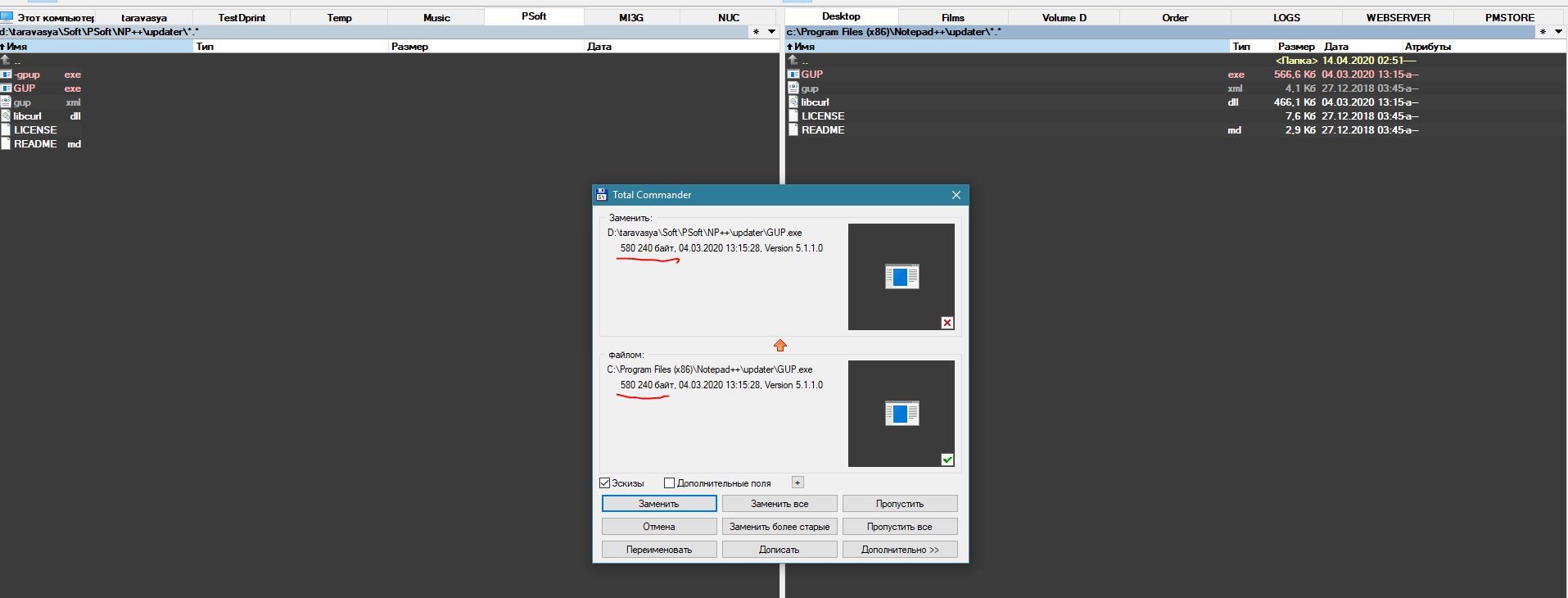
Despite the fact that the GUPs are identical in size, replacing the file helped me!!! Plugins Admin start to work and I update all my plugins!
Moreover, when I returned the GUP.exe from the portable version, the plugin manager stopped working again.
So, I can state the fact that in the archive, of a portable version npp.7.8.5.bin, was a damaged GUP.exe.
Many thanks for the help !!! -
I use only the portable version. And I have no problems updating.
This is my backup for any version of Notepad ++:

-
@andrecool-68 may be my problem was only with current downloaded zip…
Thanks for the screen with backup configs.
BTW(I think this info will be is useful here)… I use the Cloud options for store my configs. With this option, I dont need to control what files copying while update, because npp use config files placed in this location:
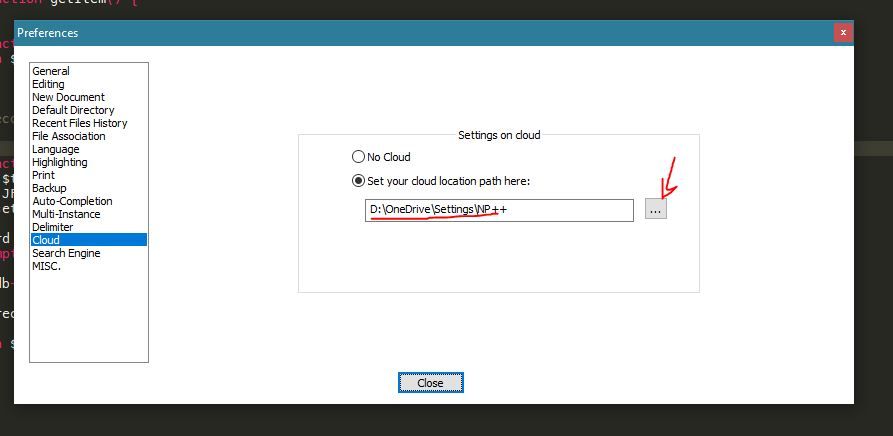
(of cause you can choose your desired ) and ignores those configuration files that are in the npp folder. -
This is unsatisfactory because I don’t understand
how this problem was generated,
but the most important thing is that it works for you again.
So let’s hope it stays that way. -
@Ekopalypse can I do something else to try debug the problem?
-
To be honest, I’m still confused about this issue.
Thank you for your offer to keep trying troubleshooting,
but right now, I have no idea what could have caused this. -
Preliminary information: Although this topic is quite old, it is - from my point of view - still up-to-date. I don’t want to bring the discussion into nirvana and therefore I’d rather not start a new topic. But if I should do so, I will refer to this topic via a reference.
I always find it a bit difficult not to update the XML files, because I don’t know if the latest update might have changed the default settings. So if I copied my customized XML from the backup over the new installation, this could lead to undesired effects.
Wouldn’t it be possible to work similar to some Linux distributions and have e.g. a config.xml which is always the one from the distributor/packager (from the archive-file) and contains all the defaults and a config.custom.xml which contains the user customizations? If config.xml is overwritten automatically or manually by the update, those custom-settings will still be there.
-
@TobWen ,
For some of the config files, they do – kindof. There’s
stylers.model.xmlandlangs.model.xml. Yes, it would be nice to have the.model.version forconfig.xml(especially) and (also nice)contextMenu.xml,shortcuts.xml, andfunctionList.xml. But I think it works differently than your suggestion – Notepad++ doesn’t read the.model.versions unless the normal version doesn’t exist; and Notepad++ doesn’t “merge” the two, which I think is what you want. -
@PeterJones said in How to update the portable version?:
it would be nice to have the .model. version for config.xml (especially) and (also nice) contextMenu.xml, shortcuts.xml, and functionList.xml.
Wouldn’t these just be the files contained in the zip for the portable release for any given version?
Yes, I know that OP is probably looking for something a bit “easier”. :-)





Hello! It looks like you're interested in this conversation, but you don't have an account yet.
Getting fed up of having to scroll through the same posts each visit? When you register for an account, you'll always come back to exactly where you were before, and choose to be notified of new replies (either via email, or push notification). You'll also be able to save bookmarks and upvote posts to show your appreciation to other community members.
With your input, this post could be even better 💗
Register Login