Notepad++ v7.9.5 released
-
I have a weird problem with some Unicode files with Chinese chars not loaded or recognized properly.
If I load the file in windows notepad and save it, the Notepad++ shows and recognize perfectly…
I leave a little test file in my server for you to test…
Test file -
@xagaba said in Notepad++ v7.9.5 released:
I have a weird problem with some Unicode files with Chinese chars not loaded or recognized properly.
Suggest looking at THIS and seeing if that has any impact.
-
Hello, @xagaba, @alan-kilborn and All,
I downloaded your
Test.txtfile and, after numerous tests, I’ve got the solution ! I even think that I’m going to create aGitHubissue in order to improve the N++ auto-detection of the right encoding ;-))But first, to correctly answer you, I need three additional pieces of information :
-
When you’ve just opened the
Test.txtfile, what encoding do you see, in the right part of the status bar ? -
Could your provide the
Debug Info...information of your Notepad++ configuration ( Menu option? > Debug Info...) -
Could you also specifiy what is your current N++ font ?
- In
Settings > Style Configurator > Global styles > Global override > Font Style > Font Name( IF theEnable global fontoption is tiched )
OR
- In
Settings > Style Configurator > Global styles > Default Style > Font Style > Font Name( IF theEnable global fontoption is NOT tiched )
- In
TIA
Best Regards,
guy038
-
-
Sorry, I try it but no luck with that…
Seems to me that it’s not a rendering issue here…
Thanks anyway ! -
@guy038 said in Notepad++ v7.9.5 released:
When you’ve just opened the Test.txt file, what encoding do you see, in the right part of the status bar ?
Unix (LF) ANSI
Could your provide the Debug Info… information of your Notepad++ configuration ( Menu option ? > Debug Info… )
Notepad++ v7.9.5 (64-bit)
Build time : Mar 21 2021 - 02:13:17
Path : C:\Program Files\Notepad++\notepad++.exe
Admin mode : OFF
Local Conf mode : OFF
OS Name : Windows 10 Pro (64-bit)
OS Version : 2009
OS Build : 19042.928
Current ANSI codepage : 1252
Plugins : DSpellCheck.dll mimeTools.dll NppConverter.dll NppExport.dllCould you also specifiy what is your current N++ font ?
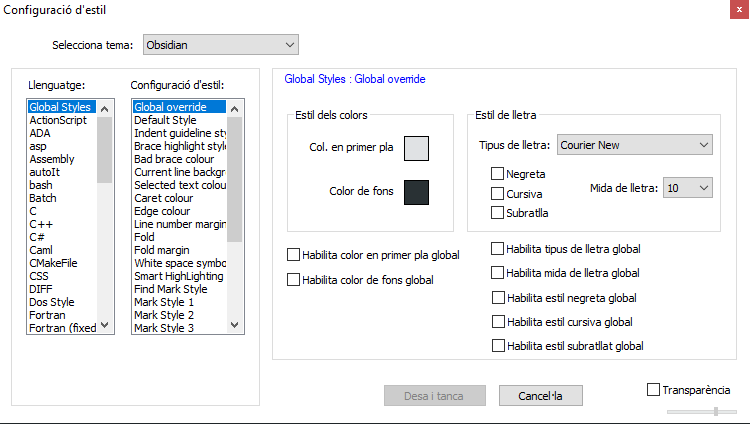
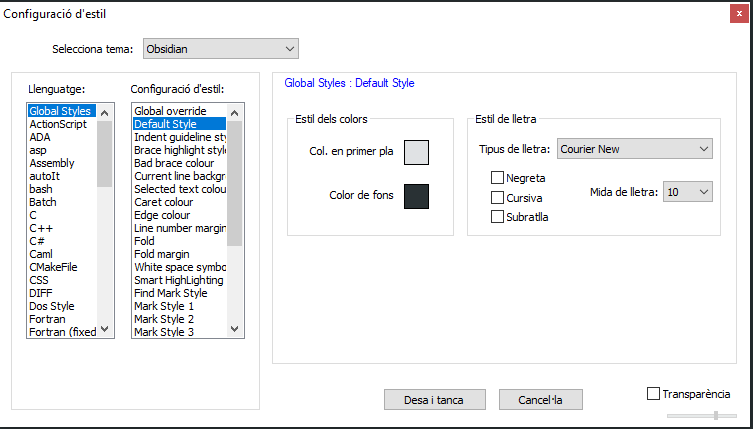
Let me know if you need anything else…
Regards !
-
Hi, @xagaba, @alan-kilborn and All,
Thanks ! No, I don’t need anything else. I just wanted to know your current font and your default
ANSIcodepage :-)After downloading your file, I realized that it contains some parts with
1null byte, EVERY2bytes. So, I supposed that it was, initially, a WindowsUnicodeencoded file !However, in that case, looking at its contents, with an hexadecimal editor, an invisible
Byte Order Mark( the two bytesFFandFE) should had been at its very beginning ! As these two bytes are absent, just follow this quick method to get the things right :-
Open your file
Test.txtin Notepad++ (174bytes ) -
Move to the very beginning of the file (
Ctrl + Home) -
Hold down the
ALTkey and hit, successively, the0,2,5and5keys of the numeric keypad -
Release the
Altkey
=> The
ÿcharacter, of ANSI code\xFF, should have been inserted at the very beginningAgain :
-
Hold down the
ALTkey and hit, successively, the0,2,5and4keys of the numeric keypad -
Release the
Altkey
=> The
þcharacter, of ANSI code\xFE, should have been inserted, right after theÿcharacter- Save the modifications of the
Test.txtfile (Ctrl + S)
As specified above, the insertion of the
ÿþstring at the very beginning of file, so the two bytes\xFF\xFE, represents the Byte Order Mark (BOM) of anUCS-2 LE BOM / UTF-16 LEencoded file, namedUnicodein the Microsoft terminology !- Reload your
Test.txtfile (Ctrl + R)
Et voilà, done ;-))
This time, the
ÿþstring, added at the very beginning of your file is correctly detected as the invisibleBOM.So, Notepad++ re-opens this file with the right encoding, displayed at the bottom of the status bar (UCS-2 LE BOM)Note that all the characters and, specifically, all the Chinese characters, are normally displayed, if you’re using, for instance, a current monospaced font, like
Courier New,ConsolasorLucida Console!Note also that your file has Unix line-endings (
LF=\x0a)Best regards,
guy038
-
-
Hi, @xagaba, @alan-kilborn and All,
Below, a view of your file, with the correct appearance !
May be, it’s worth to add that I installed, on my old
XP SP3laptop, since a long time, some services to seeFar Easternlanguages !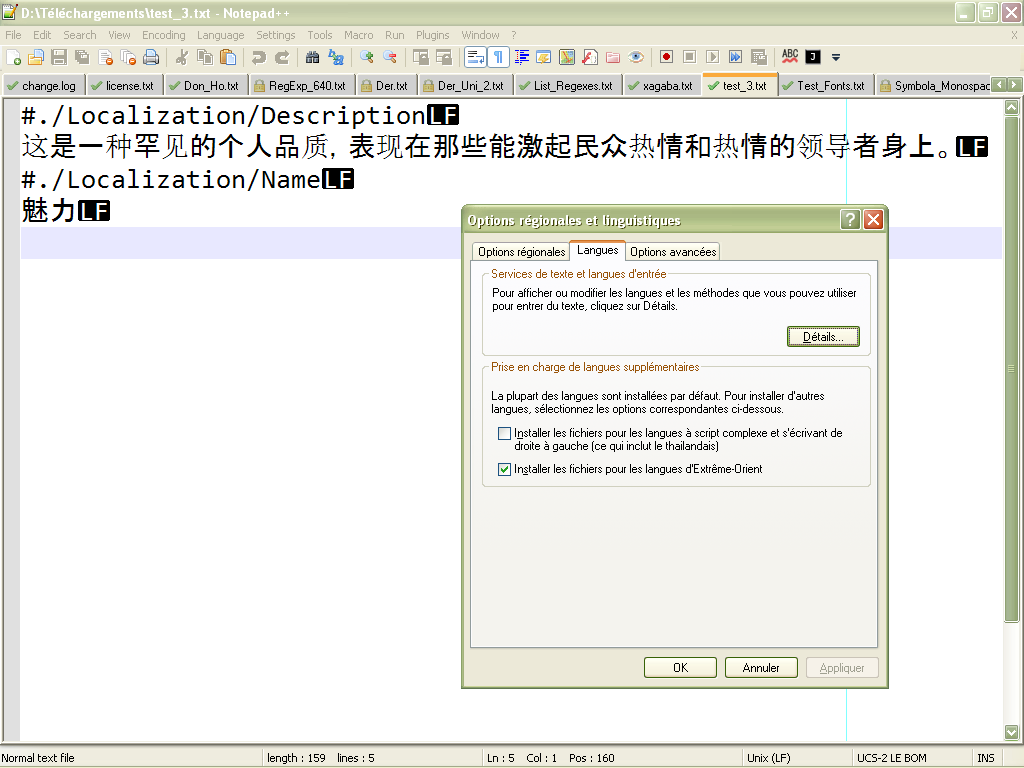
Here is the English/American translation of this French windows, after using
Start > Parameters > Regional and language optionsentry :Title : Regional and language options TABS : Regional options | Languages | Advanced Options Text services and input languages To view or change the languages and methods you can use to enter text, click on Details | Details | Support for additional languages Most languages are installed by default. To install additional languages select the corresponding options below. | | Install files for languages with complex scripts and writing from right to left (this includes Thai) |x| Install the files for the Far Eastern languages
So, may be you’ll correctly see the
#./Localization/Descriptionand#./Localization/Nameheaders but you won’t be able to get the correct displaying of all the Chinese characters : !?BR
guy038
-
Thanks for the explanation.
When the BOM it’s present I can see the Chinese chars correctly.My problem was that windows notepad loads the file fine (also without the BOM) and notepad++ doesn’t.
-
i install notepad and then something went wrong
-
@xagaba please help me fix the notpad++ cause something went wrong
-
Please start a new topic, since this topic is about problems specific to v7.9.5.
When you create the topic, please describe your problem in detail, giving us enough to understand what is wrong.
-
P PeterJones locked this topic on




Hello! It looks like you're interested in this conversation, but you don't have an account yet.
Getting fed up of having to scroll through the same posts each visit? When you register for an account, you'll always come back to exactly where you were before, and choose to be notified of new replies (either via email, or push notification). You'll also be able to save bookmarks and upvote posts to show your appreciation to other community members.
With your input, this post could be even better 💗
Register Login