Notepad++ v8.5.3 Release
-
This Version doesn’t work on Windows Server 2008:
Error:
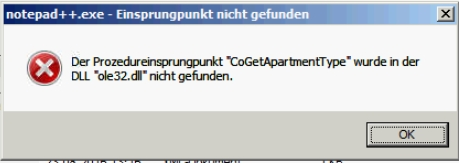
Is it possible to fix this?
I revert to 7.9.5.
Witch Version is the latest for Server 2008?Please add in the download section always a compatibility list for the OS.
PS:
And the Plugin: compareplus does also not work on Server2008. -
@volker001 said in Notepad++ v8.5.3 Release:
Witch Version is the latest for Server 2008?
https://github.com/notepad-plus-plus/notepad-plus-plus/blob/master/SUPPORTED_SYSTEM.md
-
@donho sorry couldn’t remember the version prior. But looks like the issue is with OS as I am getting the expected result on Windows Server 2012 using the same N++ version.
This is what I expected with Multi-Instance enabled. Select multiple files, right click and Edit with Notepad++, files will then be opened in a single instance of Notepad++. Select another batch of multiple files, right click and Edit with Notepad++, files will then be opened in another instance of Notepad++.
-
@Jerald-Belleza said in Notepad++ v8.5.3 Release:
@donho sorry couldn’t remember the version prior. But looks like the issue is with OS as I am getting the expected result on Windows Server 2012 using the same N++ version.
This is what I expected with Multi-Instance enabled. Select multiple files, right click and Edit with Notepad++, files will then be opened in a single instance of Notepad++. Select another batch of multiple files, right click and Edit with Notepad++, files will then be opened in another instance of Notepad++.
Could you create an issue here:
https://github.com/notepad-plus-plus/notepad-plus-plus/issuesI’ll work on it if the issue can be reproducible.
-
@donho Done! Many thanks for looking into this!
-
@donho
I too have the same problem - it was in the previous version - I updated to the next (this one) hoping it had been fixed, but no. Certainly cramps the way I use NP now. -
@Howard-Grimmer
Having said that, I’ve just rechecked setting Multi-Instance mode - it now looks like it’s working fine - so perhaps has been a Win11 problem? Great, I can work freely again! -
@Howard-Grimmer
Correction - it works fine if using a session file, but not when manually selecting some files, right-clicking, and then ‘Edit with Notepad++’. So at least there’s a work-around… -
@Jerald-Belleza said in Notepad++ v8.5.3 Release:
This is what I expected with Multi-Instance enabled. Select multiple files, right click and Edit with Notepad++, files will then be opened in a single instance of Notepad++. Select another batch of multiple files, right click and Edit with Notepad++, files will then be opened in another instance of Notepad++.
Sorry, I misread your message.
If multi-instance is enabled, it’s normal that “Edit with Notepad++” opens several files into several instances. So it’s the expected behaviour to me.Prior to 8.5.3 whenever I select multiple files (by highlighting) and right click Edit with Notepad++, all of the files are opened on a single instance. Now with 8.5.3, all files are opened separately (new instance).
Could you provide the version please?
-
@Howard-Grimmer said in Notepad++ v8.5.3 Release:
@donho
I too have the same problem - it was in the previous version - I updated to the next (this one) hoping it had been fixed, but no. Certainly cramps the way I use NP now.I guess you have also the problem of multi-instance settings with “Edit with Notepad++” problem.
What’s the old version which works to you?
I need to be able to reproduce the different behaviour to know if it’s a regression. -
@Jerald-Belleza @Howard-Grimmer
The culprit is NppShell.dll, an issue has been created:
https://github.com/notepad-plus-plus/nppShell/issues/36 -
D donho unpinned this topic on
-
@Mark-Olson said in Notepad++ v8.5.3 Release:
If anyone else is mildly (or severely!) dissatisfied with the fact that non-printing characters and control characters no longer show up by default, here is an issue that I introduced
and here is the script that I created to show non-printing and control characters but notCRandLF:from Npp import * notepad.menuCommand(44130) # toggle all non-printing characters notepad.menuCommand(44131) # toggle all control characters (e.g., BEL, ENQ)I’ve done something similar, using the Customize Toolbar plugin to create a custom button:
View,Show Symbol,Show Control Characters Unicode EOL,,*#4080C0:¶,*#4080C0:¶Note the two spaces between “Show Control Characters” and “Unicode EOL” and no ampersand![^1]
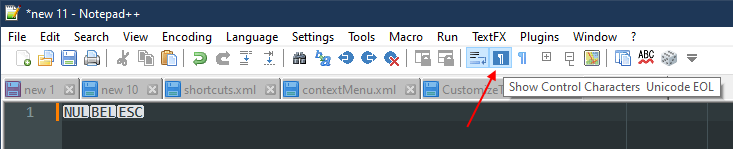
[^1]: I spent a lot of time on this until I realised I could use the string from the Shortcut Mapper.
-
P PeterJones locked this topic on


Hello! It looks like you're interested in this conversation, but you don't have an account yet.
Getting fed up of having to scroll through the same posts each visit? When you register for an account, you'll always come back to exactly where you were before, and choose to be notified of new replies (either via email, or push notification). You'll also be able to save bookmarks and upvote posts to show your appreciation to other community members.
With your input, this post could be even better 💗
Register Login