Notepad++ 8.8.9 release candidate
-
Notepad++ 8.8.9
RCRC2 is available here:
~~https://download.notepad-plus-plus.org/repository/8.x/8.8.9.RC/~~
https://download.notepad-plus-plus.org/repository/8.x/8.8.9.RC2/A crash bug regarding updating langs.xml has been fixed in v8.8.9 RC2.Notepad++ v8.8.9 new security enhancement, new features, regression fixes & bug-fixes:
- Security Enhancement: verify certificate & signature on downloaded update installer. (Implement Notepad++ commit, WinGUp commit)
- Fix corrupted file loading on Windows system using the full UTF-8 code page. (Fix #17234)
- Fix crashing when hashing SHA-256 for large files. (Fix #17243)
- Fix “Select & Find Next” command not working regression. (Fix #17200)
- MSI improvement: Add NOUPDATER option & suppress REBOOT. (Fix #ref1, #ref2)
- Fix Perl Function List causes Notepad++ to freeze on tab switch regression. (Fix #17152)
- Fix context menu truncated regression on localization change. (Fix #17249)
- Add ability to update users’ langs.xml & stylers.xml from model XML files. (Fix #17128)
- Update to Scintilla 5.5.8 & Lexilla 5.4.6. (Update #17191)
- Add feature to sort lines in a document by length. (Fix #15615, #17186)
- Undo & redo enhancement: restore vertical scroll position after undo & redo. (Fix #17194)
- Fix mouse wheel horizontal scrolling amount not respecting Windows setting. (Fix #9480)
- Fix document map regression with keyboard input. (Fix #17224)
- Fix wrong system font scaling on Windows 7. (Fix #17066)
- Update to nlohman json 3.11.3. (Update #15041)
Thank you in advance for your test. The official v8.8.9 release will be available on 9th Dec. (Paris time) if no regressions are found.
-
I just installed Notepad++ 8.8.9 RC (Windows 11 Professional 64-bit) 25H2 )OS Build 26200.7309)
The program appears to have installed correctly, at this location: C:\Program Files\Notepad++
When I try to launch it it does not open.
I opened Task Manager, found the Notepad++ process, when I try to check for details it just closed.
If you need any further details let me know.Murray
-
P PeterJones forked this topic on
-
I have the same problem, but with the portable version. In my case, I use the cloud option for local storage of
shortcuts.xml. The problem for me is thatlangs.xmlis not automatically updated fromlangs.model.xml, unlikestylers.xml, which is updated fromstylers.model.xml. In the new versions of both files, the second line is now<NotepadPlus modelDate="20251203">instead of<NotepadPlus>. I updatedlangs.xmlwith the newlangs.model.xmland Notepad++ started successfully. I also tried adding only the new line to the oldlangs.xmland Notepad++ started again. -
@rddim said in Notepad++ 8.8.9 release candidate:
I have the same problem, but with the portable version. In my case, I use the cloud option for local storage of
shortcuts.xml. The problem for me is thatlangs.xmlis not automatically updated fromlangs.model.xml, unlikestylers.xml, which is updated fromstylers.model.xml.I cannot reproduce.
I started with fresh unzips of portable 8.8.8 and 8.8.9. I copied the stylers.xml and langs.xml from 8.8.8 into the 8.8.9 directory (to guarantee they don’t have the modelDate attribute yet – I confirmed that the ones in the 8.8.8 directory did not). I ran the Notepad++ from the 8.8.9 directory, and when it loaded, it updated by stylers.xml and langs.xml – I saw the timestamp change. Then I exited, and repeated that process a few times, and it was 100% reliable.
I then created a directory to store my cloud889 settings, and used the 8.8.9 preferences dialog to set the Cloud directory. When I exited, it had created the stylers.xml and langs.xml with the modelDate attribute. While 8.8.9 was still closed, I copied the 8.8.8 stylers.xml and langs.xml (without the attributes) into the cloud889 directory, and re-ran 8.8.9. It immediately changed the timestamp on the two files in the cloud889 directory, and when I look at them, they have the attributes now.
In the new versions of both files, the second line is now
<NotepadPlus modelDate="20251203">instead of<NotepadPlus>. I updatedlangs.xmlwith the newlangs.model.xmland Notepad++ started successfully. I also tried adding only the new line to the oldlangs.xmland Notepad++ started again.For me, I cannot make Notepad++ not start successfully, whether the active settings directory (whether it’s portable or cloud directory or AppData) has an 8.8.8-style file, whether it has no file, or whether it’s got one that’s already been updated.
update: after posting this, I also tried the same experiment with the
%AppData%versions of langs.xml and stylers.xml: if I deleted those AppData files, then when I launch, installed Notepad++ 8.8.9-RC runs just fine, and when I exit, there are up-to-date versions of the two files in AppData. If I delete those, and copy the two files from portable 8.8.8 (so they don’t have the attributes), when I run the installed Notepad++ v8.8.9-RC, it immediately updates those two files so that they do have the attributes. And if I exit and run again, Notepad++ runs just fine (and doesn’t update the files a second time – the file timestamps don’t change). -
When I try to launch it it does not open.
I cannot reproduce the issue you have by using
https://download.notepad-plus-plus.org/repository/8.x/8.8.9.RC/npp.8.8.9.Installer.x64.exeI opened Task Manager, found the Notepad++ process, when I try to check for details it just closed.
After “killing” the process, can you relaunch Notepad++ now?
-
@rddim said in Notepad++ 8.8.9 release candidate:
I have the same problem, but with the portable version. In my case, I use the cloud option for local storage of shortcuts.xml. The problem for me is that langs.xml is not automatically updated from langs.model.xml, unlike stylers.xml, which is updated from stylers.model.xml. In the new versions of both files, the second line is now <NotepadPlus modelDate=“20251203”> instead of <NotepadPlus>. I updated langs.xml with the new langs.model.xml and Notepad++ started successfully. I also tried adding only the new line to the old langs.xml and Notepad++ started again.
I cannot reproduce the issue even made the cloud settings on a USB key and install with or without USB key - in both case Notepad++ is launched and both styles.xml & langs.xml are modified by adding modelDate.
Could you reproduce it and provide us the step-by-step instructions please?
-
@donho
First, I re-installed 8.8.8 , here is a screenshot of the installed files:
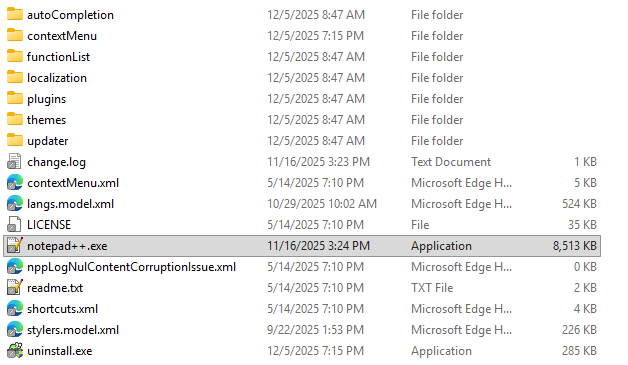
Notepad+++V8.8.8 runs correctly.
Then I installed 8.8.9, FYI both installs were run as administrator, which my account has.
Here is a screenshot of the installed files:
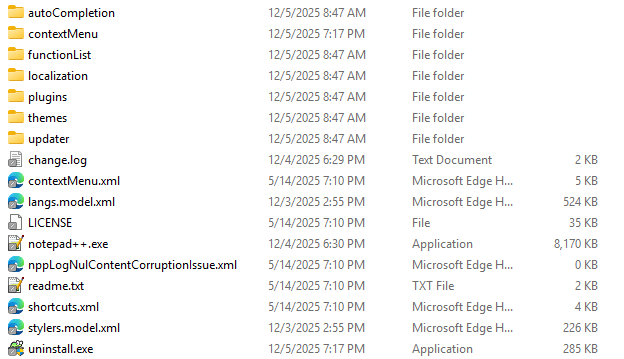
At this point I cannot launch Notepad++ nor can I find it in Task Manager.
Is there an installation log file showing the files changed or new??Murray
-
@Murray-Sobol-1
I produced a video showing the actions of Notepad++ starting and the disappearing in Task Manager.When I try to upload the video, I get this message:
You do not have enough privileges for this action.WTF???
How can I show you the results I am getting if I can not upload a video showing them?? -
@Murray-Sobol-1
Sorry for the inconvenience.
Could you show me the content of folderplugins?
Also, could you provide the config.xml, stylers.xml & langs.xml in%APPDATA%\Notepad++\? -
@donho
Plugins Folder contains this:
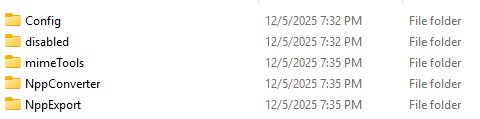
Folder: %APPDATA%\Notepad++\ config.xml
This page contains the following errors:
error on line 115 at column 44: xmlParseCharRef: invalid xmlChar value 56320
Below is a rendering of the page up to the first error.
standard show vertical hide no yes no 0 1 yes yes no yes yes yes yes 2 svn:// cvs:// git:// imap:// irc:// irc6:// ircs:// ldap:// ldaps:// news: telnet:// gopher:// ssh:// sftp:// smb:// skype: snmp:// spotify: steam:// sms: slack:// chrome:// bitcoin: show yes -
@Murray-Sobol-1
stylers.xml
This XML file does not appear to have any style information associated with it. The document tree is shown below.
<NotepadPlus>
<LexerStyles>
<LexerType name=“actionscript” desc=“ActionScript” ext=“”>
<WordsStyle name=“DEFAULT” styleID=“11” fgColor=“000000” bgColor=“FFFFFF” fontName=“” fontStyle=“0” fontSize=“”/>
<WordsStyle name=“FUNCTION” styleID=“20” fgColor=“95004A” bgColor=“FFFFFF” fontName=“” fontStyle=“0” fontSize=“” keywordClass=“type2”/>
<WordsStyle name=“PREPROCESSOR” styleID=“9” fgColor=“804000” bgColor=“FFFFFF” fontName=“” fontStyle=“0” fontSize=“”/>
<WordsStyle name=“INSTRUCTION WORD” styleID=“5” fgColor=“0000FF” bgColor=“FFFFFF” fontName=“” fontStyle=“1” fontSize=“” keywordClass=“instre1”/>
<WordsStyle name=“TYPE WORD” styleID=“16” fgColor=“8000FF” bgColor=“FFFFFF” fontName=“” fontStyle=“0” fontSize=“” keywordClass=“type1”/>
<WordsStyle name=“NUMBER” styleID=“4” fgColor=“FF8000” bgColor=“FFFFFF” fontName=“” fontStyle=“0” fontSize=“”/>
<WordsStyle name=“STRING” styleID=“6” fgColor=“808080” bgColor=“FFFFFF” fontName=“” fontStyle=“0” fontSize=“”/>
<WordsStyle name=“CHARACTER” styleID=“7” fgColor=“808080” bgColor=“FFFFFF” fontName=“” fontStyle=“0” fontSize=“”/>
<WordsStyle name=“OPERATOR” styleID=“10” fgColor=“000080” bgColor=“FFFFFF” fontName=“” fontStyle=“1” fontSize=“”/>
<WordsStyle name=“VERBATIM” styleID=“13” fgColor=“808080” bgColor=“FFFFFF” fontName=“” fontStyle=“1” fontSize=“”/>
<WordsStyle name=“REGEX” styleID=“14” fgColor=“000000” bgColor=“FFFFFF” fontName=“” fontStyle=“1” fontSize=“”/>
<WordsStyle name=“COMMENT” styleID=“1” fgColor=“008000” bgColor=“FFFFFF” fontName=“” fontStyle=“0” fontSize=“”/>
<WordsStyle name=“COMMENT LINE” styleID=“2” fgColor=“008000” bgColor=“FFFFFF” fontName=“” fontStyle=“0” fontSize=“”/>
<WordsStyle name=“COMMENT DOC” styleID=“3” fgColor=“008080” bgColor=“FFFFFF” fontName=“” fontStyle=“0” fontSize=“”/>
<WordsStyle name=“COMMENT LINE DOC” styleID=“15” fgColor=“008080” bgColor=“FFFFFF” fontName=“” fontStyle=“0” fontSize=“”/>
<WordsStyle name=“COMMENT DOC KEYWORD” styleID=“17” fgColor=“008080” bgColor=“FFFFFF” fontName=“” fontStyle=“1” fontSize=“”/>
<WordsStyle name=“COMMENT DOC KEYWORD ERROR” styleID=“18” fgColor=“008080” bgColor=“FFFFFF” fontName=“” fontStyle=“0” fontSize=“”/>
<WordsStyle name=“PREPROCESSOR COMMENT” styleID=“23” fgColor=“008000” bgColor=“FFFFFF” fontName=“” fontStyle=“0” fontSize=“”/>
<WordsStyle name=“PREPROCESSOR COMMENT DOC” styleID=“24” fgColor=“008080” bgColor=“FFFFFF” fontName=“” fontStyle=“0” fontSize=“”/>
</LexerType>
<LexerType name=“ada” desc=“ADA” ext=“”>
<WordsStyle name=“DEFAULT” styleID=“0” fgColor=“000000” bgColor=“FFFFFF” fontName=“” fontStyle=“0” fontSize=“”/>
<WordsStyle name=“INSTRUCTION WORD” styleID=“1” fgColor=“0000FF” bgColor=“FFFFFF” fontName=“” fontStyle=“1” fontSize=“” keywordClass=“instre1”/>
<WordsStyle name=“IDENTIFIER” styleID=“2” fgColor=“000000” bgColor=“FFFFFF” fontName=“” fontStyle=“0” fontSize=“”/>
<WordsStyle name=“NUMBER” styleID=“3” fgColor=“FF8000” bgColor=“FFFFFF” fontName=“” fontStyle=“0” fontSize=“”/>
<WordsStyle name=“DELIMITER” styleID=“4” fgColor=“FF8080” bgColor=“FFFFFF” fontName=“” fontStyle=“1” fontSize=“”/>
<WordsStyle name=“CHARACTER” styleID=“5” fgColor=“808080” bgColor=“FFFFFF” fontName=“” fontStyle=“0” fontSize=“”/>
<WordsStyle name=“STRING” styleID=“7” fgColor=“808080” bgColor=“FFFFFF” fontName=“” fontStyle=“0” fontSize=“”/>
<WordsStyle name=“LABEL” styleID=“9” fgColor=“804000” bgColor=“FFFFFF” fontName=“” fontStyle=“1” fontSize=“”/>
<WordsStyle name=“COMMENT LINE” styleID=“10” fgColor=“008000” bgColor=“FFFFFF” fontName=“” fontStyle=“0” fontSize=“”/>
<WordsStyle name=“ILLEGAL” styleID=“11” fgColor=“FF0000” bgColor=“FFFFFF” fontName=“” fontStyle=“0” fontSize=“”/>
</LexerType>
<LexerType name=“asn1” desc=“ASN.1” ext=“”>
<WordsStyle name=“DEFAULT” styleID=“0” fgColor=“000000” bgColor=“FFFFFF” fontName=“” fontStyle=“0” fontSize=“”/>
<WordsStyle name=“COMMENT” styleID=“1” fgColor=“007F00” bgColor=“FFFFFF” fontName=“” fontStyle=“0” fontSize=“”/>
<WordsStyle name=“IDENTIFIERS” styleID=“2” fgColor=“000000” bgColor=“FFFFFF” fontName=“” fontStyle=“1” fontSize=“”/>
<WordsStyle name=“DOUBLE QUOTED STRING” styleID=“3” fgColor=“7F007F” bgColor=“FFFFFF” fontName=“” fontStyle=“0” fontSize=“”/>
<WordsStyle name=“NUMERIC OID DEFINITION” styleID=“4” fgColor=“007F7F” bgColor=“FFFFFF” fontName=“” fontStyle=“1” fontSize=“”/>
<WordsStyle name=“NON OID NUMBERS” styleID=“5” fgColor=“7F0000” bgColor=“FFFFFF” fontName=“” fontStyle=“0” fontSize=“”/>
<WordsStyle name=“KEYWORDS” styleID=“6” fgColor=“00007F” bgColor=“FFFFFF” fontName=“” fontStyle=“0” fontSize=“” keywordClass=“instre1”/>
<WordsStyle name=“ATTRIBUTES” styleID=“7” fgColor=“F07800” bgColor=“FFFFFF” fontName=“” fontStyle=“0” fontSize=“” keywordClass=“instre2”/>
<WordsStyle name=“DESCRIPTORS” styleID=“8” fgColor=“00007F” bgColor=“FFFFFF” fontName=“” fontStyle=“0” fontSize=“” keywordClass=“type1”/>
<WordsStyle name=“TYPES” styleID=“9” fgColor=“00007F” bgColor=“FFFFFF” fontName=“” fontStyle=“0” fontSize=“” keywordClass=“type2”/>
<WordsStyle name=“OPERATORS” styleID=“10” fgColor=“222222” bgColor=“FFFFFF” fontName=“” fontStyle=“0” fontSize=“”/>
</LexerType>
<LexerType name=“asp” desc=“asp” ext=“asp”>
<WordsStyle name=“DEFAULT” styleID=“81” fgColor=“8000FF” bgColor=“C4F9FD” fontName=“” fontStyle=“0” fontSize=“”/>
<WordsStyle name=“COMMENT LINE” styleID=“82” fgColor=“008000” bgColor=“C4F9FD” fontName=“” fontStyle=“0” fontSize=“”/>
<WordsStyle name=“NUMBER” styleID=“83” fgColor=“FF0000” bgColor=“C4F9FD” fontName=“” fontStyle=“0” fontSize=“”/>
<WordsStyle name=“WORD” styleID=“84” fgColor=“000080” bgColor=“C4F9FD” fontName=“” fontStyle=“1” fontSize=“” keywordClass=“instre1”/>
<WordsStyle name=“STRING” styleID=“85” fgColor=“808080” bgColor=“C4F9FD” fontName=“” fontStyle=“0” fontSize=“”/>
<WordsStyle name=“IDENTIFIER” styleID=“86” fgColor=“000000” bgColor=“C4F9FD” fontName=“” fontStyle=“0” fontSize=“”/>
<WordsStyle name=“ASP SYMBOL” styleID=“15” fgColor=“000000” bgColor=“FFFF00” fontName=“” fontStyle=“1” fontSize=“”/>
<WordsStyle name=“SCRIPT TYPE” styleID=“16” fgColor=“000000” bgColor=“FFC000” fontName=“” fontStyle=“0” fontSize=“”/>
</LexerType>
<LexerType name=“asm” desc=“Assembly” ext=“”>
<WordsStyle name=“DEFAULT” styleID=“0” fgColor=“000000” bgColor=“FFFFFF” fontName=“” fontStyle=“0” fontSize=“”/>
<WordsStyle name=“COMMENT” styleID=“1” fgColor=“008000” bgColor=“FFFFFF” fontName=“” fontStyle=“0” fontSize=“”/>
<WordsStyle name=“NUMBER” styleID=“2” fgColor=“FF8000” bgColor=“FFFFFF” fontName=“” fontStyle=“0” fontSize=“”/>
<WordsStyle name=“STRING” styleID=“3” fgColor=“808080” bgColor=“FFFFFF” fontName=“” fontStyle=“0” fontSize=“”/> -
@Murray-Sobol-1
I am unable to post ALL of styles.xml since it is more than 16k characters. -
@Murray-Sobol-1
Langs.xml:
This XML file does not appear to have any style information associated with it. The document tree is shown below.
<NotepadPlus>
<!-- The key words of the supported languages, don’t touch them! -->
<Languages>
<Language name=“normal” ext=“txt”/>
<Language name=“actionscript” ext=“as mx” commentLine=“//” commentStart=“/" commentEnd="/”>
<Keywords name=“instre1”>add for lt tellTarget and function ne this break ge new typeof continue gt not var delete if on void do ifFrameLoaded onClipEvent while else in or with eq le return instanceof case default switch</Keywords>
<Keywords name=“type1”>arguments constructor class dynamic false extends implements import interface intrinsic newline null private public super static true undefined Accessibility Arguments Array Boolean Button Camera ContextMenu ContextMenuItem CustomActions Color Date Error Function Key LoadVars LocalConnection Math Microphone Mouse MovieClip MovieClipLoader NetConnection NetStream Number PrintJob Object TextField StyleSheet TextFormat TextSnapshot SharedObject Selection Sound Stage String System XML XMLNode XMLSocket Void abs acos asin atan atan2 ceil cos exp floor log max min pow random round sin sqrt tan onActivity onChanged onClose onConnect onData onDragOut onDragOver onEnterFrame onID3 onKeyDown onKeyUp onKillFocus onLoad onLoadComplete onLoadError onLoadInit onLoadProgress onLoadStart onMouseDown onMouseMove onMouseUp onMouseWheel onPress onRelease onReleaseOutside onResize onRollOut onRollOver onScroller onSelect onSetFocus onSoundComplete onStatus onUnload onUpdate onXML addListener addPage addProperty addRequestHeader allowDomain allowInsecureDomain appendChild apply applyChanges asfunction attachAudio attachMovie attachSound attachVideo beginFill beginGradientFill call charAt charCodeAt clear clearInterval cloneNode close concat connect copy createElement createEmptyMovieClip createTextField createTextNode curveTo domain duplicateMovieClip endFill escape eval evaluate findText fscommand flush fromCharCode get getAscii getBeginIndex getBounds getBytesLoaded getBytesTotal getCaretIndex getCode getCount getDate getDay getDepth getEndIndex getFocus getFontList getFullYear getHours getInstanceAtDepth getLocal getMilliseconds getMinutes getMonth getNewTextFormat getNextHighestDepth getPan getProggress getProperty getRGB getSeconds getSelected getSelectedText getSize getStyle getStyleNames getSWFVersion getText getTextExtent getTextFormat getTextSnapshot getTime getTimer getTimezoneOffset getTransform getURL getUTCDate getUTCDay getUTCFullYear getUTCHours getUTCMilliseconds getUTCMinutes getUTCMonth getUTCSeconds getVersion getVolume getYear globalToLocal gotoAndPlay gotoAndStop hasChildNodes hide hideBuiltInItems hitTest hitTestTextNearPos indexOf insertBefore install isActive isDown isToggled join lastIndexOf lineStyle lineTo list load loadClip loadMovie loadMovieNum loadSound loadVariables loadVariablesNum localToGlobal mbchr mblength mbord mbsubstring MMExecute moveTo nextFrame nextScene parseCSS parseFloat parseInt parseXML pause play pop prevScene print printAsBitmap printAsBitmapNum printNum push registerClass removeListener removeMovieClip removeNode removeTextField replaceSel replaceText reverse seek send sendAndLoad setBufferTime set setDate setFocus setFullYear setGain setHours setInterval setMask setMilliseconds setMinutes setMode setMonth setMotionLevel setNewTextFormat setPan setProperty setQuality setRate setRGB setSeconds setSelectColor setSelected setSelection setSilenceLevel setStyle setTextFormat setTime setTransform setUseEchoSuppression setUTCDate setUTCFullYear setUTCHours setUTCMilliseconds setUTCMinutes setUTCMonth setUTCSeconds setVolume setYear shift show showSettings silenceLevel silenceTimeout slice sort sortOn splice split start startDrag stop stopAllSounds stopDrag substr substring swapDepths toggleHighQuality toLowerCase toString toUpperCase trace unescape uninstall unLoadClip unloadMovie unloadMovieNum unshift unwatch updateAfterEvent updateProperties useEchoSuppression valueOf watch endinitclip include initclip proto _accProps _alpha _currentframe _droptarget _focusrect _framesloaded _global _height _highquality _level _lockroot _name _parent _quality _root _rotation _soundbuftime _target _totalframes _url _visible _width _x _xmouse _xscale _y _ymouse _yscale activityLevel align attributes autoSize avHardwareDisable background backgroundColor bandwidth blockIndent bold border borderColor bottomScroll bufferLenght bufferTime builtInItems bullet bytesLoaded bytesTotal callee caller capabilities caption childNodes color condenseWhite contentType currentFps customItems data deblocking docTypeDecl duration embedFonts enabled exactSettings firstChild focusEnabled font fps gain globalStyleFormat hasAccessibility hasAudio hasAudioEncoder hasEmbeddedVideo hasMP3 hasPrinting hasScreenBroadcast hasScreenPlayback hasStreamingAudio hasStreamingVideo hasVideoEncoder height hitArea hscroll html htmlText indent index italic instanceof int ignoreWhite isDebugger isFinite language lastChild leading leftMargin length loaded localFileReadDisable manufacturer maxChars maxhscroll maxscroll menu message motionLevel motionTimeout mouseWheelEnabled multiline muted name names NaN nextSibling nodeName nodeType nodeValue os parentNode password pixelAspectRatio playerType previousSibling prototype quality rate restrict resolutionX resolutionY rightMargin scaleMode screenColor screenDPI screenResolutionX screenResolutionY scroll selectable separatorBefore showMenu size smoothing status styleSheet tabChildren tabEnabled tabIndex tabStops target targetPath text textColor textHeight textWidth time trackAsMenu type underline url useCodepage useHandCursor variable version visible width wordWrap xmlDecl</Keywords>
</Language>
<Language name=“ada” ext=“ada ads adb” commentLine=“–” commentStart=“” commentEnd=“”>
<Keywords name=“instre1”>abort abs abstract accept access aliased all and array at begin body case constant declare delay delta digits do else elsif end entry exception exit for function generic goto if in interface is limited loop mod new not null of or others out overriding package pragma private procedure protected raise range record rem renames requeue return reverse select separate some subtype synchronized tagged task terminate then type until use when while with xor</Keywords>
</Language>
<Language name=“asm” ext=“asm” commentLine=“;” commentStart=“” commentEnd=“”>
<Keywords name=“instre1”>aaa aad aam aas adc add and call cbw cdqe clc cld cli cmc cmp cmps cmpsb cmpsw cwd daa das dec div esc hlt idiv imul in inc int into iret ja jae jb jbe jc jcxz je jg jge jl jle jmp jna jnae jnb jnbe jnc jne jng jnge jnl jnle jno jnp jns jnz jo jp jpe jpo js jz lahf lds lea les lods lodsb lodsw loop loope loopew loopne loopnew loopnz loopnzw loopw loopz loopzw mov movabs movs movsb movsw mul neg nop not or out pop popf push pushf rcl rcr ret retf retn rol ror sahf sal sar sbb scas scasb scasw shl shr stc std sti stos stosb stosw sub test wait xchg xlat xlatb xor bound enter ins insb insw leave outs outsb outsw popa pusha pushw arpl lar lsl sgdt sidt sldt smsw str verr verw clts lgdt lidt lldt lmsw ltr bsf bsr bt btc btr bts cdq cmpsd cwde insd iretd iretdf iretf jecxz lfs lgs lodsd loopd looped loopned loopnzd loopzd lss movsd movsx movsxd movzx outsd popad popfd pushad pushd pushfd scasd seta setae setb setbe setc sete setg setge setl setle setna setnae setnb setnbe setnc setne setng setnge setnl setnle setno setnp setns setnz seto setp setpe setpo sets setz shld shrd stosd bswap cmpxchg invd invlpg wbinvd xadd lock rep repe repne repnz repz cflush cpuid emms femms cmovo cmovno cmovb cmovc cmovnae cmovae cmovnb cmovnc cmove cmovz cmovne cmovnz cmovbe cmovna cmova cmovnbe cmovs cmovns cmovp cmovpe cmovnp cmovpo cmovl cmovnge cmovge cmovnl cmovle cmovng cmovg cmovnle cmpxchg486 cmpxchg8b loadall loadall286 ibts icebp int1 int3 int01 int03 iretw popaw popfw pushaw pushfw rdmsr rdpmc rdshr rdtsc rsdc rsldt rsm rsts salc smi smint smintold svdc svldt svts syscall sysenter sysexit sysret ud0 ud1 ud2 umov xbts wrmsr wrshr</Keywords>
<Keywords name=“instre2”>f2xm1 fabs fadd faddp fbld fbstp fchs fclex fcom fcomp fcompp fdecstp fdisi fdiv fdivp fdivr fdivrp feni ffree fiadd ficom ficomp fidiv fidivr fild fimul fincstp finit fist fistp fisub fisubr fld fld1 fldcw fldenv fldenvw fldl2e fldl2t fldlg2 fldln2 fldpi fldz fmul fmulp fnclex -
@Murray-Sobol-1
Once again, I am unable to post ALL of langs.xml due to the 16k character limit. -
@Murray-Sobol-1
If you have GitHub account, could you upload un zip file (with the 3 files I mentioned above) here:
https://github.com/notepad-plus-plus/notepad-plus-plus/commit/c64b81e3a37d044ee1136b3b9e0f9e19dff3a885#commitcomment-172114452Or please email the zip file to me (don[.]h[@]free[.]fr)
-
@PeterJones and @donho
It turns out that I was using an old version of the
langs.xmlfile. The last update was in 2022 or earlier. I also found that version8.4.1is the last one that causes the current problem. So mylangs.xmlis from version8.4.1or older. There is no problem with version8.4.2+.I ran a few tests and here are the results:
Note: I use the minimalist versions for this purpose, as they contain everything I need. I do cloud storage on a local drive.Test 1:
- Unzip version
npp.8.4.1.portable.minimalist.x64.7zand launchnotepad++.exefrom it - Close N++ without doing anything else -
langs.xmlandstylers.xmlare automatically created here - Update to the current
8.8.9 RC(I take the files fromnpp.8.8.9.portable.minimalist.x64.7zand replace them in thenpp.8.4.1.portable.minimalist.x64folder). - Start
notepad++.exefrom it
Results:
notepad++.exedoes not startTest 2:
- In the created
langs.xml, I replace<NotepadPlus>with<NotepadPlus modelDate="20251203"> - Start N++ from the folder
Results:
notepad++.exestarts successfully, but the content oflangs.xmlis not updated with that fromlangs.model.xmlTest 3:
- Delete the folder
npp.8.4.1.portable.minimalist.x64 - Unzip version
npp.8.4.1.portable.minimalist.x64.7z - In the folder
npp.8.4.1.portable.minimalist.x64, create a new foldercloud_settings. - Start
notepad++.exefromnpp.8.4.1.portable.minimalist.x64. - From the settings, set cloud storage in the folder
cloud_settings. - Close N++
- Update to the current
8.8.9 RC(take the files fromnpp.8.8.9.portable.minimalist.x64.7zand replace them innpp.8.4.1.portable.minimalist.x64) - Start
notepad++.exefrom it
Results:
notepad++.exedoes not startTest 4:
- In the created
npp.8.4.1.portable.minimalist.x64\cloud_settings\langs.xml, replace<NotepadPlus>with<NotepadPlus modelDate="20251203"> - Start N++ from the folder
Results:
notepad++.exestarts successfully, but the contents oflangs.xmlare not updated with those fromlangs.model.xmlTest 5:
- Unzip version
npp.8.8.9.portable.minimalist.x64.7z - From
npp.8.4.1.portable.minimalist.x64.7z, takelangs.model.xmlandstylers.model.xmland replace them in the foldernpp.8.8.9.portable.minimalist.x64 - Start
notepad++.exefrom it
Results:
notepad++.exestarts successfully. In the automatically createdlangs.xmlandstylers.xml,<NotepadPlus>is not updated to<NotepadPlus modelDate="20251203">The result is identical with cloud storage enabled.
With the same tests, but with version
8.4.2, N++ starts successfully every time andlangs.xmlandstylers.xmlare updated.Edit: The difference in the
stylers.model.xmllangs.model.xmlfiles between versions 8.4.1 and 8.4.2 is from line 168 to line 173. - Unzip version
-
@rddim ,
Thanks. I can confirm that if I use 841 langs.xml and 841 stylers.xml, that 889 will crash.
But oddly, despite you pointing out the difference in the stylers.xml, if I use 889 langs.xml and 841 stylers.xml, then 889 will not crash. But if I use 841 langs.xml and 889 stylers.xml, then 889 will crash. So the problem is in langs.xml, not stylers.xml.
Now that I can repeat that problem, I will try to debug to see what’s causing that crash, and if I can protect against it.
update: when looking at the 8.4.1 and 8.4.2 langs.model.xml, I can see the difference is on those lines, so I think you just typed the wrong filename in your writeup.
-
@PeterJones said in Notepad++ 8.8.9 release candidate:
Now that I can repeat that problem, I will try to debug to see what’s causing that crash, and if I can protect against it.
While doing the fix, please use :
if (modelKeywordsName.empty())
	continue;
instead of
if (!modelKeywordsName.length()) continue; -
I have created PR #17281, which fixes the crash for me, when I start with the v8.4.1 langs.xml, this properly handles the gui4cli empty-keywords
Could you please check the artifact from the PR Build, and see if that fixes your crash, and let us know ASAP?
@Murray-Sobol-1 , could you try running the exe from that build as well, to see if it fixes your problem?
Instructions:
- Go to https://github.com/notepad-plus-plus/notepad-plus-plus/actions/runs/19992591588?pr=17281#artifacts
- Click the download link for Notepad++.MSVC.x64.Release
- Extract the exe from that download
- Right click on the exe, Properties. In the “security” paragraph at the bottom of the dialog, checkmark Unblock, then click apply, if it’s there.
- Replace your v8.8.9 executable with the exe from that downloaded zipfile, and run using that new exe
- verify it fixes your problem
Thank you.
@donho, this PR is currently a draft, waiting for feedback from @rddim and/or @Murray-Sobol-1 . The PR includes changing all my instances of
if (!XYZ.length())toif (XYZ.empty()), per your comment. -
@PeterJones
It works!notepad++.exerun and thelangs.xmlis updated, but not thestylers.xml


Hello! It looks like you're interested in this conversation, but you don't have an account yet.
Getting fed up of having to scroll through the same posts each visit? When you register for an account, you'll always come back to exactly where you were before, and choose to be notified of new replies (either via email, or push notification). You'll also be able to save bookmarks and upvote posts to show your appreciation to other community members.
With your input, this post could be even better 💗
Register Login