Notepad++ release 8.9.8
-
Run a Macro Multiple Times
This change basically crippled 8.9.8 for me. Creating an ad-hoc macro and running it against every line in the file is one of my most-used features of N++.
The way I learned about the change was that it prevented me from running a macro multiple times because there was supposedly a problem with my shortcuts.xml file that I needed to fix. So, I manually edited the file. After that, it prevented me from running a macro multiple times because I had edited the file.
How do I fix this? My current solution has been to go back to 8.9.7.
-
Use the Run > Validate shortcuts.xml, as described in the user manual.
https://npp-user-manual.org/docs/macros/#macro-security -
@donho I began seeing this message pop up
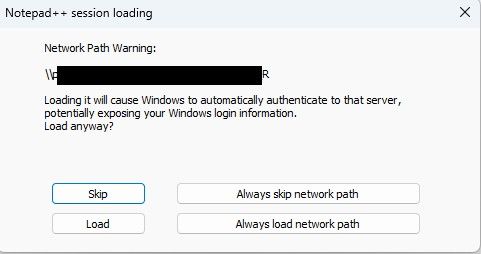
Why is it suddenly concerned about my network path? And why would it expose my login information, and to who if im in a trusted network from a trusted PC?
This prompt pops up on every file I open inside my WSL2 vm. It made using Notepad ++ so frustrating that I downgraded back to 8.9.7.
Additionally, clicking always skip or always load doesn’t stop this from re-triggering when closing and opening the same file. I don’t know if that was the intended purpose of those buttons though.
-
As @xomx said in this Issue#18315 comment, he was not able to reproduce the problem (*). Since there is an issue (even though it’s currently closed), would you be able to go to that issue, and give an exact sequence of steps (from the initial launch of Notepad++ through to the second and third time that the warning pops up even with having answered Always load …), including your full ?-menu > Debug Info, and the session.xml that is being loaded (you can change paths in the session to things like
c:\path\to\file1.jsonand\\hostname\sharename\path\to\file2.cppif your filenames or paths hold information that you need to redact.Another important question: if instead of your normal workflow, if you open Notepad++, click Always load…, then exit Notepad++ immediately and restart, does it save the answer?
If you have the ability, replying in [issue #18315](this Issue#18315 comment](https://github.com/notepad-plus-plus/notepad-plus-plus/issues/18315) might be best (IMO) at this point; but if you don’t have or cannot create an account for GitHub, you can reply here. (It just buries other things in the Release Announcement threads if it dives into debugging a specific problem.)
*: unsaid in that Issue: I had also tried to replicate it, and could not. As soon as I answer ALWAYS in a given instance of Notepad++, it stops pestering me, no matter how many times I reload a file from the network or from my local drive, or how many times I manually open a session file from the network or from my local drive. That’s why it’s so important to give the exact sequence of events you use to encounter the problem, with as many details as you can. Because until someone can replicate it, the problem likely cannot be found or fixed.
-
After using rustdesk-1.4.9-x86_64.exe to control a remote Windows 11 PC, then I opened a .txt file in Notepad++, but it appeared blank—I couldn’t see any text.
-
-
Hi Don,
Is there a configuration option to disable the fix for the potential exposure of Windows login info (SMB/NTLM) via UNC path? If not, could you please add one (preferably with the additional ability to set it using a command line switch when running the installer).
The reason for my request is that that fix not needed in secured network environments where outbound SMB connections to untrusted networks are already blocked at the perimeter firewall. In those situations, the fix unnecessarily prompts users when opening files via a UNC path, even when the SMB client and server are in the same Active Directory domain.
Thanks,
JT
-
Current workaround for now - the relevant config.xml setting needed (just use a post-install script for it or supply a pre-configured config.xml file to your users):
networkPathWarningMethod="2"which means “networkPathAlwaysLoad”.
i.e. edit this line:
<GUIConfig name="MISC" fileSwitcherWithoutExtColumn="no" fileSwitcherExtWidth="50" fileSwitcherWithoutPathColumn="yes" fileSwitcherPathWidth="50" fileSwitcherNoGroups="no" backSlashIsEscapeCharacterForSql="yes" writeTechnologyEngine="3" isFolderDroppedOpenFiles="no" docPeekOnTab="no" docPeekOnMap="no" sortFunctionList="no" saveDlgExtFilterToAllTypes="no" muteSounds="no" enableFoldCmdToggable="yes" hideMenuRightShortcuts="no" networkPathWarningMethod="2" isFawSymlinkAllowed="false" />Edit:
There already seems to be such a helper script (I didn’t test it myself):
https://github.com/notepad-plus-plus/notepad-plus-plus/issues/18319#issuecomment-5508274570 -
When you ran the installer, did you turn off the following checkmark?
How do I change this setting in the portable version?
-
How do I change this setting in the portable version?
There is no such setting for portable. The normal portable (not the minimalist) comes with the
nppPluginList.dllin the right place, so Plugins Admin should just work.If it does not, you probably left the Mark of the Web on either that DLL or on
GUP.exe. I explained how to check (and clear) that in my post above.If that’s not it, but you’ve been using the same portable directory for a long time, and have just been extracting the new exe with each update, it may be that your GUP is old enough to not have the right security handoff with notepad++.exe any more: make sure you’ve extracted the most recent GUP and nppPluginList from the newest portable zip (and removed the Mark of the Web).
(To do either of those last two paragraphs, Notepad++ must not be running.)
If you need more help, create a new Topic, as the problem you are having does not appear to be a regression, and shouldn’t be part of this Announcement.


Hello! It looks like you're interested in this conversation, but you don't have an account yet.
Getting fed up of having to scroll through the same posts each visit? When you register for an account, you'll always come back to exactly where you were before, and choose to be notified of new replies (either via email, or push notification). You'll also be able to save bookmarks and upvote posts to show your appreciation to other community members.
With your input, this post could be even better 💗
Register Login