Suggestion: Pin or favorite languages in the language menu?
-
Can we get the ability to pin or “favorite” languages in the Language menu to they sit at the top of the menu?
I find it somewhat tedious to keep scrolling down to the bottom of that menu to constantly get to XML, PHP, SQL, etc.
Or perhaps find a way to let the scroll wheel on a mouse scroll that menu.
-
-
You can add them to the toolbar using the Customize Toolbar plugin and its Custom Buttons feature.
-
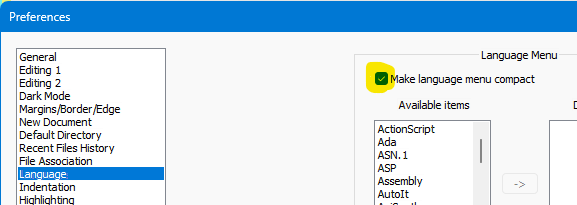
@Alan-Kilborn - I have not. The compact menu looks like it might help. Maybe not quite a quick as pinning something to the top, but much better than clicking the arrow at the bottom over and over.
-
I NEVER use the Language menu. I just save a newly created file with the proper extension and Notepad++ sets the language for me. Suggest you try that as well.
-
As explained in this reply, you can also create a Macro that changes the active language selection.
-
@pixelstuff said in Suggestion: Pin or favorite languages in the language menu?:
I find it somewhat tedious to keep scrolling down to the bottom of that menu to constantly get to XML, PHP, SQL, etc.
I use the keyboard to switch languages.
- XML is
Alt+L+X. - PHP is
Alt+Land while continuing to hold theAltkey downP+P+PthenEnter. - SQL is
Alt+Land thenS. As SQL is a ways down the list I tend to use the down arrow key rather than tappingSuntil I get to SQL.
- XML is




Hello! It looks like you're interested in this conversation, but you don't have an account yet.
Getting fed up of having to scroll through the same posts each visit? When you register for an account, you'll always come back to exactly where you were before, and choose to be notified of new replies (either via email, or push notification). You'll also be able to save bookmarks and upvote posts to show your appreciation to other community members.
With your input, this post could be even better 💗
Register Login