Notepad++ v8.8 Release Candidate
-
Hi, All,
As soon as the new
v8.8version was released, I downloaded thenpp.8.8.portable.x64.7zarchive on an USB keyon this USB key, named
D:, I extracted all contents of thenpp.8.8.portable.x64.7zarchive in a new folder880_x64I opened Notepad++ and, as usual, as it was the first time, I modified the preferences as desired, particularly the Default Directory defined as
Follow current documentDuring my tests about the colors of toolbar icons ( see my above post ), I noticed something weird ! To test it :
-
From a prompt windows, I typed in the two commands :
-
cd /d D:\880_x64 -
notepad++ -nosession
-
-
I hit the
Ctrl + Oshortcut, then go to the parent directoryD:\and open a file -
When I did again a
Ctrl + Ooperation, the current directory was, of course, unchanged (D:\), correponding to the opened file -
Then, I opened the
Settings > Preferences...dialog and… immediately closed it -
Launching again the Open dialog, this time, it displayed
D: > 880_x64, although the only file opened was in directoryD:\ -
I re-opened the
Preferencesdialog and just close it -
Again, after a
Ctrl + Ooperation, nothing has changed and it wrongly displayed the folderD:\880_x64! -
After closing this unique file (
Ctrl+ W) and re-opened it (Ctrl + Shift + T) the error cannot be reproduced and the current directory of theOpendialog was the folderD:, as expected -
On the other hand, as soon as you load an second file from the
\D:folder, the error does not seem to occur too -
Luckily, note also that the two other options (
Style Configurator...andShortcut Mapper) do not produce this error !
Guys, can you reproduce these steps ?
Best Regards,
guy038
P.S. :
Sorry, I should not have replied, specifically, in the
Notepad v8.8 Release Candidatetopic, as I tested with my old N++v8.6.2release which produces the same bug !! -
-
<Item id="6017" name="Blue"/>must beGreen
<Item id="6018" name="Green"/>must beBlue -
@rddim
Well spotted.
Fixed in https://github.com/notepad-plus-plus/notepad-plus-plus/commit/48d953693ad9bd2829f1dfd36c852504f8dc4a6fAnd the fix will be in v8.8 release
as I tested with my old N++ v8.6.2 release which produces the same bug !!
So it’s not a regression of this release.
Could you create an issue on Github please? -
Regarding:
- Dark mode enhancements: combobox. (Fix #16349)
My dropdown icon for combobox still looks like a “v” in Dark Mode. But since I am still on Win7, this could be a Win7 issue. How does it look like in Win10 or Win11 ?
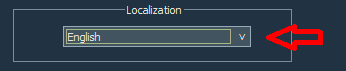
-
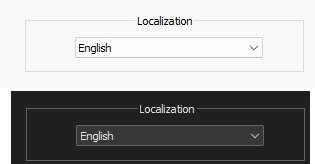
win11, light vs dark:
Notepad++ v8.8   (64-bit)
Build time : Apr 22 2025 - 18:20:44
...
OS Name : Windows 11 Home (64-bit)
OS Version : 24H2
OS Build : 26100.3775
Current ANSI codepage : 1252
For me, it’s the same essential shape, just a different color, as expected.
-
FYI:
8.8 RC is updated to 8.8 RC2:
http://download.notepad-plus-plus.org/repository/8.x/8.8.RC2Improvements:
- Fix localization files
- Improve Tab bar section’s look in Preferences dialog
-
@donho ,
Why are the Function List icons now, uncolored? :-)Update: Never mind. I did a restart, so maybe something was just jumbled…it came back up colored after the restart so it’s all good on that issue. :-)
-
Hello, @donho and All,
As promised, the GitHub issue :
https://github.com/notepad-plus-plus/notepad-plus-plus/issues/16465#issue-3016715149
BR
guy038
-
https://notepad-plus-plus.org/news/v88-we-are-with-ukraine/ gives an Error 404 (link within “F1” Info).
-
https://notepad-plus-plus.org/news/v88-we-are-with-ukraine/ gives an Error 404 (link within “F1” Info).
It’s because v8.8 is still in RC state.
It will be on line in few hours. -
D donho unpinned this topic on
-
 M Mark Olson referenced this topic on



Hello! It looks like you're interested in this conversation, but you don't have an account yet.
Getting fed up of having to scroll through the same posts each visit? When you register for an account, you'll always come back to exactly where you were before, and choose to be notified of new replies (either via email, or push notification). You'll also be able to save bookmarks and upvote posts to show your appreciation to other community members.
With your input, this post could be even better 💗
Register Login