How to disable the suggestions
-
Hello to the Community.
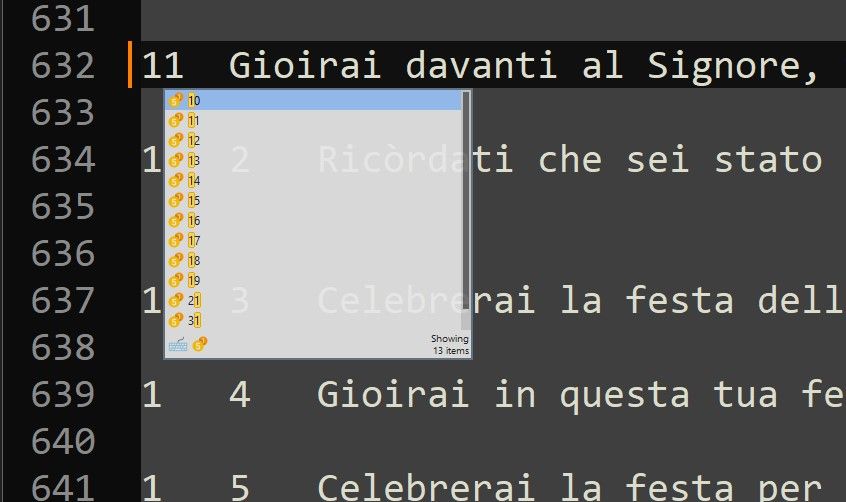
I need to find the simplest way to disable the suggestions, like the one I’m posting here below.
I don’t need this, and it is a continuous interruption in the keyboard input.
Is there anyone who can help me?
I love notepad++ but I have no time to go to read “all” the documentation, that I searched in every way without finding a solution. I suspect that it is a plug-in to disable, but I don’t know which one is it.
Please help.
Thank you in advance.
-
-
The auto-completion popup doesn’t look to me like the default auto-completion popup for base Notepad++. I think a plugin is responsible.
If you want to figure out which plugin is responsible, the simplest way is to go through each plugin you have, uninstall it, and then (optionally) reinstall it if the issue didn’t go away.
-
@Sergio-Bonfiglio ,
Sorry, don’t have the time to research and provide an answer that is obvious after reading the documentation.



Hello! It looks like you're interested in this conversation, but you don't have an account yet.
Getting fed up of having to scroll through the same posts each visit? When you register for an account, you'll always come back to exactly where you were before, and choose to be notified of new replies (either via email, or push notification). You'll also be able to save bookmarks and upvote posts to show your appreciation to other community members.
With your input, this post could be even better 💗
Register Login