[suggestion] View > Tab > Move up/down
-
Hello,
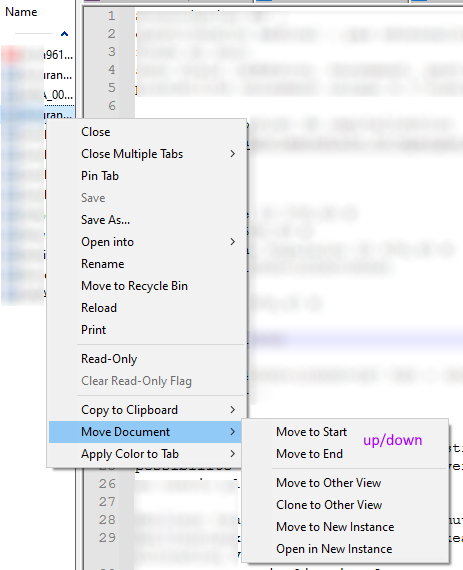
I have a suggestion for the View > Tab menu: Add “up/down” items so that a document can be moved anywhere in the list instead of just top/bottom.
Cheers,
-
@Shohreh ,
You are not showing the View > Tab menu, despite what you said.
This is View > Tab:
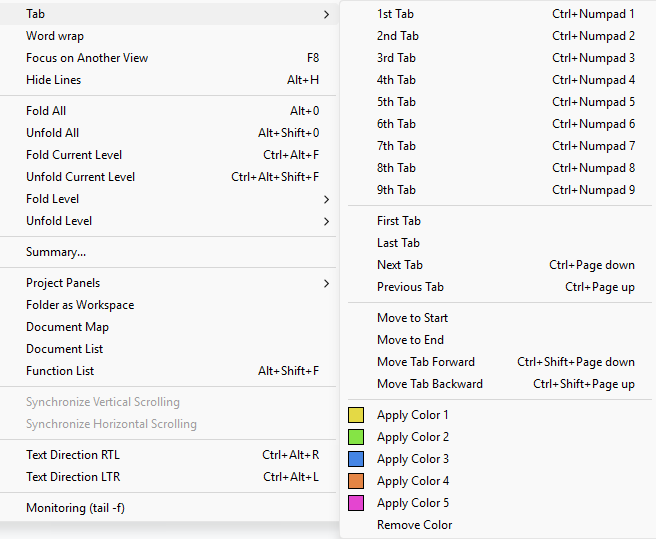
The Move Tab Forward
Ctrl+Shift+Page downand Move Tab BackwardCtrl+Shift+Page upare exactly the feature you are asking for, in the menu you claim you want them in.The View > Tab menu is described here in the Online User Manual.
What you have actually shown in your screenshot is the menu that pops up when you right-click on the tab’s title on the tab bar, which is described here.
If you don’t like the actions that are available by default in that tab-bar right-click context menu, you can customize it using
tabContextMenu.xml, as described here. (Essentially, you copy the example to the main name, customize the entries to include the extra commands you want, and then save and exit Notepad++ and re-run, and from then on, the new commands you asked for will be available in the context menu). -
Thanks for the tip.

Hello! It looks like you're interested in this conversation, but you don't have an account yet.
Getting fed up of having to scroll through the same posts each visit? When you register for an account, you'll always come back to exactly where you were before, and choose to be notified of new replies (either via email, or push notification). You'll also be able to save bookmarks and upvote posts to show your appreciation to other community members.
With your input, this post could be even better 💗
Register Login