h1's in function list for navigation
-
hi. is there a way to list all the h1 headings in a .md file in the function list for navigation? or is there a better way to do similar?
-
is there a way to list all the h1 headings in a .md file in the function list for navigation?
Yep. Notepad++ has the View > Function List command, which will show a function list. And any syntax-highlighting language (whether built-in or UDL) can have the FunctionList definition customized to your desires, assuming you know regex.
Here is an example of mine, which actually does all headings (not just h1)
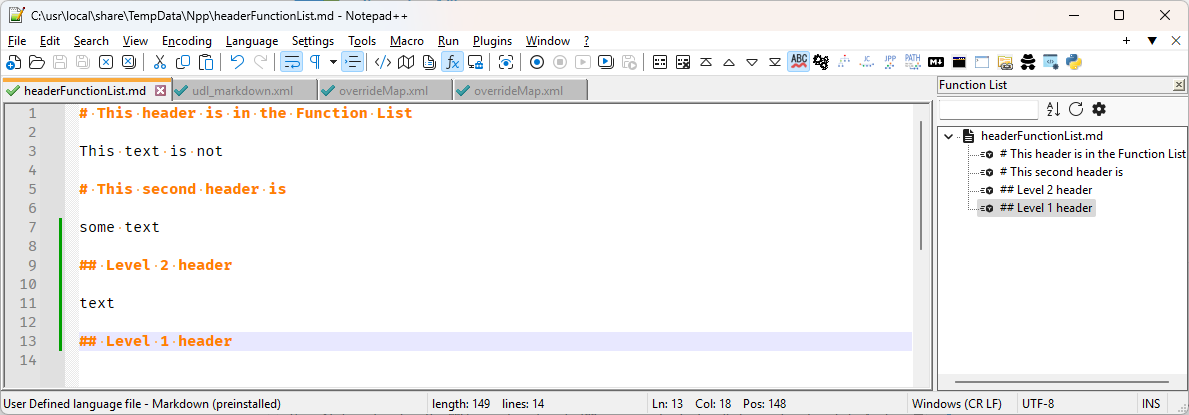
You can then double-click on any of the lines in the Function List panel to go to that line in the editor.
Instructions:
Assuming a normal installation (where settings are in
%AppData%\Notepad++, create a new file called%AppData%\Notepad++\functionList\udl_markdown.xmlwith the contents:<?xml version="1.0" encoding="UTF-8"?> <!-- ==========================================================================\ | | To learn how to make your own language parser, please check the following | link: | https://npp-user-manual.org/docs/function-list/ | \=========================================================================== --> <NotepadPlus> <functionList> <parser displayName="Markdown (preinstalled)" id="Markdown (preinstalled)" commentExpr=""> <function mainExpr="(?x-s)(^\h*\K[#]+\h*(.*?)$|^(.*)(?=[\r\n]+^([-=])\4{2,}\h*$))"/> </parser> </functionList> </NotepadPlus>Then edit
%AppData%\Notepad++\functionList\overrideMap.xml(if it doesn’t exist, copyc:\Program Files\Notepad++\functionList\overrideMap.xmlto%AppData%\Notepad++\functionList\overrideMap.xml, then edit it). Add the line<association id= "udl_markdown.xml" userDefinedLangName="Markdown (preinstalled)"/>in the User Defined Languages section:

Save those files. Exit Notepad++ and restart the app. Now, if you open a
.mdfile and it’s using the Language > Markdown (preinstalled) UDL entry that comes with Notepad++, then if you show the View > Function List, and any header lines will show up as double-clickable table-of-contents.If you only want h1, and not h2 or deeper, change to
mainExpr="(?x-s)(^\h*\K[#]\h*([^#]*?)$|^(.*)(?=[\r\n]+^([-=])\4{2,}\h*$))"in theudl_markdown.xmlfile, save, exit, and restart N++. -
@PeterJones, thank you for those straightforward instructions!
I was able to get this working, even with my own custom language parser I made for my markdown files.
How can I update it so that the function list displays with indentations, similar to a table of contents?
For example:
my-notes.md
# H1
    ## H2
        ### H3
            #### H4
# H1
    ## H2
        ....
Thanks in advance.
-
@MJKlodt747 said in h1's in function list for navigation:
How can I update it so that the function list displays with indentations, similar to a table of contents?
Get rid of the
\Kin themainExpr=..., and the Function List display will show any prefixed spaces (after you save, exit Notepad++, and re-run Notepad++, obviously). -
@PeterJones, that works for me. Thanks!


Hello! It looks like you're interested in this conversation, but you don't have an account yet.
Getting fed up of having to scroll through the same posts each visit? When you register for an account, you'll always come back to exactly where you were before, and choose to be notified of new replies (either via email, or push notification). You'll also be able to save bookmarks and upvote posts to show your appreciation to other community members.
With your input, this post could be even better 💗
Register Login