The Nightmare %> Issue
-
@Bjorgen-Eatinger said in The Nightmare %> Issue:
I’ve posted this bug on GitHub, but it hasn’t been fixed. It drives me NUTS.
I can tell you that this is almost certainly a Lexilla problem. I know that doesn’t matter to you as an end user; but as a practical matter, it means that reporting it as a Notepad++ issue is unlikely to yield useful results.
If you care enough about this, your first step should be to try to reproduce the same behavior in SciTE. Since Scintilla, Lexilla and SciTE are all related, it will be easier to get the maintainers of those projects to attend to a bug report if the bug can be demonstrated in SciTE.
If the same bug does not occur in SciTE, then it is a Notepad++ issue after all. Failure to reproduce in SciTE would be information you should definitely add to your Notepad++ issue, as it would indicate the problem isn’t what it appears to be.
If the same bug does occur in SciTE, then the place to document the problem is in the Lexilla issues.
-
@PeterJones Thank you for your reply–very much appreciated. However, I didn’t say that it was an “easy” fix. I clearly said, “SEEMS like an easy fix.” I’m just a mere coder, and don’t know anything about the internal workings of NotePad++, so I appreciate that you spent the time to write me a response. I have a work around and will continue to add that space to every comment I make where the <% %> tags are used.
I got used to using NotePad++ based upon the recommendation of another coder. I used to use Homesite Pro and loved it, but it had memory leak issues. Thank you again!
-
@PeterJones said in The Nightmare %> Issue:
Just how much did you pay for Notepad++ that you think it warrants you personal bugfixes guaranteed within N days? Especially since every contributor to Notepad++, including the owner, is an unpaid volunteer, in it only for the love of the app – but that means that when they can submit fixes depends on their life and commitments outside N++, and they have to prioritize their contributions accordingly.
With regards to this statement, I wouldn’t mind paying money for NotePad++, but that’s not possible, is it? I appreciate your post, but I think it’s a bit much to be berating me in this manner. Let’s keep things on a professional level please.
-
@Bjorgen-Eatinger said :
I didn’t say that it was an “easy” fix. I clearly said, “SEEMS like an easy fix.”
Not much of a distinctions between those two things, unless you’ve looked into it (you haven’t).
I think it’s a bit much to be berating me in this manner
A way to avoid this: Don’t say silly things in your post.
-
@Bjorgen-Eatinger
if I were you, I would try to follow @Coises 's suggestion to determinate the source of bug, and provide the necessary information to help us solve your problem, instead of shouting out loud in the forum.Let’s keep things on a professional level please.
I wouldn’t say you’re on the professional level with the following sentence:
I’ve posted this bug on GitHub, but it hasn’t been fixed. It drives me NUTS.If you don’t care about helping us identify the problem, and only come into the forum to complain, why should we help you?
The project has been maintained by volunteers since its creation. As an open-source project, the voice is always given to those who contribute - including people who provide the pertinent information to help. If you don’t know how to gether the information we need, at least be cordial. People here don’t owe you anything.
I hope you understand that.
-
@donho Thank you very much for your reply. Please let me know what else you would like me to provide to help out. Thank you very much!
-
-
@Bjorgen-Eatinger said:
I wouldn’t mind paying money for NotePad++, but that’s not possible, is it?
You can donate if you’d like; see HERE.
-
@Coises I greatly appreciate your post and kindness. I am not a pro-user by any means. I will take your advice and do my best to report this issue regarding Lexilla on GitHub. I’ll more than likely delete this post here, as the responses were unusual. I’m an older fellow and haven’t been super active other than the work that I do on my own website. I tried to edit the post, but wasn’t allowed to do so. Thank you again!
-
@Bjorgen-Eatinger said in The Nightmare %> Issue:
I’ll more than likely delete this post here, as the responses were unusual.
We prefer users to
NOTdelete posts, especially if there have been responses. Imagine some months down the track an initial post is deleted leaving all these responses to some “unknown” question.In fact, us moderators will reinstate a deleted message if there are responses so as to keep that “continuity” of information.
Terry
-
@Terry-R Okay, yes you are right. Information is key–the more the better! So I did as @Coises suggested, and download and tested SciTE, and found that it works perfectly. It handles the opening and closing brackets gracefully and correctly when they are a part of a comment. In fact, if I don’t use them correctly (e.g., '<% Hello % >), then it lets me know about it–very nice. Therefore, as @Coises suggests this problem must be in NotePad++ itself. I will update my GitHub post accordingly. Thank you all for all of your posts and guidance. Very much appreciated!
-
@Bjorgen-Eatinger said in The Nightmare %> Issue:
So I did as @Coises suggested, and download and tested SciTE, and found that it works perfectly. It handles the opening and closing brackets gracefully and correctly when they are a part of a comment.
Which is odd, because @rdipardo’s experiment, which was included in the Lexilla issue, proves that SciTE does not handle it correctly.
Can you use the
</>button on a post toolbar, and paste in the exact example text that shows Notepad++ not handling it correctly and SciTE is handling it correctly, with screenshots of both? -
@Bjorgen-Eatinger said in The Nightmare %> Issue:
Information is key–the more the better!
In that case, please reply to @PeterJones’s most recent post, and also show what options are enabled in the
Settings > Preferences > Highlightingsubmenu.My initial response to N++ issue #17072 was to assume it was a duplicate of another issue caused by the tag highlighting feature, which will naïvely find “tags” in contexts where there is no HTML markup; e.g.,
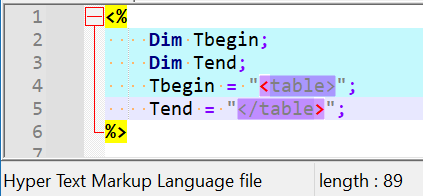
This only occurs when the active language is HTML and the
Enableoption is checked underSettings > Preferences > Highlighting > Highlight matching tags. -
For example, I spun up the IIS features on my Win11 machine.
If I use:
<!DOCTYPE html>
<html>
<body>
<%
Response.Write("Hello World!<hr>")
%>

<%
Response.Write("Run me!")
' Response.Write("Commented out!")
Response.Write("<p>Run me 2!</p>")
%>

<%
LocationPhraseServiceArea = "{This is the value}"
%>
<%
' <p>
' We provide professional event production and rental services <%= LocationPhraseServiceArea %>.
' what goeth here</p>
%>

<p>
We provide professional event production and rental services <%= LocationPhraseServiceArea %>.
what goeth here</p>

</body>
</html>
… which is the best interpretation I can come up with for your “later in the page content:” code snippet, plus some extra to prove that IIS ASP code is working around it, I get:

The Notepad++ highlighting seems to match what’s displayed when I look at what the server shows – that is, the
%>at the end does close the ASP wrapper, and it goes back to being raw HTML, which the browser renders.So you really need to show
- exactly what code you have.
If my “use the</>button” explanation doesn’t make sense to you, then use
for example,``` paste your ASP code here `````` <% Response.Write("Hello World!<hr>") %> ``` - a screenshot of the highlighting in Notepad++ being “wrong”
- a screenshot of the highlighting in SciTE (and which version of SciTE you are using) being “right”
It needs to be identical code in both Notepad++ and SciTE, so that we’re comparing apples to apples.
- exactly what code you have.
-
@PeterJones Sorry for the late reply. This issue only occurs in a case like this:
’ <% Sub ApplyPasswordReset(oConnGlobal, postData, ByRef result). %>
There is a comment (apostrophe) in front of that line of code.
The editor is not honoring the fact that this line of code is a COMMENT ONLY.
Every line of actual code after this line is now treated as text only (not ASP code).
Until you put a SPACE between the “%” and the “>”, as in the following:
’ <% Sub ApplyPasswordReset(oConnGlobal, postData, ByRef Result). % >
That’s it. Again, sorry for the late reply.
-
@Bjorgen-Eatinger said in The Nightmare %> Issue:
This issue only occurs in a case like this:
Sadly, you did not give nearly enough for us to be able to investigate your problem any further. I put in exactly that line (and only that line) into
bjorgen.aspon my local IIS, and when I go to that page, it gives me a server error:
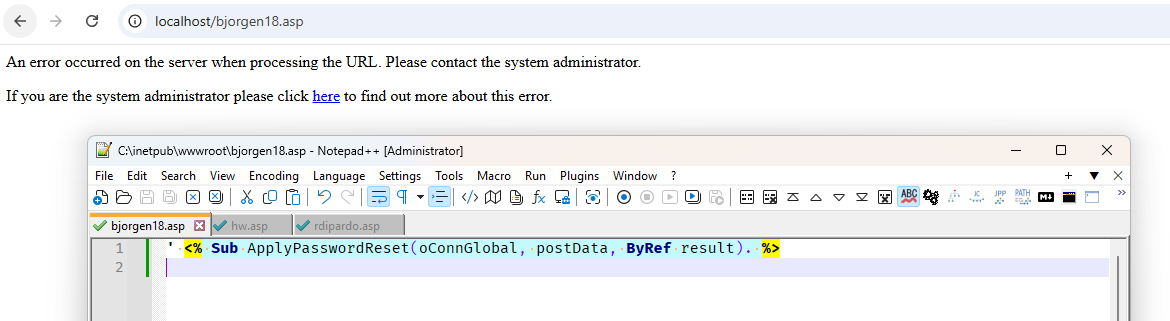
… And I confirmed that other pages, like the one I showed above, are still working on my local server.
From what I understand, the
'as a comment is VBSCRIPT syntax, not ASP-specific syntax. Because I thought everything outside of<% ... %>was just interpreted as ASP (and my quick web searches seem to confirm that conclusion on my part). In which case, putting the'before a<% ... %>line is not “commenting out” anything, it’s just putting a single-quote in the static HTML portion of the code. Moreover, you aren’t supposed to nest<% ... %>inside each other, as far as my searches tell me. So your single line is really confusing… because if it’s outside of a containing<% ... %>, then I don’t see why you think that the'is commenting anything. And if it’s inside a containing<% ... %>, I don’t see why you have another<% ... %>nested inside. This is why a complete example is needed for us to be able to see what you mean. It doesn’t have to be huge – my example document from earlier (with the. ' what goeth herein the rendering) is only about a dozen lines.And per the Microsoft documentation linked in the Lexilla issue,
<% i = i +1 'This statement increments i. (This script will work.) %>… is valid / complete syntax: the
'comment only comments out the text portion – the%>closer tag does not get hidden by the comment inside the<% ... %>.Taking that line, and putting it into
zufuliu.aspwith a few other lines,Text before <% i = i +1 'This statement increments i. (This script will work.) %> text after <br>i = <%= i %>… to actually render something in the webpage, I see:

And Notepad++ is highlighting that as expected: thei = i + 1is code, the'This statement increments i. (This script will work.)is a comment, and the%>still closes the code, and everything after still runs.Moreover, if I use a
'to “comment out” the<% ... %>line, it doesn’t actually make that code not run. It just interprets the'as part of the HTML, not as part of the VBSCRIPT.

So your single line of
' <% Sub ApplyPasswordReset(oConnGlobal, postData, ByRef result). %>does nothing to show us where the bug might be, or what’s going wrong.To be able to prove whether there’s a bug in Lexilla, a bug in Notepad++, or just user error, you need to give a complete known-good ASP code that shows the problem, that we can open with IIS to see that the code works as expected (ie, to show it’s valid ASP that you are trying to edit), that we can open with Notepad++ to see that it highlights “wrong”, and opens with SciTE to show that it highlights “right” or “wrong” depending on what you say (the last time, I believe I understood you to say that it was rendering right in SciTE),
If you want help, you need to give all the information from the 3 simple steps I put in my last post and reiterated here. Please understand, I am not saying this to be mean: the Lexilla people do not believe there is a bug in their library (the issue has been closed as PEBKAC). Nothing you have shown us gives evidence of a bug in Notepad++. If you don’t provide exactly what I described above, your report will be diagnosed to be user error, and nothing will ever happen.
At this point, it’s your decision as to what happens next.






Hello! It looks like you're interested in this conversation, but you don't have an account yet.
Getting fed up of having to scroll through the same posts each visit? When you register for an account, you'll always come back to exactly where you were before, and choose to be notified of new replies (either via email, or push notification). You'll also be able to save bookmarks and upvote posts to show your appreciation to other community members.
With your input, this post could be even better 💗
Register Login