Can't install any plugin - hash mismatch
-
Hi,
I get the following error when trying to install a plugin from the Plugin Admin tool. I’ve tried several including Compare, JSON Viewer, 3P, HEX-Editor, JSON Tools.
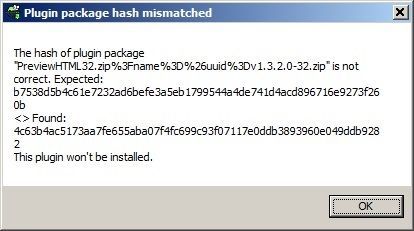
This has been happening for several months across multiple app versions. I see there are several historical posts about this but not seeing a resolution. Any way to install plugins manually, or will I just run into the same issue?
Here’s my Debug Info:
Notepad++ v8.8.8 (64-bit)
Build time: Nov 16 2025 - 20:55:01
Scintilla/Lexilla included: 5.5.7/5.4.5
Boost Regex included: 1_85
Path: C:\Program Files\Notepad++\notepad++.exe
Command Line:
Admin mode: OFF
Local Conf mode: OFF
Cloud Config: OFF
Periodic Backup: ON
Placeholders: OFF
Scintilla Rendering Mode: SC_TECHNOLOGY_DEFAULT (0)
Multi-instance Mode: monoInst
asNotepad: OFF
File Status Auto-Detection: cdEnabledNew (for current file/tab only)
Dark Mode: OFF
Display Info:
primary monitor: 3840x2160, scaling 150%
visible monitors count: 1
installed Display Class adapters:
0000: Description - Intel® Iris® Xe Graphics
0000: DriverVersion - 32.0.101.6881
OS Name: Windows 11 Enterprise (64-bit)
OS Version: 24H2
OS Build: 26100.7171
Current ANSI codepage: 1252
Plugins:
mimeTools (3.1)
NppConverter (4.7)
NppExport (0.4) -
@b-squared said in Can't install any plugin - hash mismatch:
Hi,
I get the following error when trying to install a plugin from the Plugin Admin tool. I’ve tried several including Compare, JSON Viewer, 3P, HEX-Editor, JSON Tools.
Your Debug Info shows that you are using 64-bit Notepad++ version 8.8.8; Plugins Admin in that version should be offering Preview HTML 1.3.3.3. From your screenshot, it looks like it’s trying to load a 32-bit plugin with version 1.3.2.0.
I’m thinking that somehow your copy of the plugins list is not getting updated properly. Just to be sure… is this a regular installed version or a portable version, and exactly where are you getting the download?
Any way to install plugins manually, or will I just run into the same issue?
You can install plugins manually and there isn’t a hash check when you do that. Before we go that way, though, we need to figure out why your installation copy of the plugins list is messed up — I have to think it might not be the only thing that’s messed up.


Hello! It looks like you're interested in this conversation, but you don't have an account yet.
Getting fed up of having to scroll through the same posts each visit? When you register for an account, you'll always come back to exactly where you were before, and choose to be notified of new replies (either via email, or push notification). You'll also be able to save bookmarks and upvote posts to show your appreciation to other community members.
With your input, this post could be even better 💗
Register Login