Jumping between matching brackets is not idempotent
-
Hello,
Notepad++ allows me to jump to the matching bracket with Ctrl+B. My intuitive expectation is that if I press Ctrl+B twice I end up where I came from.
Now, if I have the string
[(ab)c]and the insertion mark is between “)” and “c”, after the first press, the cursor jumps between “[” and “(”, and after the second press of Ctrl+B, it’s between “c” and “]”, i.e. NOT where I came from.Is it the intended behaviour of Notepad++?
Thank you
-
@fml2 said in Jumping between matching brackets is not idempotent:
Is it the intended behaviour of Notepad++?
That’s kind of the edge case condition, which probably wasn’t thought about too much. Notepad++ intentionally designed the brace matching so that whether your caret was on the left or the right of the brace-type character, when it went to the matching pair, it always puts the caret before that character. But that means when it gets moved between the two different opening braces, it’s before one and after the other… and because Notepad++ is processing the bytes in the order it finds them (ie, in Western cases where N++ works best, left-to-right), that means that it notices the caret is after the first brace, before it has a chance to notice it’s also before the second brace.
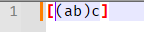
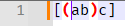
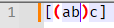
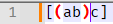
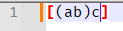
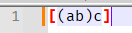
If you have the brace-highlighting turned on, you can tell which brace-pair Notepad++ thinks your caret position is associated with by which are highlighted. Here are screenshots of the highlights for each of the brace-adjacent caret positions, from left to right:
Because 4 and 5 both highlight the inner
(...). the brace-match from there will take you to the before the opening(, at condition 2. But in condition 2, the pair that Notepad++ sees as active is ``, so the brace match from there will take you to condition 6, and from 6 will go to 1 (because it’s before the[)The behavior borders on a bug… but I’m not sure there’s 100% agreement on which pair should be active and where the brace match should go in each condition, and thus I don’t know that it makes more sense to confuse people by “fixing” it to your interpretation, when it would then subvert years of expected Notepad++ behavior.
-
What I’m at is the fact that, after two Ctrl+B I’m not back where I was before.
Would it be possible to make the jumping logics more intelligent? For example, one could remember the fact that the current location has been reached by a brace search, and remember the previous location. If, in that state, brace search is performed again, the cursor would jump to where it was before. Thus one could resolve the ambiguity when the cursor is between two adjacent braces. Any manual cursor movement or text editing would reset that state, i.e. the brace search would use the default logic after that.
-
@fml2 I did a short try with your info and my version as of:
Notepad++ v8.8.9 (32-bit)
Build time: Dec 8 2025 - 00:03:04
Scintilla/Lexilla included: 5.5.8/5.4.6
Boost Regex included: 1_85
Path: F:\LargePrg\Notepad++\notepad++.exe
Command Line:
Admin mode: OFF
Local Conf mode: OFF
Cloud Config: OFF
Periodic Backup: OFF
Placeholders: OFF
Scintilla Rendering Mode: SC_TECHNOLOGY_DIRECTWRITE (1)
Multi-instance Mode: monoInst
asNotepad: OFF
File Status Auto-Detection: cdEnabledNew (for current file/tab only)
Dark Mode: OFF
Display Info:
primary monitor: 1920x1200, scaling 100%
visible monitors count: 1
installed Display Class adapters:
0000: Description - NVIDIA GeForce GTX 1060 6GB
0000: DriverVersion - 32.0.15.6094
0002: Description - Microsoft Remote Display Adapter
0002: DriverVersion - 10.0.19041.5794
OS Name: Windows 10 Enterprise (64-bit)
OS Version: 22H2
OS Build: 19045.6466
Current ANSI codepage: 1252
Plugins:
ComparePlugin (1.5.6.1)
docMonitor (2.2)
mimeTools (3.1)
NppConverter (4.7)
NppExec (0.5.3)
NppExport (0.4)
NppFTP (0.26.3)
NppInsertPlugin ()
NppNetNote (0.1)
NPPTextFX (0.2.6)
NppUTimeConv ()
PluginManager (1.3.5)
SelectNLaunch (1)
XMLTools (2.4.8)did not show the phenomenum you describe. Please provide the info from your installation by selecting Menu Item “?”->“Debug-Info” to allow us to further investigate whether this is a version-specific incident.
-
@fml2 said in Jumping between matching brackets is not idempotent:
What I’m at is the fact that, after two Ctrl+B I’m not back where I was before.
The priority goes to character before caret and if no brace found so check other side.
and same with SciTE.
https://sourceforge.net/p/scintilla/scite/ci/default/tree/src/SciTEBase.cxx#l628
It might be sloppy behavior rather than strict behavior, though there is intelligence if you can recognize it as it is not random. It is misfortunate that the caret
|with[(ab)c]goes from)|cto[|(and then toc|]though it is the priority that determines where the caret goes. At[|(, the priority of the match goes to[before the caret, not to(after the caret. -
OK, if it’s the intended behaviour then I’ll just live with it. It’s not a very big deal.
Thank you all who answered!





Hello! It looks like you're interested in this conversation, but you don't have an account yet.
Getting fed up of having to scroll through the same posts each visit? When you register for an account, you'll always come back to exactly where you were before, and choose to be notified of new replies (either via email, or push notification). You'll also be able to save bookmarks and upvote posts to show your appreciation to other community members.
With your input, this post could be even better 💗
Register Login