Notepad++ 8.9 RC is available
-
Notepad++ 8.9 RC is available here:
https://download.notepad-plus-plus.org/repository/8.x/8.9.RC/Notepad++ v8.9 new security enhancement, new improvements, regression fixes & bug-fixes:
- Security enhancement: Log security errors automatically in “%LOCALAPPDATA%\Notepad++\log\securityError.log” (Implement #17305, #WinGUp)
- Fix jarring color regression in dark mode (introduced in v8.8.9). (Fix #17289)
- Fix “/noUpdater” installer option not working if updater was previously installed. (Fix #17287)
- Fix column mode edit undo regression (introduced in v8.8.9). (Fix #17295, #17272, #16784)
- Fix issue where an empty file opened without encoding under a UTF-8 system codepage. (Fix #17258)
- Add makefile function list parser. (Fix #17293)
- Improve performance & add missing file ext. from langs.model.xml to langs.xml.(Fix #17290, implement #17314, implement #17306)
- Improve “Open containing folder in Explorer” command to avoid creating Explorer process. (Fix #17060)
- Allow updating mouse scroll amount according to OS settings changes. (Implement #17300)
-
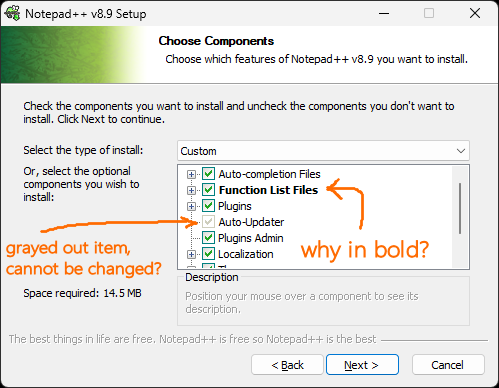
I know that the “Auto-Updater” item will not be there at all when launched with the “noUpdater” param but why does not allow the installer GUI to also use that disabling possibility?
The “Function List Files” in bold is a regression from the v8.8.9.
-
@xomx said in Notepad++ 8.9 RC is available:
The “Function List Files” in bold is a regression from the v8.8.9.
Are you sure? just tested, I can’t reproduce it in v8.8.9 installer.
OTOH, I reproduce it in v8.9 installer.No regression but feature?
why does not allow the installer GUI to also use that disabling possibility?
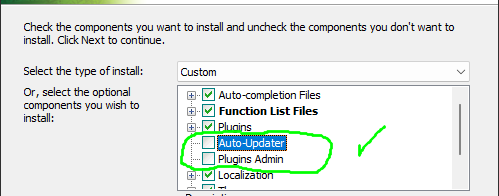
Because “Plugin Admin”, which needs WinGUp to work, is selected.
Edit: The issue of bold “Function List Files” is only reproducible for x64 installer. The x86 installer has no issue. From the modification of NSIS files, I cannot see why & how it is caused. -
@xomx
The issue of bold “Function List Files” is not a bug, but a feature in NSIS:
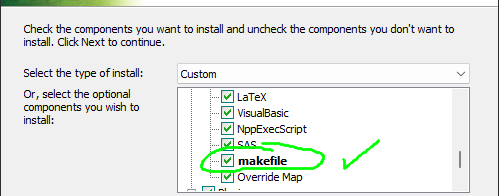
It’s bold because of new added makefile.xml to alert user there’s new added item(s) in the FunctionList. Once you finish the installation, on the 2nd launch of installer there won’t be bold “Function List Files” anymore. -
@donho said in Notepad++ 8.9 RC is available:
The issue of bold “Function List Files” is not a bug, but a feature in NSIS:
Interesting, I’ve never noticed that ft, thanks:
Because “Plugin Admin”, which needs WinGUp to work, is selected.
Yep, you’re right, thanks again:
-
@donho said in Notepad++ 8.9 RC is available:
I have not tested it, but it piqued my interest.
Where does the log go, if the default %ProgramFiles% installation path and %APPDATA% is not used? (Can be selected during installation.)
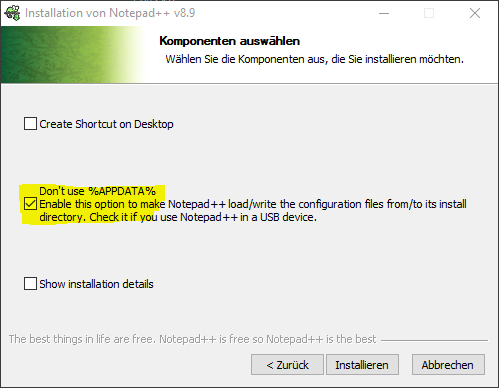
Where does the log go, if User Settings are stored on Cloud?
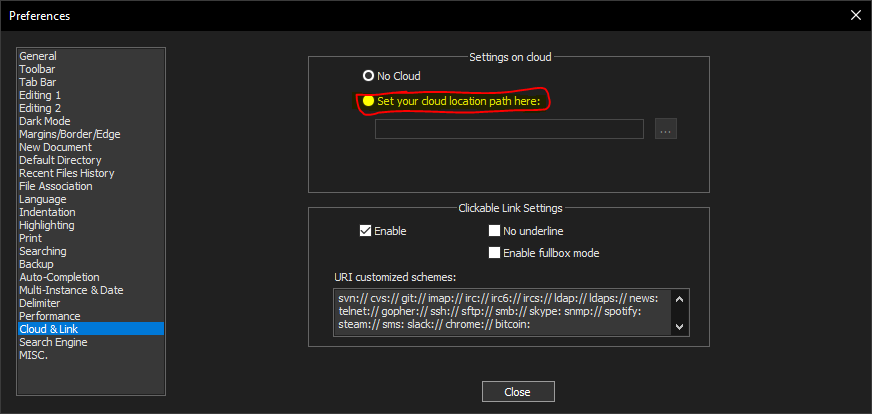
I think the log should go to the path like User Settings. Is %LOCALAPPDATA% replaced by this somewhere?
-
@MarkusBodensee said in Notepad++ 8.9 RC is available:
I think the log should go to the path like User Settings. Is %LOCALAPPDATA% replaced by this somewhere?
Security errors are the critical errors that user should get it easily. So for the moment only one path is used to make it as clear as passible. If there are more same requests coming in the future, I may consider your suggestion.
-
FYI
For the security reason, the https://download.notepad-plus-plus.org/ will be shutdown for some days.
It might be back online next year. -
D donho unpinned this topic on


Hello! It looks like you're interested in this conversation, but you don't have an account yet.
Getting fed up of having to scroll through the same posts each visit? When you register for an account, you'll always come back to exactly where you were before, and choose to be notified of new replies (either via email, or push notification). You'll also be able to save bookmarks and upvote posts to show your appreciation to other community members.
With your input, this post could be even better 💗
Register Login