Is it possible to scroll up/down with middle-click ? And/or move other view separator left/right ?
-
Hi,
I wanted to move the “other view” separator with more ease
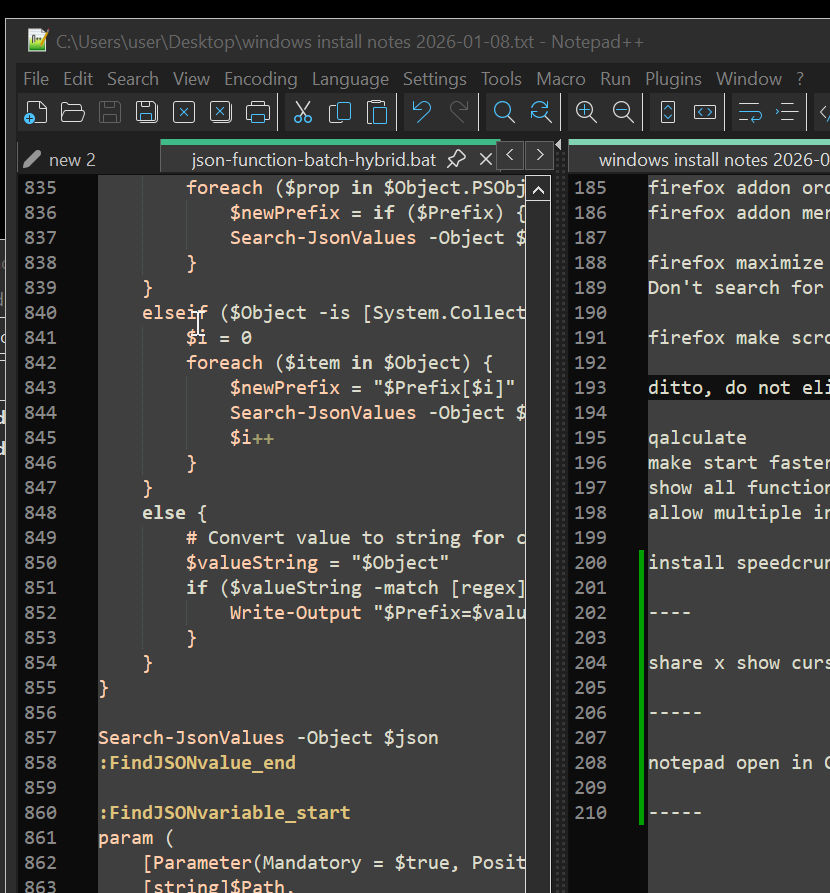
That bar in the middle
And I tried middle-click-drag, and it does nothing, there is no action associated with that button
I was wondering if I could make a plugin that
When I middle-click-drag left and right, it would move the separator left and right ?Or maybe a plugin that does this already exists ?
ok I’ll waitThanks !
-
@shodanx2 said in Is it possible to scroll up/down with middle-click ? And/or move other view separator left/right ?:
I wanted to move the “other view” separator with more ease
Left click and drag isn’t easy enough for you?
-
@PeterJones said in Is it possible to scroll up/down with middle-click ? And/or move other view separator left/right ?:
Left click and drag isn’t easy enough
I think maybe what was meant was “middle click anywhere in either window” to initiate the desired behavior?
-
@shodanx2 said :
I was wondering if I could make a plugin that
Yes, you could.
maybe a plugin that does this already exists ?
I for one don’t recall one that does this.
-
@PeterJones
Hello,Yes by that I mean at positionning the cursor on a 15 pixel wide bar and then left-click-dragging it left and right, is more difficult than.
Placing the cursor anywhere on the window and middle-click-dragging left and right.
This is probably because I’m an altsnap user with the hotclick function enabled that I noticed this.
https://github.com/RamonUnch/AltSnap
In my operating system, I press my hotclick button and I can move window around, no matter when I click them, and I right-click-resize them also by click them almost anywhere (well, resizing is by quadrant)
And so, I find I often need to swipe the other view separator left and right, relatively often and I find that comparatively finicky compared to moving around anything else on my desktop.
I also use “scroll anywhere” in my browser
https://addons.mozilla.org/en-CA/firefox/addon/scroll_anywhere/
Which allows me to middle click drag anywhere on a page and very quickly scroll it up and down. One windowheight of dragging equals 100% document scroll height, so the most you have to scroll is one page height to get anywhere in the document, this is a kind of “rough scrolling” and I finish fine scrolling with my mouse that has a semi-automatic “smooth scroll” function (electromagnetic clutch that opens when you scroll it fast)
So I thought that these could be easily done in notepad++. I figured I would ask before trying to make it myself.
Since the middle-click-drag is not currently bound to any action, I think a script that listens for middle-click-dragging. Then for every pixel of left-right movement, move the other view separator by an equal amount of pixel in the same (or opposite ? maybe some people would prefer opposite) direction. And maybe also for up/down movement, scroll the document up and down by a percentage of the document height by the amount of cursor movement divided with the windowheight of notepad++, in the view that was initially click at the start of middle-click dragging
I tried doing this with pythonscript however it appears that pythonscript does not have mouse movement event hooks and it would need an external application (like altsnap and x mouse button control) to monitor the mousemovements ? but maybe a “real” plugin could do it ?
Here is a tentative non-working pseudo code of what that might look like
from pynput import mouse from time import sleep from Npp import notepad initial_x = None initial_splitter = None def on_click(x, y, button, pressed): global initial_x, initial_splitter if button == mouse.Button.middle: if pressed: initial_x = x initial_splitter = notepad.getSplitterPos()[0] else: initial_x = None def on_move(x, y): global initial_x, initial_splitter if initial_x is not None: delta = x - initial_x notepad.setSplitterPos(initial_splitter + delta) listener = mouse.Listener(on_click=on_click, on_move=on_move) listener.start() # Keep script running while True: sleep(1) -
@shodanx2 said :
I tried doing this with pythonscript however
You can do it in a PythonScript, but you have to obtain the window handle for the control of interest and then set up a hook function to be able to monitor its messages. When you get the message(s) of interest, then run the logic(s) that you’d like to have.
-
Placing the cursor anywhere on the window and middle-click-dragging left and right
Interesting. Apparently I am not creative enough to think of clicking on anything but the window/subwindow/panel frame to try to resize a window/subwindow/panel. Since there’s apparently utilities to enable that in other things, I guess you’re not the only one, but it’s just not something I’d ever thought of. (And sorry, in case it wasn’t obvious, unlike @Alan-Kilborn , I didn’t originally understand that you weren’t just trying a different button on the center bar between.)
Which allows me to middle click drag anywhere on a page and very quickly scroll it up and down.
That sounds very much like browser-style autoscroll features (though in those, they just click-and-release on the middle button, and that switches to autoscroll mode). And autoscroll as a feature has been rejected time after time after time(*) after time after time after time(*) (where the two *-d times were official word from the developer saying that autoscroll won’t be implemented). So while people obviously like it, the developer has made it clear it won’t be native to Notepad++.
So a script (as @Alan-Kilborn has given you hints on) or writing a plugin are the only options for your autoscroll-like behavior.
Regarding the script – if you search the forum for PythonScript and the mouse-based messages, I am guessing you’ll find an ancient script by one of the regulars here who gives an example of intercepting the mouse actions to add features to a script.
-
Hello,
Here is a demonstration of what altsnap does
You can press the ALT key, or the “hot click” which on my mouse is mouse button #5.
And this allows moving and resizing a window from anywhere.
It is very ergonomic as you don’t have to position the cursor on the thin window edges.
I think this is quite rare and cutting edge practice, most people I think just maximize their window and use one application at a time.
But I have a very large desktop of 4x 40 inch 4K monitors and I needed more efficient way to move the windows around.
As for the scrolling, there are two “middle-click” based scrolling methods I know about. There’s the autoscroll round thing which I don’t really like, it’s like using a thumbstick. It’s good if you want to let it scoll at a constant speed like the text scroll at the beginning of star wars but it is otherwise clumsy and slow to use, not “dextrous”.
I prefer the “scroll anywhere” method which is similar to like you would scroll a touch tablet interface.
I demonstrate both of these modes here
https://youtube.com/shorts/yHuWI4f1rOg
So, what I am asking is like scroll anywhere but in a left-right direction to move the center divider around.


Hello! It looks like you're interested in this conversation, but you don't have an account yet.
Getting fed up of having to scroll through the same posts each visit? When you register for an account, you'll always come back to exactly where you were before, and choose to be notified of new replies (either via email, or push notification). You'll also be able to save bookmarks and upvote posts to show your appreciation to other community members.
With your input, this post could be even better 💗
Register Login