The problem with notepad.runMenuCommand
-
I created an issue: https://github.com/notepad-plus-plus/notepad-plus-plus/issues/17164
but it was closed. Then I added more details—I made a screen recording of the problem.
There is a problem with any language other than EN.And I found a discussion thread on the same issue:
https://sourceforge.net/p/npppythonscript/discussion/1188886/thread/bc080292/And I realized that it was because of nativeLang.xml
The essence of the problem is that the command:
notepad.runMenuCommand(menuName, menuOption) for menuName does not use “menuId”,
and “name” from the xml string: <Item menuId=“language” name=“&Language”/>
Which varies depending on the language npp! And it turns out that the command is not universal!Usually, universal commands are used for this, and I think that “menuId” or “Id” should be used here!
Then no one will have any problems writing code.I decided to write on the forum because I found a solution to get around this, given the situation, and before calling the command, I substitute the necessary current translation as follows:
langID_dict = {'abkhazian.xml': 'Асинтаксисқәа', 'afrikaans.xml': 'Taal', 'albanian.xml': 'Gjuha', 'arabic.xml': 'لغة', 'aragonese.xml': 'Luengache', 'aranese.xml': 'Lenguatge', 'azerbaijani.xml': 'Dil', 'basque.xml': 'Hizkuntza', 'belarusian.xml': 'Сінтаксіс', 'bengali.xml': 'ভাষা', 'bosnian.xml': 'Jezik', 'brazilian_portuguese.xml': 'Linguagem', 'breton.xml': 'Yezh', 'bulgarian.xml': 'Синтаксис', 'catalan.xml': 'Llenguatge', 'chineseSimplified.xml': '语言(L)', 'corsican.xml': 'Linguaghju', 'croatian.xml': 'Sintakse', 'czech.xml': 'Syntaxe', 'danish.xml': 'Sprog', 'dutch.xml': 'Syntaxis', 'english.xml': 'Language', 'english_customizable.xml': 'Language', 'esperanto.xml': 'Lingvaĵo', 'estonian.xml': 'Keel', 'extremaduran.xml': 'Luenga', 'farsi.xml': 'زبان', 'finnish.xml': 'Koodikieli', 'french.xml': 'Langage', 'friulian.xml': 'Lengaç', 'galician.xml': 'Linguaxe', 'georgian.xml': 'სინტაქსი', 'german.xml': 'Sprache', 'greek.xml': 'Γλώσσα', 'gujarati.xml': 'ભાષા', 'hebrew.xml': 'שפה', 'hindi.xml': 'भाषा', 'hongKongCantonese.xml': '語言(L)', 'hungarian.xml': 'Nyelv', 'indonesian.xml': 'Bahasa', 'irish.xml': 'Teanga', 'italian.xml': 'Linguaggio', 'japanese.xml': '言語(L)', 'kabyle.xml': 'Tameslayt', 'kannada.xml': 'ಲ್ಯಾಂಗ್ವೇಜ್', 'kazakh.xml': 'Бағдарламалық тіл', 'korean.xml': '언어(L)', 'kurdish.xml': 'زمانەكان', 'kyrgyz.xml': 'Синтаксис', 'latvian.xml': 'Valoda', 'ligurian.xml': 'Lengoaggio', 'lithuanian.xml': 'Kalba', 'luxembourgish.xml': 'Sprooch', 'macedonian.xml': 'Јазик', 'malay.xml': 'Bahasa', 'marathi.xml': 'भाषा', 'mongolian.xml': 'Хэл', 'nepali.xml': 'भाषा', 'norwegian.xml': 'Språk', 'nynorsk.xml': 'Språk', 'occitan.xml': 'Lengatge', 'piglatin.xml': 'Anguagelay', 'polish.xml': 'Składnia', 'portuguese.xml': 'Linguagem', 'punjabi.xml': 'ਭਾਸ਼ਾ', 'romanian.xml': 'Limbaj', 'russian.xml': 'Синтаксисы', 'samogitian.xml': 'Shnekta', 'sardinian.xml': 'Limbàgiu', 'serbian.xml': 'Jezik', 'serbianCyrillic.xml': 'Језик', 'sinhala.xml': 'භාෂාව', 'slovak.xml': 'Jazyk', 'slovenian.xml': 'Sintaksa jezika', 'spanish.xml': 'Lenguaje', 'spanish_ar.xml': 'Lenguaje', 'swedish.xml': 'Språk', 'tagalog.xml': 'Wika', 'taiwaneseMandarin.xml': '語言(L)', 'tajikCyrillic.xml': 'Забон', 'tamil.xml': 'மொழி (L)', 'tatar.xml': 'Синтакслар', 'telugu.xml': 'ల్యాంగ్వేజ్ (L)', 'thai.xml': 'ภาษา (L)', 'turkish.xml': 'Diller', 'ukrainian.xml': 'Мова', 'urdu.xml': 'پروگرامنگ زبان', 'uyghur.xml': 'پروگرامما تىلى', 'uzbek.xml': 'Sintaksislar', 'uzbekCyrillic.xml': 'Синтаксис', 'venetian.xml': 'Ƚenguagio', 'vietnamese.xml': 'Ngôn ngữ', 'welsh.xml': 'Iaith (L)', 'zulu.xml': 'ulimi'} _file_lang = notepad.getNativeLangFileName() notepad.runMenuCommand(langID_dict[_file_lang], '222') -
To begin with: I like your workaround script. It’s a great thing to share, which is why I upvoted it. (I am saying this, so that you don’t take my further comments as a criticism of this script)
@westyles said in The problem with notepad.runMenuCommand:
I created an issue: https://github.com/notepad-plus-plus/notepad-plus-plus/issues/17164
but it was closed.Because it was missing essential details for any Notepad++ bug report. Namely, it did not include the steps to reproduce, nor did it include the ?-menu’s Debug Info that every issue requests that you include. Based on this lack of information, the developer could not replicate your problem, and thus closed the issue. (But more on this in a bit)
Then I added more details—I made a screen recording of the problem.
But a screen recording is not necessarily sufficient to show the steps to reproduce, clicking on links to random upload websites is foolish (so i wouldn’t expect anyone to click to your random “video” – please note, such websites would allow you to upload malicious content and claim it’s a video), and you didn’t include the requested details.
And I found a discussion thread on the same issue:
Notice where that discussion was: in the NppPythonScript plugin repo for the old 2016-era version of the PythonScript plugin. That plugin has a new home and a new maintainer/developer. If you want a feature request or bug report for the PythonScript plugin, you would need to go to the https://github.com/bruderstein/pythonscript repo. But this is neither a bug, nor does a feature need to be added
And this is not a bug. The
notepad.runMenuCommand()interface is well established as being based on the name of the menu item. It literally searches the underlying win32 menu objects looking for matching text. If you want a new command that runs it based on menuCommand-ID, you could request that (if it didn’t already exist). But note, that’s precisely whatnotepad.menuCommand()does – it “Runs a Notepad++ menu command. Use the MENUCOMMAND enum, or integers directly from the nativeLang.xml file.” So if you want to use Command ID, then usenotepad.menuCommand(). If you want to use the name of the command, usenotepad.runMenuCommand(). -
@PeterJones said in The problem with notepad.runMenuCommand:
And this is not a bug
Thank you for the clarification
I replied to you here:
https://github.com/notepad-plus-plus/notepad-plus-plus/issues/17164#issuecomment-3762757796Added:
I’ve already written to the PythonScript plugin author, and one feature has already been added at my request, under Settings:
“DISABLE” another script is running popup warning -
@westyles said in The problem with notepad.runMenuCommand:
@PeterJones said in The problem with notepad.runMenuCommand:
And this is not a bug
Thank you for the clarification
I replied to you hereSince it is not a Notepad++ application issue, but your usage of a plugin, with you thinking that the plugin needs a new feature, continuing the conversation in the official application Issues is the wrong place, as I tried to make clear. So I will quote your message from there, and reply here, where it belongs.
When I figured it out for myself, I realized that in my case, neither of the two commands you mentioned would work. There are no suitable commands.
I disagree.
Because I need to call up the menu items created with user userDefineLangs (from files in the userDefineLangs folder), they are created each time npp is started.
Yep. But they still have command-ID values – you just have to figure out what they are. And once you do,
notepad.menuCommandwill work for you, because as I quoted before, it is documented to work either with the plugin’s ENUM values for builtin, or using the raw command-ID integer.There are no permanent built-in commands for this;
I disagree.
only notepad.runMenuCommand is suitable, and it depends on the npp language.
It’s not the only suitable choice.
As you wrote, in this case, another command is needed that will call menuId or ID
That’s exactly what
notepad.menuCommanddoes.So, in my current Notepad++ instance, the Language > Markdown (preinstalled) is getting the dynamic commandID=
46181. I can determine this easily using the UI Spy plugin:
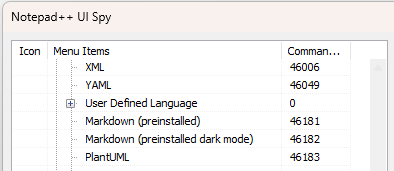
So then I call up the PythonScript console, and send the command
notepad.menuCommand(46181), and it changes my language from Normal text file (Language > None (Normal Text)) to the UDL Markdown (preinstalled), thus showing that, indeed, you can use already-existingnotepad.menuCommand()using an integer command ID to call a UDL’s command ID (or anything else by commandID).So if you know the commandID, whether it’s a built-in command or a dynamic command (like a UDL or macro), you can use
notepad.menuCommand(). If you don’t already know the commandID, then you cannot use it (but then again, you couldn’t use this “new” function that you claim you want, because this new requested function would also require that you already know the commandID, based on the feature you described).So I don’t see why you think it won’t work for you. Because I can use it to call any of the UDL or Macros that I want to call.
-
@PeterJones said in The problem with notepad.runMenuCommand:
So I don’t see why you think it won’t work for you. Because I can use it to call any of the UDL or Macros that I want to call.
To do this, you need to know about the UI Spy plugin.
The description for the notepad.menuCommand() command does not mention anything about the UI Spy plugin, or that it can be used to obtain ID numbers for this command. I was unaware of this.
ID numbers may change in different versions of the program, or their syntax may be added or removed and their order may change, i.e., specifying the number is not universal, but as an option, it is not bad at all. -
I was very confused by your replies, until I reread the exact phrasing of your original
I think that “menuId” or “Id” should be used here. (Some of my confusion may have been while hopping back and forth between what you said in the Issue and what you said here, and getting my wires crossed as a result.)I had interpreted the
"Id"in that sentence to be equivalent tocommandIDin my mind… but I now believe I had misinterpreted that. And I can see that my insistence that using the commandID integer is really easy would be confusing and frustrating for you.I don’t know what you meant by that
"Id"as distinct frommenuId, but I will reply on themenuIdportion of that suggestion: Notepad++ does not give plugins direct access to the internal translation table it uses for localization. So the PythonScript plugin has no way of knowing, by asking Notepad++, what the underlyingmenuIdstring is for a given menu name. So there is no way that PythonScript could give you a function that uses themenuIdinternal strings instead of the strings displayed in the active menu localization, sorry.Most scripts for PythonScript are for a single user, or distributed across a single organization in a corporate setting, so my guess is that most people have just written their scripts with a single localization in mind, and not bothered trying to make it more “generic” than that. If you are writing scripts for multi-localization needs, then I can see why this would be frustrating.
That said, hardcoding the translation for the Language menu name is fragile, at best – it will only work until someone decides that there’s a better spelling word for that menu in a given language, or until another localization is added to Notepad++'s distribution. What I might suggest, instead:
- create a string like
themepath = notepad.getNppDir() + "\\localization\\" + notepad.getNativeLangFileName(), - then use
import xml.etree.ElementTreeto parse that file, to be able to extract the actual<Item menuId="language" name="&Language"/>
- create a string like
-
@PeterJones said in The problem with notepad.runMenuCommand:
What I might suggest, instead:
I meant <Item menuId=“…” and <Item id=“…” in nativeLang.xml:
<NotepadPlus> <Native-Langue name="English" filename="english.xml" version="8.7.9"> <Menu> <Main> <!-- Main Menu Entries --> <Entries> <Item menuId="file" name="&File"/> <Item menuId="edit" name="&Edit"/> <Item menuId="search" name="&Search"/> <Item menuId="view" name="&View"/> <Item menuId="encoding" name="E&ncoding"/> <Item menuId="language" name="&Language"/> <Item menuId="settings" name="Se&ttings"/> <Item menuId="tools" name="To&ols"/> <Item menuId="macro" name="&Macro"/> <Item menuId="run" name="&Run"/> <Item menuId="Plugins" name="&Plugins"/> <Item menuId="Window" name="&Window"/> </Entries> <!-- Sub Menu Entries --> <SubEntries> <Item subMenuId="file-openFolder" name="Open Containing &Folder"/> ...... </SubEntries> <!-- all menu item --> <Commands> <Item id="41001" name="&New"/> <Item id="41002" name="&Open..."/> <Item id="41019" name="Explorer"/>Yes, I always write universal code, and in this case, it is necessary for different languages.
It is important that the code does not depend on anything, but it is also critical that it is not “heavy.”
Therefore, ideally, in this case, a command is needed to specify menuId=“language.”In my case, the code may be called frequently, and I didn’t want each call to parse the XML file—that’s not efficient.
And I didn’t want to write complex code to remember which files had already been parsed so that they wouldn’t be parsed again if it had already been done for that file.
I wanted a simple and “light” solution. In my case, it is enough to rely on ready-made translations from the current language files for menuId=“language”; the probability of changing the translation for this menuId is minimal.
And adding a new language is not critical.In this case, if the user deletes syntaxes or adds new ones, the code will continue to work—this is the most important thing in my case.
Thank you for the parsing suggestion.In general, I have a rule for code: universal, effective, easy, fast.
-
@westyles said in The problem with notepad.runMenuCommand:
Yes, I always write universal code, and in this case, it is necessary for different languages.
…
I wanted a simple and “light” solution.Simple and light is often the opposite of universal. For example, if someone used english_customizable.xml to rename that menu to the more-sensible “Syntax Highlighting”. your fixed table would not work, whereas actually parsing the active
nativeLang.xmlXML would work. It’s obviously your choice to use whatever you want – I’m just pointing out that by not caring about new languages or english_customizable, you are not writing things as universally as you claim. If you solution is “universal enough” for you, fine; but it has its own set of limitations – just ones you are willing to live with. -
@westyles said:
I have a rule for code: universal, effective, easy, fast
Good luck achieving all of those all of the time.
Or do you have a “pick any 2” or “pick any 3” type rule? ;-) -
@PeterJones said in The problem with notepad.runMenuCommand:
Simple and light is often the opposite of universal.
This is often the case, but not always.
@PeterJones said in The problem with notepad.runMenuCommand:
If you solution is “universal enough” for you, fine;
Of course, when there is no ideal option, you have to choose the one that is most suitable for the situation.
@Alan-Kilborn said in The problem with notepad.runMenuCommand:
Good luck achieving all of those all of the time.
Or do you have a “pick any 2” or “pick any 3” type rule? ;-)Thanks. It happens to everyone at some point ;)
But it must be universal and fast, even if it means making the code complex.


Hello! It looks like you're interested in this conversation, but you don't have an account yet.
Getting fed up of having to scroll through the same posts each visit? When you register for an account, you'll always come back to exactly where you were before, and choose to be notified of new replies (either via email, or push notification). You'll also be able to save bookmarks and upvote posts to show your appreciation to other community members.
With your input, this post could be even better 💗
Register Login