Notepad++ v8.9.2 Release
-
🧡 Thank you very much for all the hard work you put into Notepad++
-
@donho ,
Regression with UDL. See #17520 for details.
Steps to Reproduce
- Launch fresh portable v8.9.2
- In Language > User Defined Language > Define your language…, set KEYWORDS1 =
ABILITYCATEGORY - Paste the following:
ABILITYCATEGORY:Haunted VISIBLE:QUALIFY ABILITYCATEGORY:Background / Quirk VISIBLE:INVISIBLE ABILITYCATEGORY:Arcane VISIBLE:QUALIFY - Set Language > User-Defined
- Crash
Issue report has NppDump.dmp file.
Same steps work just fine in fresh portable 8.9.1, so it’s a regression in this version.
(This occurred while I was trying to create my reply here – it would crash when I was trying to create the new UDL in v8.9.2, but if I went to v8.9.1 portable, it worked just fine.)
-
The “Plugins Admin” menu item is missing from the Plugins menu in version 8.9.2; it is still present in version 8.9.1.
-
It’s there for me. Did you turn off auto-updater when you installed? Because Plugins Admin requires the auto-updater/gup to work
-
Hello, @peterjones,
In this post, you said :
Did you turn off auto-updater when you installed? Because Plugins Admin requires the auto-updater/gup to work.
I was rather intrigued by your response !
So, I’ve just done a test with my fresh portable
8.9.2release and, although the auto-updater is disabled, I still can open thePlugin Admindialog !?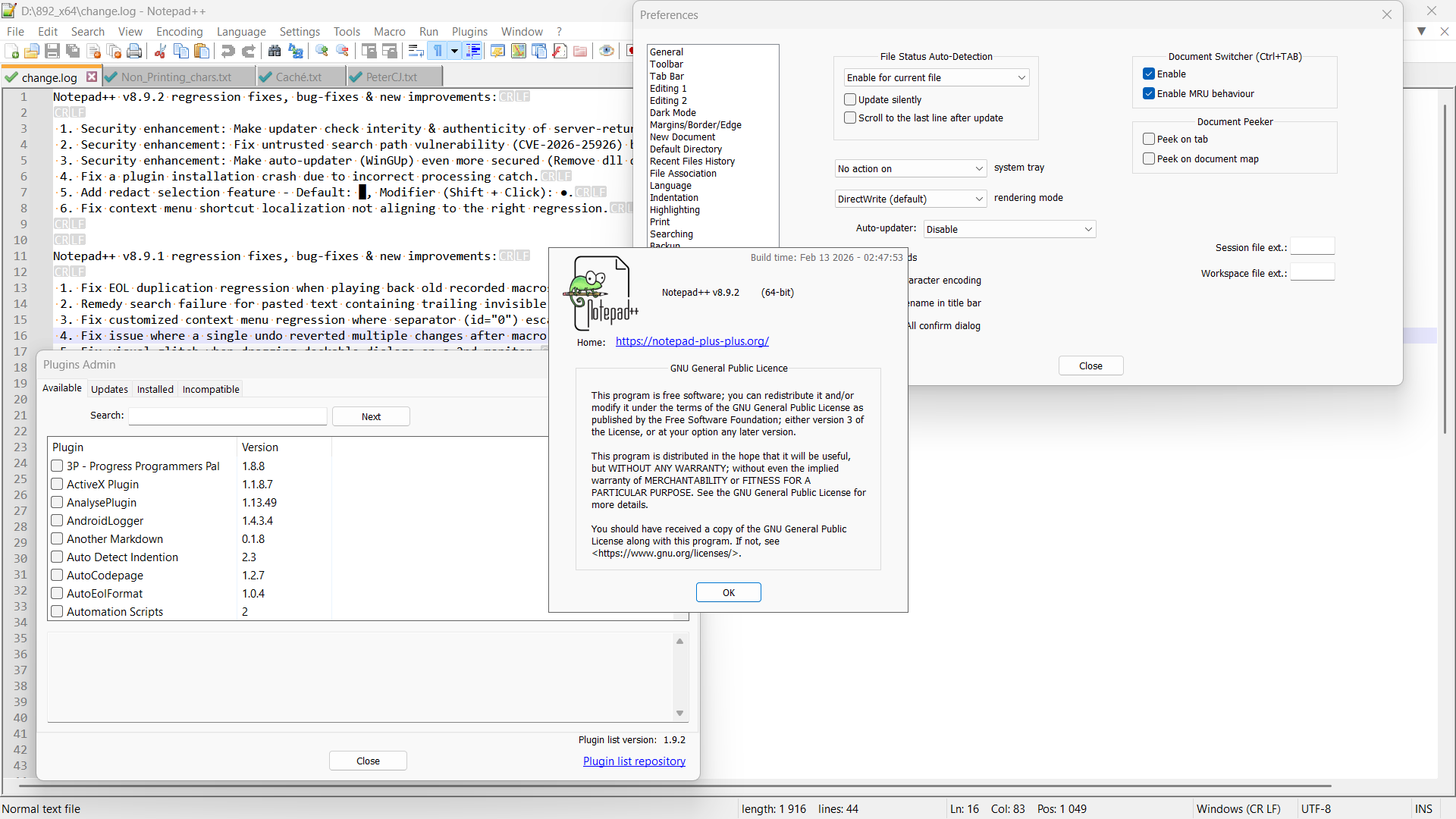
Notepad++ v8.9.2   (64-bit)
Build time: Feb 13 2026 - 02:47:53
Scintilla/Lexilla included: 5.5.8/5.4.6
Boost Regex included: 1_90
pugixml included: 1.15
nlohmann JSON included: 3.12.0
Path: D:\892_x64\notepad++.exe
Command Line:
Admin mode: OFF
Local Conf mode: ON
Cloud Config: OFF
Periodic Backup: OFF
Placeholders: OFF
Scintilla Rendering Mode: SC_TECHNOLOGY_DIRECTWRITE (1)
Multi-instance Mode: monoInst
asNotepad: OFF
File Status Auto-Detection: cdEnabledNew (for current file/tab only)
Dark Mode: OFF
Display Info:
    primary monitor: 1920x1080, scaling 125%
    visible monitors count: 1
    installed Display Class adapters:
        0001: Description - Intel(R) Iris(R) Xe Graphics
        0001: DriverVersion - 32.0.101.7077
OS Name: Windows 11 Pro (64-bit)
OS Version: 25H2
OS Build: 26200.7462
Current ANSI codepage: 1252
Plugins:
    mimeTools (3.1)
    NppConverter (4.7)
    NppExport (0.4)
Best Regards,
guy038
-
@guy038 said in Notepad++ v8.9.2 Release:
although the auto-updater is disabled,
I didn’t say “disable auto-updater in the Notepad++ preferences”. I said “turn off auto-updater when you installed”. There is a difference. From @xomx’s post in the 8.9 RC announcement discussion:
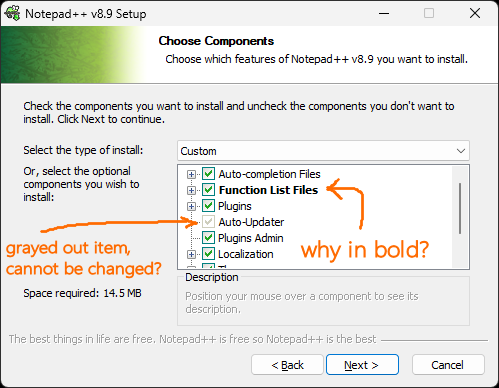
vs
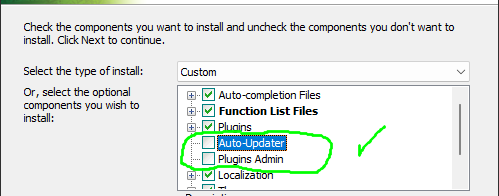
If you uncheck the Plugins Admin and Auto-Updater checkboxes, the gup.exe will not be installed, and Plugins Admin will not work. (I know there was a recent conversation and/or issue and/or PR about also having that remove the old gup.exe if it’s unchecked in the installer, but I cannot find it, and cannot remember whether the removal has been implemented yet or not.)
Many people are taking the (misguided, IMO) approach that, because of the recent kerfuffle about the updater website hack, they should disable auto-updater even when installing one of the recent, secure Notepad++. So I am assuming that @thoralf-gerbeth was one of those who didn’t understand that the auto-updater that ships with v8.9.2 is highly secure and is safe to include when installing Notepad++ – if my assumption is correct, then turning off those options in the installer would explain why Plugins Admin isn’t working. If that wasn’t uncheckmarked (or they don’t remember), I was going to follow up with asking for directory listings of the updater subdirectory, and checking windows file properties for the Mark of the Web and what have you, but I thought the low-hanging fruit of “you told the Notepad++ to not install the updater and plugins admin” would be a good first question to ask.
-
@PeterJones said in Notepad++ v8.9.2 Release:
If you uncheck the Plugins Admin and Auto-Updater checkboxes, the gup.exe will not be installed, and Plugins Admin will not work. (I know there was a recent conversation and/or issue and/or PR about also having that remove the old gup.exe if it’s unchecked in the installer, but I cannot find it, and cannot remember whether the removal has been implemented yet or not.)
It is fixed and implemented in Notepad++ v8.9, see fix for no 3 in the list Commit e89b0be.
-
Is anyone else seeing this? Using Notepad++ 8.9.2, x86 or x64, installed version, when I install or remove any plugin through Plugins Admin, Notepad++ is relaunched indicating in the title bar that it is in Adminstrator mode.
This doesn’t happen in 8.9.1.
It may matter that I am on Windows 10 with UAC disabled (because it annoys the hell out of me, yes I know that’s not recommended).
-
@Coises said in Notepad++ v8.9.2 Release:
anyone else seeing this
https://github.com/notepad-plus-plus/notepad-plus-plus/issues/17540
-
@PeterJones said in Notepad++ v8.9.2 Release:
https://github.com/notepad-plus-plus/notepad-plus-plus/issues/17540
Thanks. I should know better… I forgot to search closed issues, not just open ones.
-
D donho unpinned this topic on





Hello! It looks like you're interested in this conversation, but you don't have an account yet.
Getting fed up of having to scroll through the same posts each visit? When you register for an account, you'll always come back to exactly where you were before, and choose to be notified of new replies (either via email, or push notification). You'll also be able to save bookmarks and upvote posts to show your appreciation to other community members.
With your input, this post could be even better 💗
Register Login