Unexpected match when searching files for an end-quote character (non-ASCII)
-
Fellow Notepad++ Users,
Could you please help me with the following search~~-and-replace~~ problem I am having?
The text is from a Perl script I wrote long ago. Notepad++ identifies the file as “ANSI” and it appears to be encoded as Windows-1254, although Notepad++ doesn’t identify it as such.
Here is the data I currently have (“before” data):
binmode STDOUT, ':utf8';
print "Çirçös\n";
Here is how I would like that data to look (“after” data):
This match was found by a file search. I didn't expect that the ″ character would be found in this file.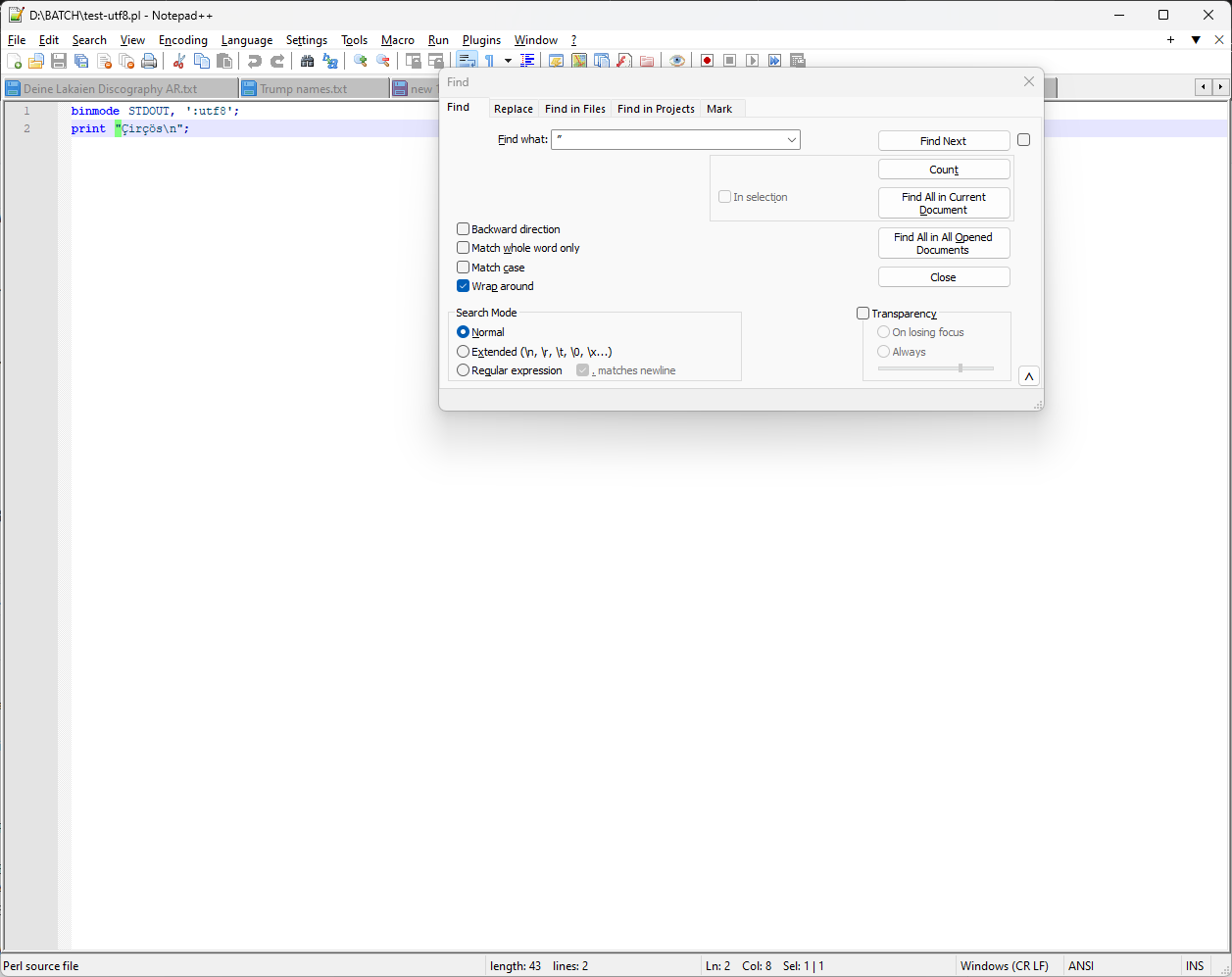
To accomplish this, I have tried using the following Find/Replace expressions and settings
- Find What =
″ - Replace With =
- Search Mode = NORMAL
- Dot Matches Newline = CHECKED
Unfortunately, this did not produce the output I desired, and I’m not sure why. Could you please help me understand what went wrong and help me find the solution?
- Find What =
-
@Freon-Sandoz said in Unexpected match when searching files for an end-quote character (non-ASCII):
The text is from a Perl script I wrote long ago. Notepad++ identifies the file as “ANSI” and it appears to be encoded as Windows-1254, although Notepad++ doesn’t identify it as such.
When Notepad++ opens a file as ANSI, it is using the default code page for your system. Is the default code page for your system Windows-1254? (One way to tell would be to copy the Debug Info… from the ? menu. Among other useful diagnostic information, it lists the Current ANSI codepage.)
If your code page is not 1254, then try opening the file in Notepad++ and immediately — before you do anything else! — select Encoding | Character sets | Turkish | Windows-1254. That will cause Notepad++ to reload the file and interpret it using the specified code page.
I’m not convinced that is the problem, though. In the screen shot you included, the quotes look like straight quotes, not typographic quotes. You’ve highlighted the quote mark, but that appears to be just your selection, not the result of a search; I think the search you show in that screen shot will not (and should not) match.
So I think it’s more likely that the problem lies in whatever led you to think that there is a non-ASCII end quote in the file. You say you didn’t expect a curly quote and it looks like you don’t have one. What sort of file search did you do that led you to think there was one?
-
@Coises: I didn’t think that there is a non-ASCII end quote in the file. Notepad++ finds both straight quotes with a search for a typographic end quote. (The fact that I was doing a file search turned out to be irrelevant; the behavior can be replicated with a simple search of the file.)
The current ANSI codepage is 1252.
If I reopen the file then select Windows-1254, the characters appear unchanged, but then the search does not find the typographic end quote, which was the behavior that I expected.
Here are the file contents:
binmode STDOUT, ':utf8';
print "Çirçös\n";

62 69 6E 6D 6F 64 65 20 53 54 44 4F 55 54 2C 20
27 3A 75 74 66 38 27 3B 0D 0A 70 72 69 6E 74 20
22 C7 69 72 E7 F6 73 5C 6E 22 3B
I can reproduce the file contents and the unexpected behavior by pasting the characters into a new file (which Notepad++ identifies as UTF-8), saving it, selecting “ANSI” and saving it again.
UPDATE: I haven’t been able to successfully create a Windows-1252 file containing a typographic (“smart”) end quote with Notepad++, but I can do so with a hex editor. Notably, this character does not have quite the same visual appearance in Notepad++ as the UTF-8 “smart” end quote.
-
@Freon-Sandoz said in Unexpected match when searching files for an end-quote character (non-ASCII):
I can reproduce the file contents and the unexpected behavior
I was able to do that, too… and now I see what is happening. The character you are calling an end quote is not the Right Double Quotation Mark, U+201D but the Double Prime, U+2033.
Windows-1252 (and Windows-1254) contains the right double quotation mark at 0x94. However, it does not contain the double prime. The entry boxes on the file dialog are always in Unicode. (That’s how it works pretty much everywhere in modern Windows.) But if the file is in ANSI, the file search is done in ANSI, so Notepad++ asks Windows to translate the string you gave it into ANSI. Seeing that there is no double prime character in your current code page, Windows “helpfully” translates it to something that looks a lot like it… the ASCII double quote.
Further confusing the issue is that Notepad++ never loads a file in any code page other than your system code page (which you said is 1252) or Unicode. So when you open the file in Windows-1254, Notepad++ is actually converting it from 1254 to UTF-8 and editing that way. That’s why the search behaved as expected in 1254: it wasn’t really 1254 in, it was in UTF-8.
Bottom line… this behavior actually is “expected”… but not by any normal human being. About the only thing you can do about it is to work in Unicode wherever possible when you are using non-ASCII characters.
It might be possible for Notepad++ to change its search so that it warned you when you tried to search an ANSI document for characters that aren’t possible in that document. I haven’t looked into it in depth; I would guess there must be a call to WideCharToMultiByte somewhere, and it could be passed the
WC_NO_BEST_FIT_CHARSflag and thelpUsedDefaultCharoutput pointer to detect such shenanigans so the program could tell the user about it instead of potentially claiming to find something that isn’t there.

Hello! It looks like you're interested in this conversation, but you don't have an account yet.
Getting fed up of having to scroll through the same posts each visit? When you register for an account, you'll always come back to exactly where you were before, and choose to be notified of new replies (either via email, or push notification). You'll also be able to save bookmarks and upvote posts to show your appreciation to other community members.
With your input, this post could be even better 💗
Register Login