How to Remove "Edit with Notepad++" from the Right-Click Context Menu
-
I’ve got a bit of a minor annoyance I’m hoping to fix. When I right-click on certain files, the context menu always shows an “Edit with Notepad++” option. I’d really like to remove this, but I’m having trouble finding the setting for it within Notepad++ itself.
Any pointers on how to get rid of this specific entry from the right-click menu would be greatly appreciated! -
When you install Notepad++, it installs the right-click context-menu entry using a “Shell Extension”. The User Manual has an entire page on the Shell Extension, including a secion on how to unregister the Shell Extension so that the “Edit with Notepad++” entry goes away
-
@PeterJones Doesn’t work for me unfortunately. “regsvr32 /U NppShell.dll” does nothing and “regsvr32 /U /i NppShell.dll” produces an error prompt with “DLLnstall entry point not found”. I wish programs would just stop cluttering your context menu with useless entries without asking you.
-
“Does nothing” may have just silently unregistered it. After doing both of those, try deleting/renaming the DLL, then rebooting, and see if it’s still there. (Some portions of install/uninstall changes require reboots, at least on some machines; it may be that on your machine, you need to reboot before it leaves your context menu.)
Also, check the registry (use regedit), and see if there’s anything in
HKEY_CLASSES_ROOT\CLSIDthat containsNppShell.dll(when mine is registered, I find it under the right {…} in the InProcServer32 subkey, and then elsewhere under theHKEY_CLASSES_ROOT\PackagedCom\Package\NotepadPlusPlus_1.0.0.0_neutral__...\class\{...}. If you delete it from both of those, I believe it will be effectively unIf it doesn’t let you delete the DLL even using UAC permission (elevated/administrator) because it’s still “in use”, then boot into recovery mode (which I believe will not load that registered DLL), and delete the file
I wish programs would just stop cluttering your context menu with useless entries
A: not useless to everybody. And in fact, the vast majority of conversations in the Community Forum about the NppShell are when people aren’t getting the Edit with Notepad++ and desparately want it.
B: Portable versions (like the portable zip that Notepad++ distributes) are your friend, if you want to not use things like shell context menus: avoiding operating system entanglements is one of the primary reasons portable versions exist.
-
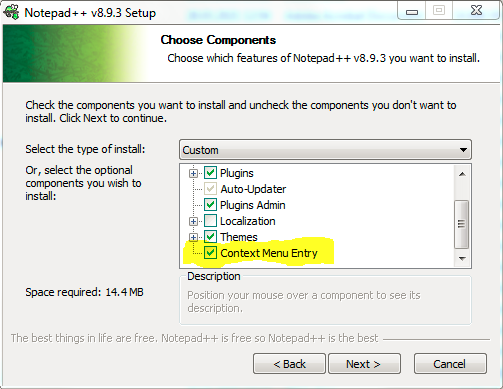
And please don’t forget the easiest solution, just uncheck the option to install the Context Menu Entry during Notepad++ installation.


Hello! It looks like you're interested in this conversation, but you don't have an account yet.
Getting fed up of having to scroll through the same posts each visit? When you register for an account, you'll always come back to exactly where you were before, and choose to be notified of new replies (either via email, or push notification). You'll also be able to save bookmarks and upvote posts to show your appreciation to other community members.
With your input, this post could be even better 💗
Register Login