Using Notepad++ to Organize Game Guides and Documentation
-
I’ve been using Notepad++ to organize documentation for a Nintendo 3DS gaming project and I’m curious how other users manage large collections of text files.
My workflow includes:
Writing gameplay guides and walkthroughs.
Organizing notes with Markdown and plain text.
Managing hundreds of article drafts.
Using Find in Files to quickly locate game names, characters, and keywords.
Comparing different versions of articles before publishing.I’m interested in learning how other members use Notepad++ for large documentation projects outside of software development.
Do you use any plugins, custom themes, or productivity tips that make organizing large text collections easier?
I’d love to hear about your workflow and recommendations.
-
moderator aside: I approved the above post after removing what was likely just a spam URL. I am doubtful that the OP actually intended it as anything but an excuse to drive traffic to their 3DS site. But the questions asked aren’t completely out of the realm of general interest for a Notepad++ forum, so I decided to sanitize the post and let it stay, in case it drives actual discussion. Changed the Topic Title to be more generic, to match what’s on-topic for this forum.
Those workflow steps all seem reasonable to do in Notepad++.
Comparing different versions of articles before publishing.
I definitely use the Compare++ plugin to compare files: if you’re using Git or SVN for version control, it even has the ability to do the equivalent of git-diff or svn-diff, without having to manually have two copies with different versions of the same file, so you can see how the file has changed since your last commit, which is quite useful.
use Notepad++ for large documentation projects outside of software development.
I mean, there are plenty of people who use Notepad++ for making websites. There are some users here who pester us with a gazillion questions on how to edit raw HTML with regex (even though regex isn’t the best tool, since HTML is too free-form for most regex to work effectively).
And I use Notepad++ for editing the Markdown of the Notepad++ User Manual. But I don’t do much “fancy” outside of normal Notepad++ usage (with the occasional MarkdownViewer++ to preview the rendered version of the Markdown… though since we use hugo, I actually use hugo to render to HTML and view it in my browser instead, because of hugo’s special features that MarkdownViewer++ doens’t render properly)
Do you use any plugins …
Depending on the underlying language/filetype of the documentation:
- HTML ⇒ there are plenty of plugins helpful with HTML – just use Plugins Admin and type in HTML, and it will step through some. Though one of the most useful would be XML Tools, which can help with pretty-printing
- Markdown ⇒ there are multiple plugins for helping with Markdown: there are some “preview” tools which render your markdown into a panel inside the Notepad++ window, for example. Again, typing
Markdownin the search bar in Plugins Admin will give you some ideas - GitSCM ⇒ allows you to integrate Git version control actions inside the Notepad++ interface, so you don’t have to drop to the command line or using a git GUI in Windows Explorer
custom themes
Themes are just the color sets for the builtin languages. Everyone has different preferences as to what colors “look best” to their eyes. I don’t understand how you could think “custom themes” would help; would you care to explain/expound on that?
Did you mean “custom User Defined Languages [UDL]”, which allows custom keyword-based syntax highlighting? Then, depending on what languages/format you are using for the text of the documentation, some might help. Notepad++ already ships with a Markdown UDL, but if you don’t like the colors that ship with N++, you can always edit the UDL to choose different colors. And, since it’s a UDL, if you don’t like the decisions that were used for how to apply keyword-based styling to something that’s more punctuation-based, you can play with alternatives.
If you have an underlying language/format for your file that’s not found int he Languages list, you should consider looking at the UDL Collection repository, which collects user-submitted UDL, and many languages have one or more user-submitted UDL (and some have associated functionList and autoCompletion definitions). The CollectionInterface plugin (available thru Plugins Admin) can make it easier to install such a UDL (especially with the FL or AC additions) rather than manually trying to figure out where to put each of those files.
But all-in-all, your post seems so generic and vague that I’m not convinced that you didn’t just use an AI with a prompt like “pretend I use [INSERT TEXT EDITOR NAME HERE] to edit my documentation, and write a post for me that adds a link to [WEBSITE URL AND NAME HERE] in something that they won’t mark as spam/off-topic”. If that’s what you did, you failed, because we didn’t include your spam link in your post. Please read the rules of this forum before posting more spam. If your future posts – to this topic, or any other topic in this forum – try to re-include links to your site, or other sites you might want to advertize, you will be banned. Other posts in this discussion which include links to sites not related to Notepad++ will also be blocked and their users banned. If this topic just devolves into an attempted honeypot, where the only posts are people trying to violate these restrictions, the topic will be locked.
-
The question is indeed in the realm of what drove me to this forum in the first place, so, thanks for a most sensible moderation here!
I am looking for something that maybe could be a plugin, but I’m not quite sure what to even call the concept I’m looking for. I’ve not succeeded in finding any apps that suit my needs.
What am I trying to do:
Write a large document, or probably three or four documents that are interlinked and crossreferenced, that is, they are one project. It’s sort of a legal document (workers’ union’s tariff contract).
I need to be able to mark up defined terms with some sort of tag and have the app or plugin automatically collect those terms in a chapter of definitions (I fill in the definitions themselves manually, but the automated collection helps me not to forget any term, and lets me skip hopping between files a lot during writing).
I also need to be able to move around paragraphs easily during the writing process; that means, each paragraph (marked up as such, probably with markdown) should be its own entity, and there should be something similar to a filetree in the sidebar, where those paragraphs can be dragged around and arranged in at least three or four levels, without regressing to alphabetical order of headings (that is why simply using a textfile for each paragraph is not what I’m looking for).
It would be wonderful if I could write in one big textfile, and the plugin would rearrange the paragraphs in that textfile, when I drag them in the tree. I might want to have a couple of textfiles for the larger documentparts though, but I would want to drag a pragraph from one document to another.
The order in which I drag them should automatically be reflected in an automatically created table of contents, and, either when rendering the final document or maybe even in realtime, the numbering of paragraph headings should update accordingly; it’s probably enough that the numbering is shown in the arranged filetree, it does not need to be shown in the textfiles themselves, but when at last rendering the whole document (into pdf or what have you), numbering should be visible in the headings.
I’m not sure whether this should be a feature request, or is even small enough for a plugin or if this already is a known concept in the productivity area and I just haven’t found the right apps.
I tried NovelWriter, which is close but not quite there. I imagine there must be other areas than the fine arts that need these kind of features.
-
@annettekusma said:
I tried NovelWriter, which is close but not quite there. I imagine there must be other areas than the fine arts that need these kind of features.This is a markdown variant, AFAIK . Markdown has many variants so may seem like your problem is a variant that suits your needs. ASCIIDoc IIRC is a lexer that is not exposed in Notepad++ so perhaps wanted? This needs some more detail to know if the interest is desired.
I also need to be able to move around paragraphs easily during the writing process
Specialized functions based on the markdown variant. This is not something in common interest. May need something extraordinary.
-
I also need to be able to move around paragraphs easily during the writing process
# header

paragraph before

paragraph with no enter newlines, but just use line wrap.  this allows you to use Ctrl+Shift+Up/DownArrow to move it up or down

paragraph after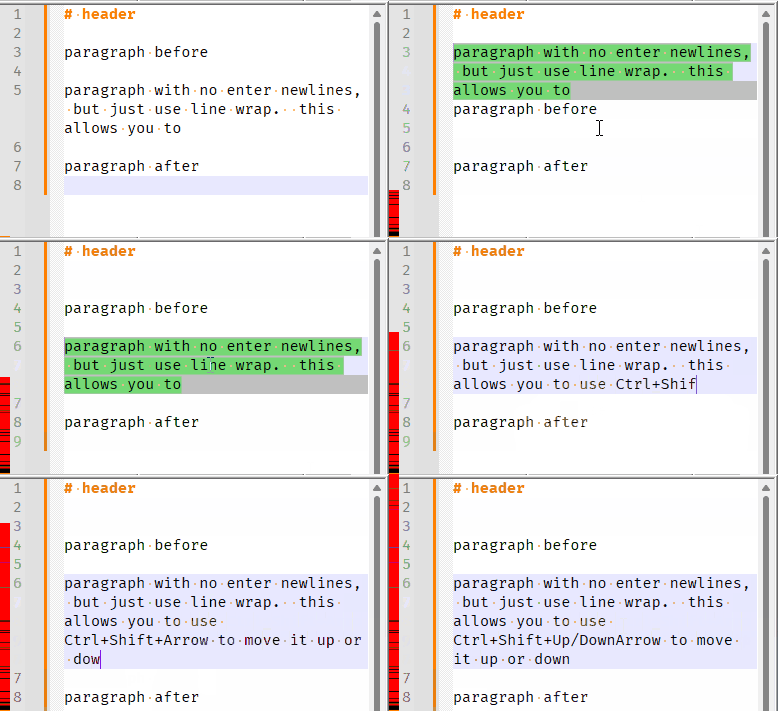
I might want to have a couple of textfiles for the larger documentparts though, but I would want to drag a pragraph from one document to another.
You would have to have both files open in Notepad++ tabs, and drag the text across between views (or use cut from one tab and paste into the other)
automatically created table of contents,
That is a word processor / desktop publishing software feature, not a feature of a text editor.
Notepad++ can show the list of “functions” in the Function List panel, and for Markdown, I have headers defined as functions ⇒ here is the simplistic functionList definition I use for Markdown. If you put it in
%AppData%\Notepad++\functionListasudl_markdown.xml, and then add<association id="udl_markdown.xml" userDefinedLangName="Markdown (preinstalled)"/>in your overrideMap.xml file in the same directory (if you don’t already have one there, copyc:\Program Files\Notepad++\functionList\override_map.xmlinto the AppData locaton) . But that is only visible inside Notepad++ itself, is not inherent to the file, and is dependent on having the functionList definition mapped in the overrideMap.You can come close to what you want in Notepad++, but it will never have all the features you have requested, because Notepad++ is a text editor, not a desktop publisher, and to expect a text editor to behave like a desktop publisher is to invite disappointment.
-
P PeterJones forked this topic on

Hello! It looks like you're interested in this conversation, but you don't have an account yet.
Getting fed up of having to scroll through the same posts each visit? When you register for an account, you'll always come back to exactly where you were before, and choose to be notified of new replies (either via email, or push notification). You'll also be able to save bookmarks and upvote posts to show your appreciation to other community members.
With your input, this post could be even better 💗
Register Login