When finding in files is it possible to show more than one line?
-
I looked around through AI and Google and did not see a solution to this. So apologize if this is an old rathole. However when searching using Find In Files. I would like to see more text above and/or below the keyword I am searching for. I am gathering with the default implementation of Notepad++ that is not possible but wondering if there was a plugin to help with this perhaps? Support for multiple keywords would be an additional plus.
I was looking at some other off the shelf tools and Notepad++ would be a better place to execute this type of search imo. The file extensions I am looking through are non-standard but do contain searchable text but the tool I looked at did not allow other non standard extensions. So Notepad++ had a leg up there.
Now if can get a bigger chunk of text surrounding the keyword returned. Problem is there are thousands of files I need to search through searching for the keyword “error” and I don’t have time to open each one to figure out more details about the error.
-
The Search Results panel is designed to only show one line per match (even if you do a search expression that matches text that crosses over lines, it will only show the first line of the match). There isn’t a way to increase context.
Support for multiple keywords would be an additional plus.
The existing regular expression (regex) feature already handles that.
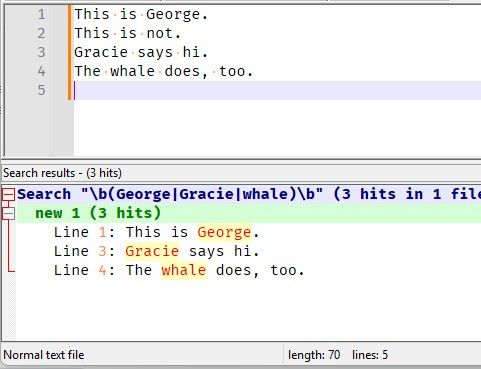
- Find What =
\b(George|Gracie|whale)\b- the
\bmatches “word boundary” so it would matchGeorgebut notGeorgene, etc. - the
(...)makes a group - without this logical group, the\bwould have to be repeated at the beginning and end of each word, like\bGeorge\b|\bGracie\b|\bwhale\b - the
|means “OR” - translated to english, this Find What means “match a boundary, then
GeorgeorGracieorwhale, then another boundary”
- the
- Match Case = off
- Search Mode = Regular Expression
. matches newline= off
–
From our FAQ section, the Generic Regular Expression formula FAQ links to a post Generic Regex: Logic Gates for Regular Expressions which explains how to match lines with AND, OR, Exclusive-OR, and similar logical constructs. - Find What =
-
-
Star Trek IV reference? :-)
It only took 5 years for people to finally understand me correctly. I guess I made it too obvious this time, with finally adding the third alternative. :-)
-
@PeterJones Without the whale, it’s just Burns and Allen.
-
@PeterJones That works too! I like it actually better as the logs are fairly consistent in structure! thanks Peter!
-
@PeterJones Oh yes, one other question. This might be above and beyond. Any keywords to require all the hits (in your example of 3 hits). Or perhaps to require one of the keywords to gate whether results are shown? So I have a scenario where it is finding the error(s) which is great but I am also getting smaller hits that have to do with the process in the logfile which I don’t care to see in the results if there is also not an error keyword along with it in that file. As I mentioned there are thousands of files I am combing through. Thanks again!!!
-
Any keywords to require all the hits
The “logic gates” link I gave you includes how to do “AND” (“requires A and B and C”)
With logic, you can create any more complicated rules you want (like “(A AND B) BUT NOT (C OR D)”) by nesting inside the constructs. Play with the expressions from that “logic gates” page, see what they do; try nesting them; get a feel for how the logic works together. Soon, you’ll be able to craft the combinations that most help you with your data.
-
@PeterJones Ah sorry! I was thinking afterwards there must be an && and didn’t pay attention to your hyperlink. I checked it out thanks!!! One other question. So if I search using
(?=.*Error)(?=.*Foobar1)(?=.*Foobar2)
With regular expression and newline checked. I do see it boil down to the files I am interested in. My only other need is to see all the lines associated/contained with the AND. It just shows the chunk of text from the beginning of the file to the first match it finds which in this example is Foobar1. I was more interested in seeing each line (e.g. also Error) that matched. I didn’t see this in the help page. Maybe this is not possible but thought I would ask. Thanks for all your help so far!
-
So if I search using
(?=.*Error)(?=.*Foobar1)(?=.*Foobar2)
With regular expression and newline checked. I do see it boil down to the files I am interested in. My only other need is to see all the lines associated/contained with the AND. …
The first table in the FAQ is just showing the logic for matching all of those terms. Later down in the FAQ, there is another table which explains how to find the exact line that matches all of those terms. In your case, the AND would be
(?-s)(?:(?=.*Error)(?=.*Foobar1)(?=.*Foobar2))^.*(?:\R|\z)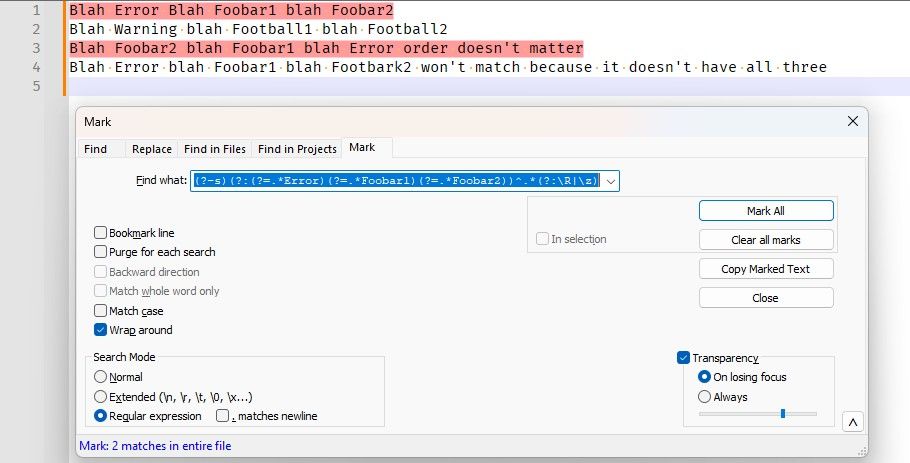
or, using the Find Results via Find All in Current Document:
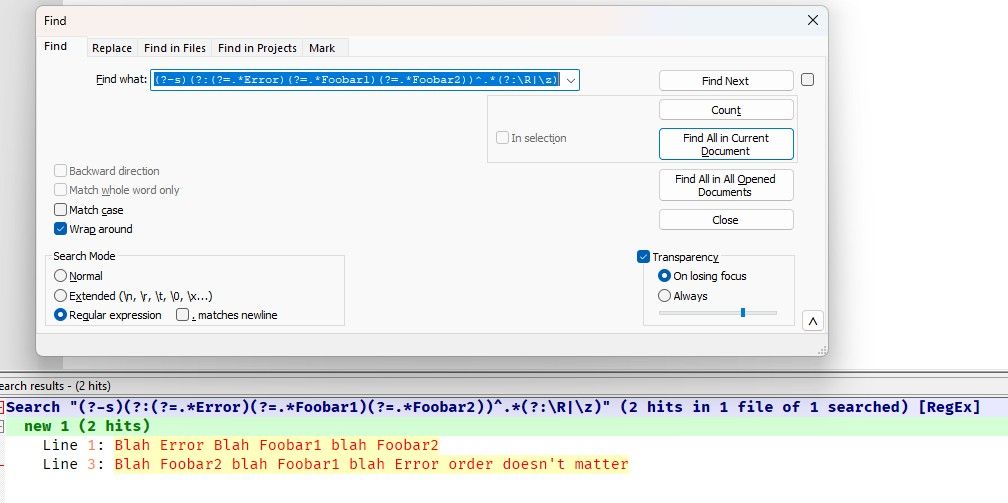
dummy example file to show it working:
Blah Error Blah Foobar1 blah Foobar2
Blah Warning blah Football1 blah Football2
Blah Foobar2 blah Foobar1 blah Error order doesn't matter
Blah Error blah Foobar1 blah Footbark2 won't match because it doesn't have all three



Hello! It looks like you're interested in this conversation, but you don't have an account yet.
Getting fed up of having to scroll through the same posts each visit? When you register for an account, you'll always come back to exactly where you were before, and choose to be notified of new replies (either via email, or push notification). You'll also be able to save bookmarks and upvote posts to show your appreciation to other community members.
With your input, this post could be even better 💗
Register Login