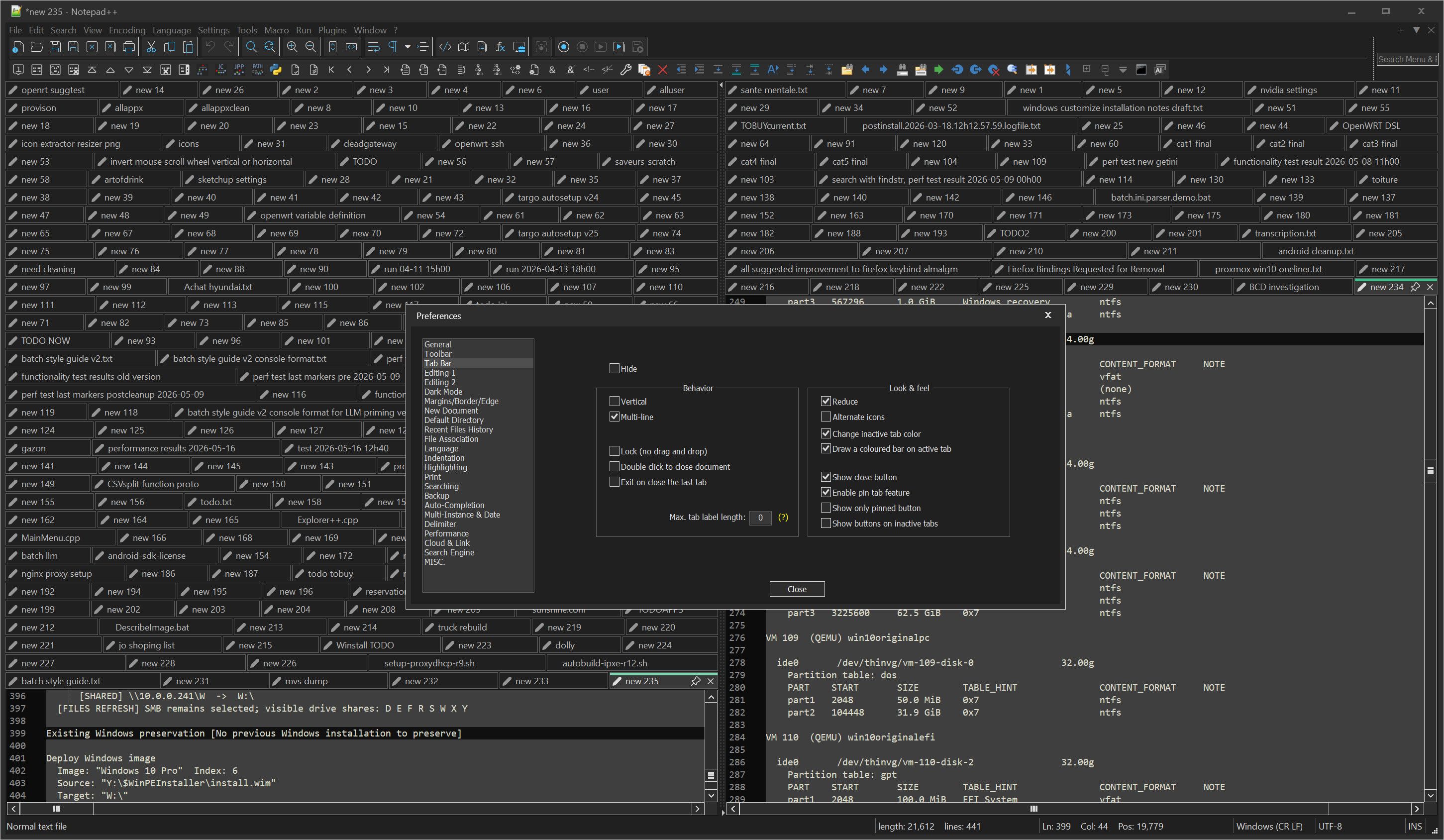
Multi line tab bar but with maximum X lines ?
-
Hi,
I’d like to use multi line tab bar.just so I can see more of my tabs at once
But I’d like to have 2, 3 or 4 lines of tabs maximum and then horizontally scroll the rest of the way with my side scroll wheel on my mouse.
Is there a way to limit this ?
thanks !
-
-
@Michael-Vincent
Data conciergery is a computer’s job -
Data conciergery is a computer’s job
But not every conciegery task is easy to implement in code. With the existing “all or nothing” approach, it’s a simple Boolean toggle (if/else). Trying to split it up into on/some/off will be difficult (ie, that “some” logic will be convoluted, to be able to get a mix of features for the “on” and “off” modes – so either code duplication, or interleaving a lot more if/then conditions throughout the code, making it harder to maintain).
It’s an interesting idea… and if someone knew how to implement it, I would personally have no problem with it being added as a third option. But it is likely to be a lot of work, and I am doubtful that the main developer would find it worth his while to implement (especially if there’s only one person interested in such a thing).
But, if someone (you) were to put in an official feature request (rather than just talking about it with fellow users – see our Feature Request FAQ), then at least the developer and other volunteer contributors would be informed about the idea, and could decide for themselves whether they thought it was worth implementing. Plus, there, it could slowly amass upvotes – if it turned out that many people upvote the request, then it’s more likely that a volunteer would decide to take it on at some point in the future.
-
Question for OP:
Quick, without looking, what kind of data do you have in
new126? -
And further to @Alan-Kilborn’s query: you do understand that, while Notepad++ does it’s best to keep unsaved changes in the temporary session-snapshot-and-periodic-backup folder, it does not guarantee that the OS won’t crash, causing the loss of some or all of those files. If you have 1-2 files worth of data loss from that, that’s horrible (as many, many posts have proven, over the years). But you have what is likely a hundred or more unsaved files in that screenshot. Which means if your OS gets in a bad mood, or if something interferes with a Notepad++ update process, you would lose huge amounts of data.
Please, for the sake of all that information that I am sure you actually care about, please look into a way to save files to meaningful locations and institute appropriate backups for mission-critical data. Because I’d hate for you to be the next unfortunate soul to lose all their unsaved changes, and the best we would be able to tell you is “maybe try Recuva”. That stinks, for everyone involved (but mostly for you).
We have a Backup FAQ to help you make informed decisions about your own saving and backup schemes. And I encourage people to use external backup software, and/or version control software, as appropriate.
Please, PLEASE, don’t just continue working with a hundred or more unsaved files, hoping that nothing will ever go wrong.
-
I’d support a row cap for multi-line tabs. I also work with a large number of open tabs, and a multi-line cap would be a great visual refinement for Notepad++.
Regarding the technical side: I took a brief look at TabBar.cpp. It might be possible to add this as a strictly isolated, opt-in feature without disrupting the existing default code too much. But I could be wrong there.
If @shodanx2 creates an official feature request, I would gladly upvote it.
-
@PeterJones
Thank you for this caring answer !
I simply don’t have the mental space to go through all these documents and give them names and save them and do all the things. I will get there eventually.But I also observe that my friends are in the same boat, whenever we need scratch space to write something down, we double click on an empty place on the tab bar, a new tab appears, then data is written and pasted and so on…
I have many old notepad++\backup folder strewn all over the place

It is a huge burden to handle and search these.
When I need to search my stuff I use Voidtools Everything
with this search"new *" content:"my search terms here"And that works adequately !
I am considering writing a Notepad++ Plugin to use local open source LLM to read the content of search tab, and give them a descriptive name and save them as files in my scratch text folder.
But getting back at the current matter, I would like to see more of my tabs, on more than one row but not see all of them at once, which blots out all the reader space.
So an adjustable row tab count limit would made the multiple row tab very useful.
While researching this I came accross this discussion
https://superuser.com/questions/153109/is-there-a-way-to-manage-tabs-efficiently-in-notepad
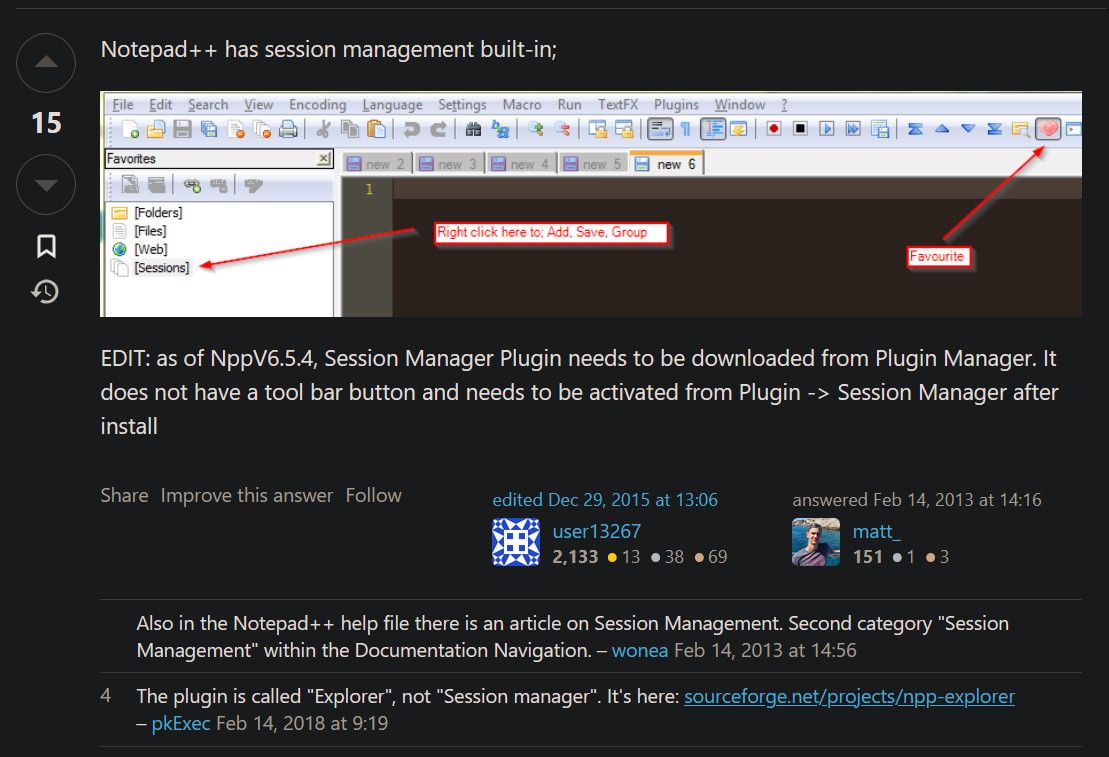
I tried finding this in my installation but could not figure it out. Seems that it is buried somewhere in the menus, which would make making a habit of using it difficult.
I see there are also options of use folders as scratch space and “workspace” and etc… however I have not developed habits regarding these methods yet.
One thing I really which is to also have the ability to have multiple notepad++ window, like multiple firefox windows. Or at least have floating notepad++ window with just one tab. This would make my life easier organizationally !
To a point that now, I sometime use notepad rather than notepad++, even though it is much much worse just so I don’t add another random tab for my main notepad++ !
The thing I find is that if I have something to write, and it’s urgent, I can’t give it a title, a filename or save it, I have a hard time explaining why those extremely easy things are so hard for me, but I simply cannot.
The ability to “just write” is probably one of the thing I love the most about notepad++ and I wish it were even easier to “sprawl” even more but that it would help me with staying organized without me having to start organizing it.
-
@Alan-Kilborn
It is a draft of a letter I did not finish
Addressed to these people
Philobot
Cory Doctorow
Peter Coffin -
Here is a proposed implementation
I don’t have the build environment to test it at this time
Most of the changes are contained in
PowerEditor\src\WinControls\TabBar\TabBar.cpp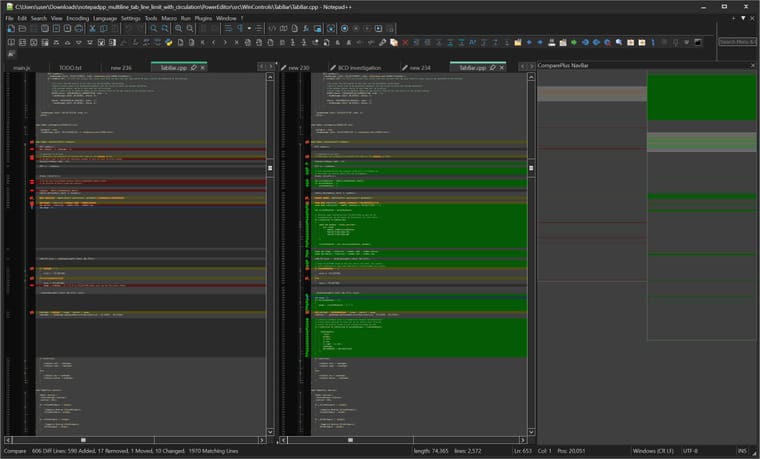
Please minor modification in these files as well
C:.
└───PowerEditor
    └───src
        │   Parameters.cpp
        │   Parameters.h
        │
        └───WinControls
            ├───Preference
            │       preference.rc
            │       preferenceDlg.cpp
            │       preferenceDlg.h
            │       preference_rc.h
            │
            └───TabBar
                    TabBar.cpp
I can’t paste a zip file, but here is the URL where it can be downloaded
https://chatgpt.com/share/6a8737fe-0170-83ea-a576-4943583fa744
I hope you guys aren’t AI vegans !
-
Ah and the TLDR
The first concern is limiting the number of tabs visible.
Also the setting for “multi line tab line limit” has to be broken out in preferences and it has to be tracked as a global parameter.
Next, the trickier part is scrolling, in multiline mode, there is no scrolling, but you need scrolling if you limit the number of visible tabs.
How I designed it is that say you have 3 lines of tabs maximum. As you scroll tabs they move on their one line, and then jump to the next line’s other side until they “fall off the screen” or rather “view”.
One thing I forgot to ask, is to be side-scroll (horizontal scroll )also work for the scroll bar, rather than only vertical scroll as is currently the case. But there’s already enough opportunity for bugs so I will wait until there is a positive result before adding that.
-
I have posted the proposed source code modification to file share website “gofile dot io”
-
I simply don’t have the mental space to go through all these documents and give them names and save them and do all the things. I will get there eventually.
Then you will likely lose data.
But I also observe that my friends are in the same boat, whenever we need scratch space to write something down, we double click on an empty place on the tab bar, a new tab appears, then data is written and pasted and so on…
And then click
Ctrl+Sand save to a meaningful location, while it’s still fresh in your mind. It’s really easy to add that to your mental workflow.I have many old notepad++\backup folder strewn all over the place
Crazy. Those are temporary backup folders, and if you’re keeping them as long-term storage, you are asking to lose data.
It is a huge burden to handle and search these.
When I need to search my stuff I use Voidtools EverythingWhy not first, copy all except the active (2026-08-19) backup directory, copy them to a known folder in one location – if you need to, make it a hierarchy, like
c:\some\path\old-npp-unsaved\, and then have2022-08and2022-12and2026-03and2024-01as subdirectories, if you want/need to keep them separate; or, since every file has the datestamp in it already, just put all the contents of each of those in the samec:\some\path\old-npp-unsaved\…
Then, when you need to search your old backup archives, they are in one easy location. And you can just use Notepad++'s built-in Search > Find in Files, with Directory =c:\some\path\old-npp-unsaved\and☑ In all subfolders, then just enter your search term in the FIND WHAT box.But getting back at the current matter, I would like to see more of my tabs, on more than one row but not see all of them at once, which blots out all the reader space.
So put in a feature request, as described in our feature request FAQ. I was just warning that it might be harder than you think, or there might not be anyone wanting to do it. But since @thomas-knoefel seems to have an idea for an implementation, then there’s likely to be a PR sometime soonish after you put in the feature request, and then it can quickly get reviewed by the developer. It might even make it into v8.9.9 (it’s too late for v8.9.8, since that’s in Release Candidate), but that means it might actually make it soon.
https://superuser.com/questions/153109/is-there-a-way-to-manage-tabs-efficiently-in-notepad
I tried finding this in my installation but could not figure it out. Seems that it is buried somewhere in the menus, which would make making a habit of using it difficult.
The SU answer was originally from
20102013, and then edited in 2015, so the description is confusing, especially in 2026. The Session Manager that they mentioned is not “built in”, it is a plugin. Notepad++ has simplistic native sessions, but nothing to the capability of the Session Manager that they were talking about.To install it, the “Plugin Manager” that was described in 2015 hasn’t been compatible with Notepad++ since v7.6 in 2019. Looking at questions and answers from a decade ago aren’t necessarily going to work in modern Notepad++.
Instead, that old plugin manager tool was replaced with the builtin Plugins Admin instead in 2019. And the Session Manager plugin that the ancient SU answer referenced does still exist: you can install it using Plugins > Plugins Admin
One thing I really which is to also have the ability to have multiple notepad++ window, like multiple firefox windows.
That feature has existed for more than a decade (as I said here, just yesterday – why are people just now discovering the multi-instance capabilities, when it’s essentially always been a part of Notepad++). As was said in yesterday’s conversation, you can drag a tab out into empty space, and it will create a new instance; or, not mentioned yesterday, you can use the right-click context menu on a tab then Move Document, or equivalently use View > Move/Clone Current Document…, to then pick Move to New Instance, and it will open a new Notepad++ window.
Or at least have floating notepad++ window with just one tab. This would make my life easier organizationally !
Saving files would make your life easier.
The thing I find is that if I have something to write, and it’s urgent, I can’t give it a title, a filename or save it, I have a hard time explaining why those extremely easy things are so hard for me, but I simply cannot.
You can, actually. It might take a little retraining, but even an old dog can learn new tricks.
The ability to “just write” is probably one of the thing I love the most about notepad++ and I wish it were even easier to “sprawl” even more but that it would help me with staying organized without me having to start organizing it.
Hopefully, your AI will be able to help you… though I am doubtful of it.
Still, I highly recommend setting up true backup, version control, and a saving system going forward, otherwise you will lose data, and there’s nothing that Notepad++ can do to save you from your current risky behavior. Good luck.



Hello! It looks like you're interested in this conversation, but you don't have an account yet.
Getting fed up of having to scroll through the same posts each visit? When you register for an account, you'll always come back to exactly where you were before, and choose to be notified of new replies (either via email, or push notification). You'll also be able to save bookmarks and upvote posts to show your appreciation to other community members.
With your input, this post could be even better 💗
Register Login