Notepad++ release 8.9.8
-
After using rustdesk-1.4.9-x86_64.exe to control a remote Windows 11 PC, then I opened a .txt file in Notepad++, but it appeared blank—I couldn’t see any text.
-
-
Hi Don,
Is there a configuration option to disable the fix for the potential exposure of Windows login info (SMB/NTLM) via UNC path? If not, could you please add one (preferably with the additional ability to set it using a command line switch when running the installer).
The reason for my request is that that fix not needed in secured network environments where outbound SMB connections to untrusted networks are already blocked at the perimeter firewall. In those situations, the fix unnecessarily prompts users when opening files via a UNC path, even when the SMB client and server are in the same Active Directory domain.
Thanks,
JT
-
Current workaround for now - the relevant config.xml setting needed (just use a post-install script for it or supply a pre-configured config.xml file to your users):
networkPathWarningMethod="2"which means “networkPathAlwaysLoad”.
i.e. edit this line:
<GUIConfig name="MISC" fileSwitcherWithoutExtColumn="no" fileSwitcherExtWidth="50" fileSwitcherWithoutPathColumn="yes" fileSwitcherPathWidth="50" fileSwitcherNoGroups="no" backSlashIsEscapeCharacterForSql="yes" writeTechnologyEngine="3" isFolderDroppedOpenFiles="no" docPeekOnTab="no" docPeekOnMap="no" sortFunctionList="no" saveDlgExtFilterToAllTypes="no" muteSounds="no" enableFoldCmdToggable="yes" hideMenuRightShortcuts="no" networkPathWarningMethod="2" isFawSymlinkAllowed="false" />Edit:
There already seems to be such a helper script (I didn’t test it myself):
https://github.com/notepad-plus-plus/notepad-plus-plus/issues/18319#issuecomment-5508274570 -
Hello,
since the Version 8.9.8 i have the problem that the command “Notepad++.exe myFile.txt” does not open the requested file if Notepad++ is already running.
The command works only if Notepad++ is not running.
In previous versions the command worked fine.Company machine, Windows 11, Notepad++ v8.9.8 (64bit)
-
I assume you are using scoop, or some other package manager that uses junctions in the path to Notepad++. v8.9.8 introduced an issue where that will not work. It has already been fixed in the codebase, so the next version will not have that problem (release candidate for v8.9.8.1 should be soon). In the meantime, you can go back to v8.9.7
-
P PeterJones forked this topic on
-
@donho Hey, Just wanted to let you know in case this isn’t just an isolated incident that my Notepad++ isn’t updating to 8.9.8. It’s now the 17th of September for me which is 3 weeks since the release of 8.9.8, and idk if this is an isolated incident, but my Notepad++ is still 8.9.7 and clicking the “Update Notepad++” button still displays the “No update is available” message, though the update is being detected by winget, just not the actual program, which is odd. Anyways, just thought i’d let you know about this just in case it’s not actually just an isolated issue! I’ll attach a screenshot of the info screen and updater, and will also add the Debug info below this and above the screenshots!
Debug Info: Notepad++ v8.9.7 (64-bit)
Build time: Jul 14 2026 - 01:26:22
Scintilla/Lexilla included: 5.6.4/5.5.1
Boost Regex included: 1_90
pugixml included: 1.16
nlohmann JSON included: 3.12.0
Path: C:\Program Files\Notepad++\notepad++.exe
Command Line:
Admin mode: ON
Local Conf mode: OFF
Cloud Config: C:\Users\Foxy\OneDrive
WinGUp: present
disableNppAutoUpdate.xml: absent
Periodic Backup: ON
Placeholders: ON
Scintilla Rendering Mode: SC_TECHNOLOGY_DIRECTWRITE (1)
Multi-instance Mode: monoInst
asNotepad: OFF
File Status Auto-Detection: cdEnabledNew (for current file/tab only)
Dark Mode: ON
Display Info:
primary monitor: 1920x1080, scaling 100%
visible monitors count: 1
installed Display Class adapters:
0000: Description - Meta Virtual Monitor
0000: DriverVersion - 5.3.57.114
0001: Description - Intel® UHD Graphics 750
0001: DriverVersion - 32.0.101.7088
0002: Description - NVIDIA GeForce RTX 3050
0002: DriverVersion - 32.0.16.1692
OS Name: Windows 10 Pro (64-bit)
OS Version: 22H2
OS Build: 19045.7725
Current ANSI codepage: 1252
Plugins:
ComparePlugin (2.0.2)
JsMapParser.NppPlugin (4.2)
mimeTools (3.1)
NotepadStarterPlugin (2.3.3)
NppConverter (4.7)
NppExport (0.4)Screenshots
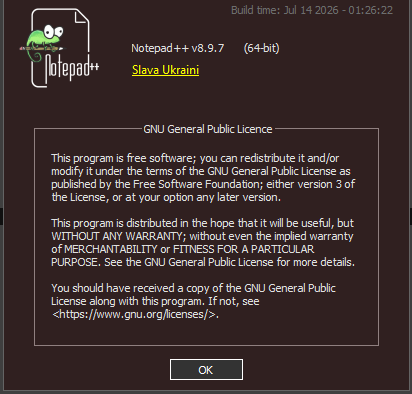
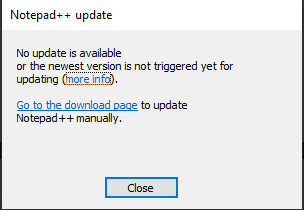
-
my Notepad++ isn’t updating to 8.9.8.
That’s because it was not triggered for auto-update.
The downloads page at https://notepad-plus-plus.org/downloads/ will indicate the most recent auto-update version with “(stable: auto-update triggered)” or similar phrasing. As of today, 8.9.7 is the last triggered version.
The manual explains the reason for not immediately triggering a new version for auto-update here: https://npp-user-manual.org/docs/upgrading/#no-new-version-found-safety-delay.
In this case, there were some critical fixes needed, hence today’s v8.9.8.1 Release Candidate
-
I am seeing an issue that I’m not certain it is the installer of Notepad++ 8.9.8 itself or if Microsoft has inadvertently caused this…
Using Microsoft’s Enterprise App Catalog to install 8.9.8 on top of an existing installation of 8.9.6.4 seems to result in the registry information being updated to say 8.9.8 but when you check C:\Program Files\Notepad++\notepad++.exe it is still 8.9.6.4.
This was horrifying, as it’s the perfect way to maintain a vulnerable copy of the app on Enterprise systems. It could go completely unknown because, at least on ours, MDM systems seem to inventory based on what the registry says and not what’s on the actual disk.
Server OS endpoints updated using the traditional SCCM method appear to update correctly. So, this adds weight to the issue being Microsoft’s Enterprise App Catalog implementation. It is almost as though they are updating the registry on behalf of Notepad++, ignoring the true status of the app.
-
D donho unpinned this topic on
-
@PeterJones Oh!! Understood!! thank you!!!

Hello! It looks like you're interested in this conversation, but you don't have an account yet.
Getting fed up of having to scroll through the same posts each visit? When you register for an account, you'll always come back to exactly where you were before, and choose to be notified of new replies (either via email, or push notification). You'll also be able to save bookmarks and upvote posts to show your appreciation to other community members.
With your input, this post could be even better 💗
Register Login