Notepad++ release 8.9.8.1
-
My layout got corrupted/reset by this upgrade. Plugins etc. are installed but layout, themes fonts etc. are back to defaults:
quick way to restore?
Hopefully, it’s just that it used to point to local config but is now AppData, or similar. Can you share ?-menu’s Debug Info?
upgraded / Installed via scoop.
My guess is that the 8.9.8.1 fix for the 8.9.8 scoop problem somehow had that side effect. But that’s just my guess as someone on the periphery. With your Debug Info, one of the experts might have more insight.
-
Hopefully, it’s just that it used to point to local config but is now AppData, or similar.
As a scoop user myself, I can confirm that it will configure Notepad++ for portable usage by default.¹ Removing the magic
doLocalConf.xmlfile at%USERPROFILE%\scoop\apps\notepadplusplus\currentis probably all that’s needed.
¹ This is one setting that’s not preserved during an upgrade (the other being the
autoCompletionfolder), while the contents of${NPP_INSTALLATION_ROOT}\{backup,cloud,plugins,themes,userDefineLangs}are kept in sync by means of junctions between the canonicalcurrentfolder and the versioned one. Someone should open an issue in the scoop repository, I just haven’t found the free time yet. -
As a scoop user myself, I can confirm that it will configure Notepad++ for portable usage by default.¹
Thank you for the confirmation.
Are you saying that scoop changed their way to install Notepad++ due to the Regression of failure to open files via Notepad++ symlink paths in v8.9.8? -
Are you saying that scoop changed their way to install Notepad++ due to the Regression of failure to open files via Notepad++ symlink paths in v8.9.8?
No. Scoop has always used junctions to persist the user’s config files — before and after v8.9.8 — by linking the (portable) installation directory to a stable
%UserProfile%\scoop\persist\notepadplusplusfolder, e.g.,¹> dir %UserProfile%\scoop\apps\notepadplusplus\8.9.8.1 10/01/2026 08:01 PM <DIR> . 09/29/2026 06:20 PM <DIR> .. 09/24/2026 09:58 AM <DIR> autoCompletion 09/29/2026 06:20 PM <JUNCTION> backup [\??\C:\Users\Rob\scoop\persist\notepadplusplus\backup] ... 09/29/2026 06:20 PM <JUNCTION> cloud [\??\C:\Users\Rob\scoop\persist\notepadplusplus\cloud] ... 09/29/2026 06:20 PM <JUNCTION> plugins [\??\C:\Users\Rob\scoop\persist\notepadplusplus\plugins] ... 09/29/2026 06:20 PM <JUNCTION> themes [\??\C:\Users\Rob\scoop\persist\notepadplusplus\themes] ... 09/29/2026 06:20 PM <JUNCTION> userDefineLangs [\??\C:\Users\Rob\scoop\persist\notepadplusplus\userDefineLangs]The problem I was mentioning is with the installation script (available here). Because it always downloads a portable release, the bundled
doLocalConf.xmlfile is extracted — and kept — every time, whether or not the user wants to run in portable mode.
¹ Notice that
autoCompletionis not soft-linked, probably by oversight. -
FYI: the auto-update is triggered for this release.
-
Search in Files not working (no result found where obviously there are) in this release. Reinstallation => NO SUCCESS. I had to revert to 8.9.8 to use it again.
-
Search in Files not working (no result found where obviously there are) in this release. Reinstallation => NO SUCCESS. I had to revert to 8.9.8 to use it again.
v8.9.8.1 Find in Files works fine for me.
Please:
- Try with all plugins disabled, to make sure it’s not a plugin issue
- share ?-menu’s Debug Info
- share your FIND WHAT (use
`before and after your search, like`my.*search`, so that the Forum doesn’t “eat” your search characters as post-formatting) - share all the options in the Find in Files dialog (Filters, Directory, Search Mode, other checkboxes – a screenshot would be easiest)
- does your directory contain
*.lnkto files or other directories? or windows junctions or symlinks or hardlinks?
-
The installation keeps failing in my user\appdata\roaming\Notepad++\ folder. It keeps saying that access is denied. Its access is granted.
-
D donho referenced this topic on
-
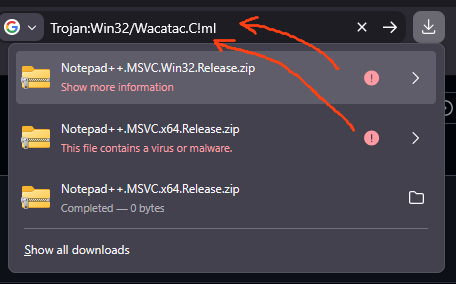
Maybe an antivirus or similar problem.
Yesterday, I had some false-positives even while trying to download N++ GitHub artifacts. I checked these "notepad++.exe"s via VirusTotal and these were flagged (only by the MS own Defender engine). Now it’s ok, so I’d try again.
-
@Coises
Notepad++ v8.9.8.1 appears to misdetect a valid UTF-8 file without BOM as OEM 855. The file contains valid UTF-8 multibyte characters and can be decoded successfully as UTF-8. When “Autodetect character encoding” is disabled, closing and reopening Notepad++ correctly identifies the file as UTF-8. Re-enabling autodetection causes the same file to be detected as OEM 855 again.
For example, string UTF8 Ok but incorrect auto-detection: 🧠 🧠 🧠 🧠 🧠 🧠 🧠 🧠 🧠 🧠 -
@Coises
Notepad++ v8.9.8.1 appears to misdetect a valid UTF-8 file without BOM as OEM 855. The file contains valid UTF-8 multibyte characters and can be decoded successfully as UTF-8. When “Autodetect character encoding” is disabled, closing and reopening Notepad++ correctly identifies the file as UTF-8. Re-enabling autodetection causes the same file to be detected as OEM 855 again.
For example, string UTF8 Ok but incorrect auto-detection: 🧠 🧠 🧠 🧠 🧠 🧠 🧠 🧠 🧠 🧠Just my personal opinion, not any sort of “official Notepad++ position”: Autodetect character encoding is an accident waiting to happen. There is no way to consistently and accurately detect character encoding on Windows, because Microsoft, in their infinite wisdom, did not choose to store the character encoding of a file in any sort of metadata.
If you really have many files with different legacy character encodings, you will have to intervene manually to get correct results. There is no way around it. Autodetect character encoding might or might not reduce the number of cases where you must manually select the correct encoding, but sometimes it will be wrong. You can use the Encoding | Character sets menu to select the correct encoding before you modify the document in any way.
More common is to have just two potentially ambiguous cases: so-called “ANSI,” meaning the system default code page, and UTF-8 with no byte order mark. Outside of contrived examples and files that were supposed to be UTF-8 but contain invalid byte sequences, it is easy to tell those two apart with a very high rate of accuracy. (However, Notepad++ has a bug that can cause UTF-8 files to be mis-detected as ANSI.) That works better if you do not check Autodetect character encoding.
-
The text direction switching for Hebrew and Arabic does not work
Notepad++ v8.9.8.1 (32-bit) Build time: Sep 24 2026 - 15:33:17 Scintilla/Lexilla included: 5.6.6/5.5.3 Boost Regex included: 1_90 pugixml included: 1.16 nlohmann JSON included: 3.12.0 Path: E:\allTools\Editors\Texts\Notepad++\BAK++\npp.zip\npp.8.9.8.1.portable\notepad++.exe Command Line: Admin mode: ON Local Conf mode: ON Cloud Config: OFF WinGUp: present disableNppAutoUpdate.xml: present Periodic Backup: ON Placeholders: OFF Scintilla Rendering Mode: SC_TECHNOLOGY_DIRECTWRITE (1) Multi-instance Mode: monoInst asNotepad: OFF File Status Auto-Detection: cdEnabledNew (for current file/tab only) Dark Mode: OFF Display Info: primary monitor: 1920x1080, scaling 100% visible monitors count: 2 installed Display Class adapters: 0000: Description - Intel(R) HD Graphics 4000 0000: DriverVersion - 10.18.10.3345 0001: Description - Стандартный VGA графический адаптер 0001: DriverVersion - 6.1.7600.16385 0002: Description - NVIDIA Quadro FX 580 (Microsoft Corporation - WDDM v1.1) 0002: DriverVersion - 8.15.11.8593 OS Name: Windows 7 Home Premium (64-bit) OS Build: 7601.0 Current ANSI codepage: 1251 Plugins: ColorPicker (2.3) ComparePlugin (2.0.2) DSpellCheck (1.5) Explorer (1.9.9) HexEditor (0.9.14) HTMLTag_unicode (1.6.1) HugeFiles (0.4.1) ImgTag (2.0.1) JSMinNPP (25.11.16) mimeTools (3.1) NppConverter (4.7) NppExec (0.8.10) NppExport (0.4) NppMarkdownPanel (0.9.3) NppMenuSearch (0.9.7) NppQCP (2) NppSnippets (1.7.1) NppUISpy (1.2) PreviewHTML (1.4.7) RegexTrainer (1.2) ShtirlitzNppPlugin (1.1.2) WebEdit (2.8.1.2) _CustomizeToolbar (5.3) -
@andrecool-68 for me it’s working:
русский
english
עברית שפה קשה
Notepad++ v8.9.8.1 (64-bit)
Build time: Sep 24 2026 - 15:34:11
Scintilla/Lexilla included: 5.6.6/5.5.3
Boost Regex included: 1_90
pugixml included: 1.16
nlohmann JSON included: 3.12.0
Path: C:\Program Files\Notepad++\notepad++.exe
Command Line:
Admin mode: ON
Local Conf mode: OFF
Cloud Config: OFF
WinGUp: present
disableNppAutoUpdate.xml: absent
Periodic Backup: ON
Placeholders: OFF
Scintilla Rendering Mode: SC_TECHNOLOGY_DIRECTWRITE (1)
Multi-instance Mode: monoInst
asNotepad: OFF
File Status Auto-Detection: cdEnabledNew (for current file/tab only)
Dark Mode: OFF
Display Info:
primary monitor: 1920x1080, scaling 100%
visible monitors count: 2
installed Display Class adapters:
0000: Description - Intel® Graphics
0000: DriverVersion - 32.0.101.8991
0001: Description - Microsoft Remote Display Adapter
0001: DriverVersion - 10.0.26100.8521
0003: Description - Microsoft Remote Display Adapter
0003: DriverVersion - 10.0.26100.8737
OS Name: Windows 11 Enterprise (64-bit)
OS Version: 26H2
OS Build: 26300.9711
Current ANSI codepage: 1255
Plugins:
ComparePlus (3)
mimeTools (3.1)
NppConverter (4.7)
NppExport (0.4) -
-
-
-






Hello! It looks like you're interested in this conversation, but you don't have an account yet.
Getting fed up of having to scroll through the same posts each visit? When you register for an account, you'll always come back to exactly where you were before, and choose to be notified of new replies (either via email, or push notification). You'll also be able to save bookmarks and upvote posts to show your appreciation to other community members.
With your input, this post could be even better 💗
Register Login