Silent update is way too loud and intrusive
-
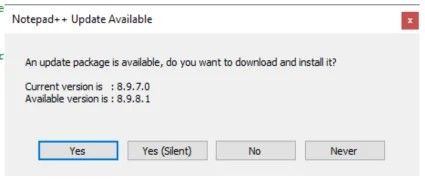
- When this pops up you MUST interact with it and it blocks you from doing anything else.
-
Accidentally clicking OK because you were looking away and hit enter for new line takes you through the FULL install all questions. That is super disruptive!
-
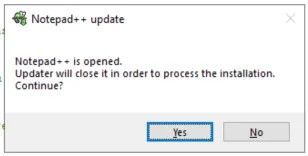
Clicking Yes (Silent) gets you this in a couple seconds. Again you must interact with this dialog and it prevents you from doing anything else.
-
Saying YES to this prompt will close the entire app. Changes will not be saved to disk for files you are working on, but will be stored to be saved later.
-
Bonus; Saying NO to this prompt will bring you back to step 1 next time you use the app. I already OK’d the update, just do it the next time I use it.
-
Upon next load (automatic) change.log will be displayed hijacking the open tab of the thing you were working on.
Am I the only one that finds this behavior extremely intrusive?
Can we get rid of these, auto do background updates and just have a nice subtle change.log new tab open the next time you load N++? And please don’t open that tab by default on next load!!
-
Most of your complaints can be addressed by: Settings > Prefereences > MISC > Auto-updater, set to
Enable on Notepad++ Exit. That way, it will be as you are exiting the program, after everything is properly saved, not disrupting your workflow. All you have to do is answer “Yes (Silent)”, and since it will be closing Notepad++ anyway, there shouldn’t be the extra prompt of “updater will close it” because it’s already being closed.Also, after update is applied, it won’t check again for another 2 weeks, and usually there will be more than a month between new versions being triggered for auto-update, so it will only annoy you once every month or two.
Upon next load (automatic) change.log will be displayed hijacking the open tab of the thing you were working on.
It doesn’t hijack your tab. It adds another tab to the View. Your old file is still there, in that View, just not on the active tab for that View. So all you have to do after this “annoying” change.log view is click the close icon, or
Ctrl+W, or File > Close, or whatever your preferred tab-closing action is. -
Settings, preferences, auto updater; I would need to change that across 100+ servers…
We have already made the decision that asking is important enough to be the default, can we go the next step and just do it in the background and not interrupt work flow getting it done?Edit; what is being discussed here is the “tyranny of the default”. The vast majority of users are going to leave it default so for that audience is it better to have a workflow with some interruptions or a workflow that doesn’t interrupt them and leads them to a hopefully more secure installation?
“hijacking the open tab of the thing you were working on” and “just not on the active tab for that View” sounds like the same thing with different words to me.
-
Settings, preferences, auto updater; I would need to change that across 100+ servers…
Use powershell (or whatever other IT tools you have access to) to edit
config.xmlon all those servers with one simple script to change<GuiConfig name="noUpdate" .* autoUpdateMode="[01]">.*</GuiConfg>to
<GuiConfig name="noUpdate" .* autoUpdateMode="2">no</GuiConfg>We have already made the decision that asking is important enough to be the default, can we go the next step and just do it in the background and not interrupt work flow getting it done?
That’s the idea behind the silent-at-exit, which mostly doesn’t interfere at all.
There also exists the MSI installer now, which allows IT departments to better control the install process – I don’t pretend to understand its benefits or how to use it to the full effectiveness, but I’ve been told it makes corporate environments easier or more convenient. One of its options is
NOUPDATER=1, which allows you to completely turn off auto-updater on the installed Notepad++, which then means that the corporate scripts are in charge of running the MSI from the central location on your schedule, rather than allowing each of the 100+ servers to decide it’s time for them to update on their own schedule, breaking users’ workflows.Edit; what is being discussed here is the “tyranny of the default”. The vast majority of users are going to leave it default so for that audience is it better to have a workflow with some interruptions or a workflow that doesn’t interrupt them and leads them to a hopefully more secure installation?
And the majority of single-user environments can click Yes (silent) once every couple of months. And if they set it to on-exit rather than on-startup, it shouldn’t even need to ask them to close Notepad++. One extra click every month or two doesn’t seem too onerous to me. YMMV.
“hijacking the open tab of the thing you were working on” and “just not on the active tab for that View” sounds like the same thing with different words to me.
Sorry, since you were using your own terminology, rather than Notepad++'s terminology, I thought you were describing a situation that didn’t exist, and was correcting that. If you’re using different terminology, that’s fine, but don’t be surprised when people misinterpret you. I disagree that the
change.logtab being put in front of your active tab once every few months is a horrible thing, but each person has their own frustration points.As you presumably saw when you created your account and read the “Read this before posting”, this is a Community of Notepad++ Users, so if you want something to change in the product, rather than just talking about it with other users, you would have to follow our easily-findable links to the GitHub issue tracker, and put in requests (after verifying that those requests don’t already exist, opened or closed).

Hello! It looks like you're interested in this conversation, but you don't have an account yet.
Getting fed up of having to scroll through the same posts each visit? When you register for an account, you'll always come back to exactly where you were before, and choose to be notified of new replies (either via email, or push notification). You'll also be able to save bookmarks and upvote posts to show your appreciation to other community members.
With your input, this post could be even better 💗
Register Login