bookmark line color
-
How can a line color for a bookmark be changed?
Maybe something like
<WidgetStyle name=“Bookmark” styleID=“36” bgColor=“FF0000” fontStyle=“0” fontSize=“10” />in
…\Notepad++\stylers.xml
? -
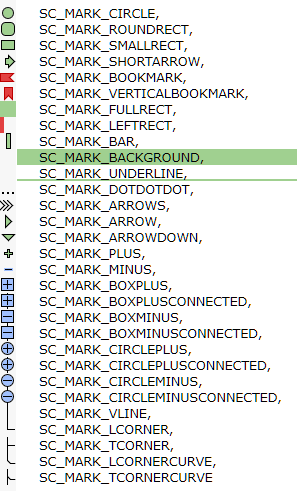
Currently that’s not possible because the built-in bookmark is an actual image. However with a plugin you could change it to any of the following (and change the colors)
-
If I have in Preferences -> Editing -> Display bookmark (un check)
there is no green circle, but a line is dark in white background, but is hardly visible, it is better visible in dark background, in that case the line is lighter.So, if I understand correctly, if I un check “display bookmark”, we talk about line color, not an image ?
-
Oh, I see what you are saying now. :)
AFAIK this isn’t configurable through any config file (although not a bad idea), but you can do it with a plugin. You can do this with PythonScript but I’m not familiar enough with it. LuaScript is more lightweight and easier to install.
- Install LuaScript via the Plugin Manager.
- Go to
Plugins > LuaScript > Edit Startup Script - Add the following to the script.
-- This value is a hex color. NOTE: this is BGR values not RGB
editor.MarkerBack[24] = 0xFF0000
-- Opacity between 0 and 255
editor.MarkerAlpha[24] = 128
You can tweak this to whatever you want. When you restart N++ then it should work fine.
-
This post is deleted!


Hello! It looks like you're interested in this conversation, but you don't have an account yet.
Getting fed up of having to scroll through the same posts each visit? When you register for an account, you'll always come back to exactly where you were before, and choose to be notified of new replies (either via email, or push notification). You'll also be able to save bookmarks and upvote posts to show your appreciation to other community members.
With your input, this post could be even better 💗
Register Login