Notepad++ 7.8.3 Release Candidate
-
http://download.notepad-plus-plus.org/repository/7.x/7.8.3.RC/
Change log:
- Add the “Expand All”, “Fold All” and “Select/Show current editing file” capacity into Folder as Workspace.
- Fix restoring line position issue while document is wrapped.
- Improve Json syntax highlighting.
- Make filling find field of Find dialog with selected word(s) optional.
- Make doSaveOrNot dialog simpler when there’s a single file to save.
- Fix auto-insert {[“”]} imbrication not working issue.
- Make cmd cli (for “Open Containing Folder in cmd”) customizable.
- Prevent from setting Updater’s Proxy as Notepad++ is not in Admin mode.
- Disable file association settings when Notepad++'s no admin right.
- Fix incremental search bar “highlight all” option not conserved bug.
- Enhance SQL syntax highlighting (add 2 more keyword lists).
- Fix too small buffer issue during add text macro playback.
- Fix “Close All Unchanged” not working issue for sub-view.
- Eliminate garbage displaying in Find-result fold margin.
-
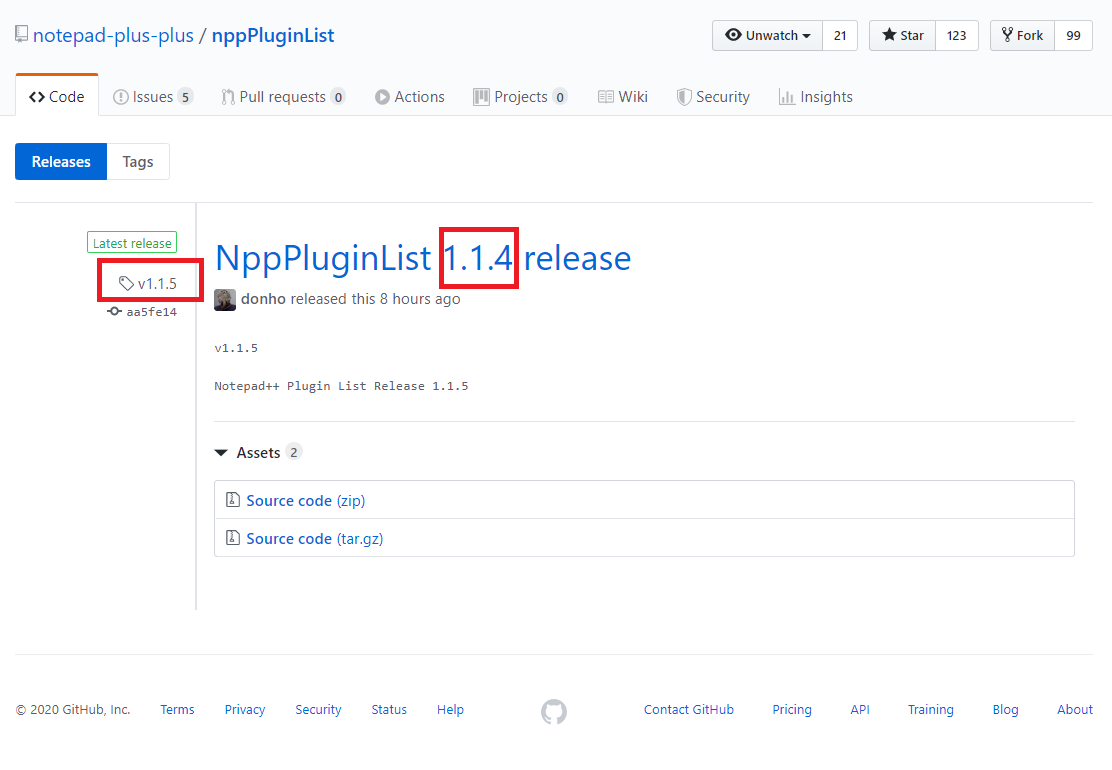
It’s kinda out of context but the name of the NppPluginList release has a big typo that can lead to misunderstanding : 1.1.4 instead 1.1.5
-
@cmeriaux
Thank you for your heads up.
It’s fixed now. -
This should be a minor bug. In Preferences->Auto-Completion if you uncheck and recheck the Enable auto-completion on each input option, the highlighted with blue “from” characters are not highlighted any more.
-
Hello, @don-ho, and All,
Many thanks for this new version, especially for points
#1,#4and#10:-))One question, Don : what does the point
#7means ?!7. Make cmd cli (for “Open Containing Folder in cmd”) customizable.
Personally, I did not see any difference from before !
Here’s a tip, regarding the new option in the Find dialog ( point
#4)Let’s suppose you decided to adopt the new behaviour of the
Find whatfield, ticking theSettings > Preferences... > MISC. > Don"t fill find field in Find dialog with selected wordoptionTo get the old behaviour ( the
Find whatfilled with current main selection or with word close to the caret ) :-
Do a selection of the normal text, extended text or regular expression to search for
-
Use, once, the
Ctrl + F3shortcut -
Then, hit the
[ Shift +] F3shortcut, as usual
Oh, I forgot : for lack of space, the
Auto-indentoption has been logically moved from theMISC.panel to theAuto-completionpanel !Best Regards,
guy038
-
-
Personally, I did not see any difference from before !
It’s for the advanced users. So users have to modify config file manually :
https://github.com/notepad-plus-plus/notepad-plus-plus/commit/4228c315fd53298dad0712a0bce74452fd69994b -
@donho said in Notepad++ 7.8.3 Release Candidate:
It’s for the advanced users. So users have to modify config file manually :
FINE WITH ME!! SOOO looking forward to trying this as I’ve converted to Powershell from CMD years ago and other N++ plugins support it (NppConsole, Explorer, etc.)
Thank You!
-
P PeterJones locked this topic on




Hello! It looks like you're interested in this conversation, but you don't have an account yet.
Getting fed up of having to scroll through the same posts each visit? When you register for an account, you'll always come back to exactly where you were before, and choose to be notified of new replies (either via email, or push notification). You'll also be able to save bookmarks and upvote posts to show your appreciation to other community members.
With your input, this post could be even better 💗
Register Login