SQL keywords not highlighted
-
Some ANSI SQL keywords are not highlighted like:
(keywords)
backup
database
full
top
(functions)
string_split
string_agg
Should I open a ticket in Github, or are there some reasons for that?
And what about T-SQL keywords (no ANSI)? -
All except the functions are highlighted for me.
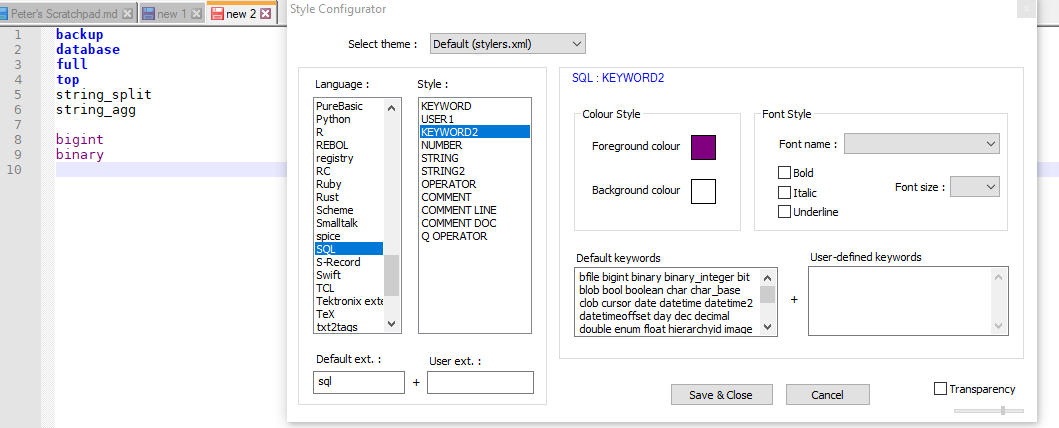
You might want to check to make sure that you have the most recent Notepad++, with its updated langs.xml. The
backupanddatabaseandfullandtopwere all added in Jul 2019, which means they should have been in most or all of the v7.8.x versions – though there is ambiguity to me when that got merged, so I’d say to be safe, grab v7.8.4.If you have v7.8.4, but those aren’t in the KEYWORDS2 list that I showed in the image, you might try to delete
%AppData%\Notepad++\langs.xml, so that Notepad++ regenerates it from the install-directory’slangs.model.xml.For the functions and any T-SQL keywords that you want, which still aren’t in
langs.model.xml, you could add them to the User-defined keywords box in one of the three KEYWORD, USER1, or KEYWORD2 boxes, as appropriate. -
thanks,
I had already had the 7.8.4, then I deleted the file and now it works!
For the ANSI and T-SQL missing key word, I can add it to the User-defined keywords.
Should I also open a ticket in Github for ANSI missing key word?
I have to check but I think that “string_split” and “string_agg” are ANSI 2016 and I’m not sure about try_convert. -
@conky77 said in SQL keywords not highlighted:
then I deleted the file and now it works!
Yeah: when the
*.model.xmlconfig files change, but you already have an installation with the non-.modelconfig file, the updater/installer doesn’t clobber your existing config file; but that means that sometimes, people who have been longtime users aren’t working with the most-recent config defaults. It’s part of the tradeoff between being polite to the existing user (don’t delete my customized config!) vs updated settings availability (the keywords are missing!).Should I also open a ticket in Github for ANSI missing key word?
If you think the change would be useful to the general audience of people who use Notepad++ to edit SQL, then creating a GitHub issue is a good idea. It probably won’t be a high-priority edit; but then again, it’s not a high-difficulty or high-risk edit.
If you do open a ticket, post a link in this thread to the issue.
-
I created the issue 7988


Hello! It looks like you're interested in this conversation, but you don't have an account yet.
Getting fed up of having to scroll through the same posts each visit? When you register for an account, you'll always come back to exactly where you were before, and choose to be notified of new replies (either via email, or push notification). You'll also be able to save bookmarks and upvote posts to show your appreciation to other community members.
With your input, this post could be even better 💗
Register Login