Spell-check highlighting delayed
-
I use version 7.8.5 on windows 10. My spell-check highlighting does not immediately work. If I misspell a word it will not be underlined until I change tabs to another file and come back. It does know of the misspelling immediately; if I right-click on the word it gives me a list of choices in the pop-up menu, even though it was not underlined.
-
By the way, this used to work for me. It stopped working after a new notepad++ version I think, but I don’t recall which. Its been roughly a year I guess.
-
Assuming you’re using DSpellCheck? What version - the latest? Confirm with Plugins=>Plugins Admin… Updates tab; if there is a newer version available it will list here. Also, please tell us the version you are using:
Plugins=>DSpellCheck=>About.
It could be DSpellCheck settings. I have it set to check all files *.*, but also to “In code, check only” comments and strings. I don’t know how DSpellCheck determines what’s code and what’s not unless it’s looking at the N++ language selected for the given file.
In short, we need a bit more info to help:
?=>Debug Info
Plugins=>DSpellCheck=>AboutMaybe a screenshot of the file you’re editing with misspellings, not highlighted?
Cheers.
-
DSpellCheck 1.4.6.0
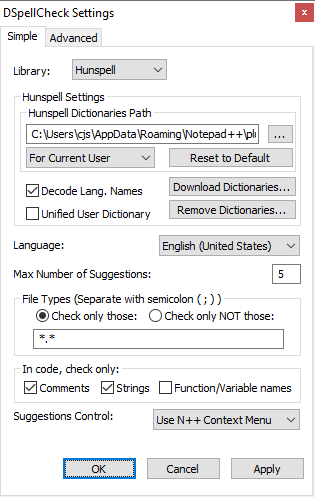
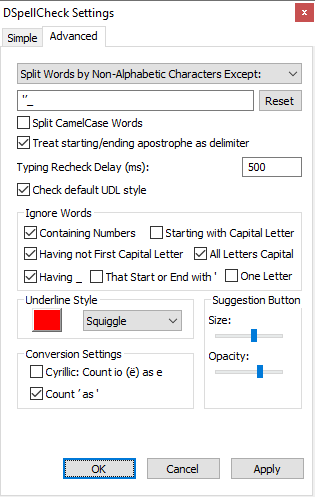
-
I just updated DSpellCheck to version 1.4.15.0; the problem went away. Sorry for the bother.
-
No worries!! Glad it worked out. I believe 1.4.16 is the latest DSpellCheck available for Notepad++ 7.8.7. But as long as it’s working - stay where you are!
Cheers.


Hello! It looks like you're interested in this conversation, but you don't have an account yet.
Getting fed up of having to scroll through the same posts each visit? When you register for an account, you'll always come back to exactly where you were before, and choose to be notified of new replies (either via email, or push notification). You'll also be able to save bookmarks and upvote posts to show your appreciation to other community members.
With your input, this post could be even better 💗
Register Login