Cannot Install New Plugins
-
I have been trying to install additional plugins but no matter what I try it does not work. I do not get any error messages. Can someone help me to install plugins?
Notepad++ v7.9.2 (64-bit)
Build time : Dec 31 2020 - 04:01:34
Path : C:\Users\MTARKOW3\Notepad\Notepad++\notepad++.exe
Admin mode : OFF
Local Conf mode : OFF
OS Name : Windows 10 Enterprise (64-bit)
OS Version : 1909
OS Build : 18363.1316
Current ANSI codepage : 1252
Plugins : ComparePlugin.dll DSpellCheck.dll mimeTools.dll NppConverter.dll NppExec.dll NppExport.dll -
I have never seen difficulty with v7.9.2 installing plugins. I have used it both under “normal installation” (
c:\program files\notepad++\) and portable instances (where debug info showsLocal Conf mode : ON).- Do you have write permission to
C:\Users\MTARKOW3\Notepad\Notepad++\folder? - Do you have write permission to
C:\Users\MTARKOW3\Notepad\Notepad++\pluginsfolder? - How are you trying to install the plugins? Tell us the exact steps you are taking
- Do you have write permission to
-
Open Notepad++
Plugins / Plugins Admin
Select checkbox for JSTool and click install.
Notepad++ restarts but new plugin not added.Also, I cannot update existing plugins displayed under Updates tab.
-
What about the question whether you do have proper write access to the mentioned directories?
-
yes, I have write access
-
do you know procmon?
Just before you click install I would start it, set a filter for process to be notepad++.exe and gup.exe
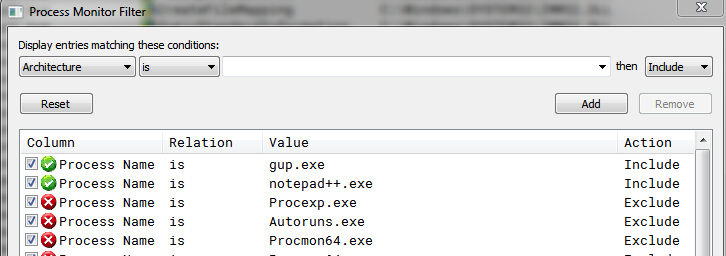
and see what it does
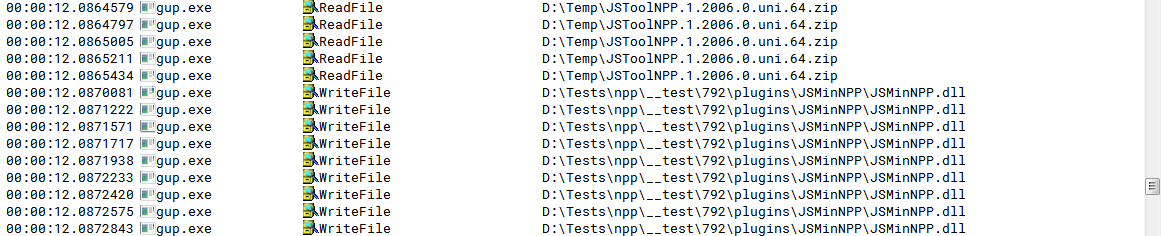
Maybe that will give you a hint why this isn’t working for you.
-
I had to move my installaion to C:\Program Files\Notepad++ and everything worked.
Thank you for your help. All set.



Hello! It looks like you're interested in this conversation, but you don't have an account yet.
Getting fed up of having to scroll through the same posts each visit? When you register for an account, you'll always come back to exactly where you were before, and choose to be notified of new replies (either via email, or push notification). You'll also be able to save bookmarks and upvote posts to show your appreciation to other community members.
With your input, this post could be even better 💗
Register Login