Community
    • Login

    Page side by side preview/ feature request

    Scheduled Pinned Locked Moved General Discussion
    20 Posts 5 Posters 2.4k Views 1 Watching
    Loading More Posts
    • Oldest to Newest
    • Newest to Oldest
    • Most Votes
    Reply
    • Reply as topic
    Log in to reply
    This topic has been deleted. Only users with topic management privileges can see it.
    • overstopO Offline
      overstop
      last edited by

      What is cloning ?

      Alan KilbornA 1 Reply Last reply Reply Quote 0
      • Alan KilbornA Offline
        Alan Kilborn @overstop
        last edited by

        @overstop

        Best way to understand it is to try it:

        • right-click a Notepad++ tab for a file
        • choose Clone to other view in the resulting popup menu
        overstopO 1 Reply Last reply Reply Quote 5
        • overstopO Offline
          overstop @Alan Kilborn
          last edited by

          Thank you. How can sync scrolling of the two views?

          Alan KilbornA 1 Reply Last reply Reply Quote 0
          • Alan KilbornA Offline
            Alan Kilborn @overstop
            last edited by

            @overstop

            View menu > Synchronize Vertical Scrolling

            1 Reply Last reply Reply Quote 4
            • overstopO Offline
              overstop
              last edited by overstop

              Would it be possible to add feature:
              Clone to other view sets right view first line as last line of the left view + 1 automatically ?

              Alan KilbornA 1 Reply Last reply Reply Quote 0
              • Alan KilbornA Offline
                Alan Kilborn @overstop
                last edited by

                @overstop said in Page side by side preview/ feature request:

                Would it be possible to add feature:

                Probably not reasonable as a feature addition.
                Probably very doable as a script.

                1 Reply Last reply Reply Quote 1
                • Alan KilbornA Offline
                  Alan Kilborn
                  last edited by Alan Kilborn

                  Here’s a barebones PythonScript that shows how this could work:

                  notepad.menuCommand(MENUCOMMAND.VIEW_CLONE_TO_ANOTHER_VIEW)
                  editor2.setFirstVisibleLine(editor1.getFirstVisibleLine() + editor1.linesOnScreen())
                  notepad.menuCommand(MENUCOMMAND.VIEW_SYNSCROLLV)
                  

                  Because Notepad++'s View menu’s Synchronize Vertical Scrolling choice is a toggle, however, the above only works if it is currently off. This is a problem with a few Notepad++ menu commands and scripts.

                  I wonder if @Ekopalypse has some ideas about some script code that can read the status of a checkable menu item? Ideally it would depend only upon command-id (e.g. 44035 in this case) and not the text of the menu item (to avoid problems with using N++ in a different localization).

                  EkopalypseE 2 Replies Last reply Reply Quote 1
                  • EkopalypseE Offline
                    Ekopalypse @Alan Kilborn
                    last edited by

                    @Alan-Kilborn

                    I ASSUME i can be done using GetMenuItemInfoW and MENUITEMINFOW. Will follow up later, probably tomorrow.

                    1 Reply Last reply Reply Quote 1
                    • EkopalypseE Offline
                      Ekopalypse @Alan Kilborn
                      last edited by

                      @Alan-Kilborn

                      A quick one, just tested with py3.
                      Now I need to shutdown before I get into trouble with my family boss. :-)

                      import os
                      import ctypes
                      from ctypes import wintypes
                      
                      user32 = ctypes.WinDLL('user32')
                      
                      MFS_ENABLED = 0x0
                      MFS_DISABLED = 0x3
                      MIIM_STATE = 1
                      MIIM_ID = 2
                      MIIM_SUBMENU = 4
                      MIIM_STRING = 64
                      MFT_STRING = 0
                      MFS_ENABLED = 0
                      
                      MF_BYPOSITION = 0x00000400
                      MF_POPUP = 0x00000010
                      
                      class MENUITEMINFO(ctypes.Structure):
                          ''' Implements the winapi MENUITEMINFO structure'''
                          _fields_ = [('cbSize', wintypes.UINT),
                                      ('fMask',  wintypes.UINT),
                                      ('fType',  wintypes.UINT),
                                      ('fState',  wintypes.UINT),
                                      ('wID',  wintypes.UINT),
                                      ('hSubMenu',  wintypes.HMENU),
                                      ('hbmpChecked',  wintypes.HBITMAP),
                                      ('hbmpUnchecked', wintypes.HBITMAP),
                                      ('dwItemData',  wintypes.LPVOID),
                                      ('dwTypeData',  wintypes.LPWSTR),
                                      ('cch',  wintypes.UINT),
                                      ('hbmpItem',  wintypes.HBITMAP),]
                      
                      main_menu = notepad.getMenuHandle(1)
                      view_menu = user32.GetSubMenu(main_menu, 3)
                      menu_items = user32.GetMenuItemCount(view_menu)
                      print(menu_items)
                      
                      for pos in range(menu_items):
                          mii = MENUITEMINFO()
                          mii.cbSize = ctypes.sizeof(mii)
                          mii.fMask = MIIM_ID | MIIM_STATE
                          # mii.fType = None
                          mii.dwTypeData = None
                          lpmii = ctypes.byref(mii)
                      
                          user32.GetMenuItemInfoW(view_menu, pos, True, lpmii)
                          for field in mii._fields_:
                              if mii.wID == 44035:
                                  print('State:', mii.fState)
                                  break
                      
                      Alan KilbornA 2 Replies Last reply Reply Quote 4
                      • Alan KilbornA Offline
                        Alan Kilborn @Ekopalypse
                        last edited by

                        @Ekopalypse said in Page side by side preview/ feature request:

                        A quick one, just tested with py3.

                        Nice – works fine!
                        Thank you.

                        Now I need to shutdown before I get into trouble with my family boss

                        Way worse than the Monday thru Friday boss, when you get their ire up!
                        Go man go!

                        1 Reply Last reply Reply Quote 2
                        • Alan KilbornA Offline
                          Alan Kilborn @Ekopalypse
                          last edited by

                          @Ekopalypse

                          I turned your script into the following recursive function that finds a specified id:

                          def menu_search_for_specified_id(menu_handle, id_to_find):  # returns ( direct-menu-handle, position-on-menu )
                              menu_item_count = user32.GetMenuItemCount(menu_handle)
                              for menu_pos in range(menu_item_count):
                                  sub_menu_handle = user32.GetSubMenu(menu_handle, menu_pos)
                                  if sub_menu_handle != 0:
                                      (h, p) = menu_search_for_specified_id(sub_menu_handle, id_to_find)
                                      if h != 0: return (h, p)
                                  else:
                                      mii = MENUITEMINFO()
                                      mii.cbSize = ctypes.sizeof(mii)
                                      mii.fMask = MIIM_ID
                                      mii.dwTypeData = None
                                      lpmii = ctypes.byref(mii)
                                      user32.GetMenuItemInfoW(menu_handle, menu_pos, True, lpmii)
                                      if mii.wID == id_to_find: return (menu_handle, menu_pos)
                              return (0, 0)  # nothing found
                          

                          I’ll keep going with a final solution for the OP’s request, that uses this…interested parties please check back later. :-)

                          1 Reply Last reply Reply Quote 2
                          • AmitA Offline
                            Amit
                            last edited by

                            • You can Clone the text document to the other view. (Dual View).
                            • Scroll down to about page length.
                            • And then use Synchronized Vertical Scrolling feature to have Two-Page View in Notepad++.

                            This is not a fully automated feature but one that you can do it very easily.

                            This video shows how you can use Synchronized Vertical/horizontal scrolling feature in Notepad++. Hope it helps.

                            (disclaimer: I am the owner of this Notepad++ YouTube Channel).

                            EkopalypseE 1 Reply Last reply Reply Quote 0
                            • EkopalypseE Offline
                              Ekopalypse @Amit
                              last edited by

                              @Amit - that is what @Alan-Kilborn suggested first, isn’t it?

                              1 Reply Last reply Reply Quote 1
                              • Alan KilbornA Offline
                                Alan Kilborn
                                last edited by

                                I found time sooner than I thought to integrate the menu-search function into the main code for this thread’s topic.

                                Here’s a replacement script; obviously, quite a bit more complicated.
                                But, due to the virtues of encapsulation, the run() function looks very much like the original, simpler script (the first script provided in this thread).

                                I call the script CloneActiveDocAndCreateDualPageView.py and here’s its code:

                                # -*- coding: utf-8 -*-
                                
                                from Npp import editor, notepad, MENUCOMMAND
                                import ctypes
                                from ctypes import wintypes
                                
                                user32 = ctypes.WinDLL('user32')
                                
                                MIIM_STATE = 1
                                MIIM_ID = 2
                                MFS_DISABLED = 0x3
                                MFS_CHECKED = 0x8
                                
                                class MENUITEMINFO(ctypes.Structure):
                                    _fields_ = [
                                        ('cbSize', wintypes.UINT),
                                        ('fMask', wintypes.UINT),
                                        ('fType', wintypes.UINT),
                                        ('fState', wintypes.UINT),
                                        ('wID', wintypes.UINT),
                                        ('hSubMenu', wintypes.HMENU),
                                        ('hbmpChecked', wintypes.HBITMAP),
                                        ('hbmpUnchecked', wintypes.HBITMAP),
                                        ('dwItemData', wintypes.LPVOID),
                                        ('dwTypeData', wintypes.LPWSTR),
                                        ('cch', wintypes.UINT),
                                        ('hbmpItem', wintypes.HBITMAP),
                                    ]
                                
                                class CADACDPV(object):
                                
                                    def __init__(self):
                                        pass
                                
                                    def menu_search_for_specified_id(self, menu_handle, id_to_find):  # returns ( direct-menu-handle, position-on-menu )
                                        menu_item_count = user32.GetMenuItemCount(menu_handle)
                                        for menu_pos in range(menu_item_count):
                                            sub_menu_handle = user32.GetSubMenu(menu_handle, menu_pos)
                                            if sub_menu_handle != 0:
                                                (h, p) = self.menu_search_for_specified_id(sub_menu_handle, id_to_find)
                                                if h != 0: return (h, p)
                                            else:
                                                mii = MENUITEMINFO()
                                                mii.cbSize = ctypes.sizeof(mii)
                                                mii.fMask = MIIM_ID
                                                mii.dwTypeData = None
                                                lpmii = ctypes.byref(mii)
                                                user32.GetMenuItemInfoW(menu_handle, menu_pos, True, lpmii)
                                                if mii.wID == id_to_find: return (menu_handle, menu_pos)
                                        return (0, 0)  # nothing found
                                
                                    def view_menu_sync_vertical_scroll_not_on(self):
                                        npp_main_menu_handle = notepad.getMenuHandle(1)
                                        (owner_menu, pos_in_owner_menu) = self.menu_search_for_specified_id(
                                                npp_main_menu_handle, int(MENUCOMMAND.VIEW_SYNSCROLLV))
                                        if owner_menu != 0:
                                            mii = MENUITEMINFO()
                                            mii.cbSize = ctypes.sizeof(mii)
                                            mii.fMask = MIIM_STATE
                                            mii.dwTypeData = None
                                            lpmii = ctypes.byref(mii)
                                            user32.GetMenuItemInfoW(owner_menu, pos_in_owner_menu, True, lpmii)
                                            if not (mii.fState & MFS_DISABLED) and not (mii.fState & MFS_CHECKED):
                                                return True
                                        return False
                                
                                    def run(self):
                                        notepad.menuCommand(MENUCOMMAND.VIEW_CLONE_TO_ANOTHER_VIEW)
                                        editor2.setFirstVisibleLine(editor1.getFirstVisibleLine() + editor1.linesOnScreen())
                                        if self.view_menu_sync_vertical_scroll_not_on():
                                            notepad.menuCommand(MENUCOMMAND.VIEW_SYNSCROLLV)
                                
                                if __name__ == '__main__': CADACDPV().run()
                                
                                1 Reply Last reply Reply Quote 2
                                • Alan KilbornA Offline
                                  Alan Kilborn
                                  last edited by Alan Kilborn

                                  @Ekopalypse

                                  One thing I noticed… In the code you provided, you called:

                                  notepad.getMenuHandle(1)

                                  and it works to get the main-menu handle (I suppose! because the rest of the logic works!).

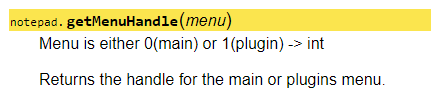
                                  But the documentation for this says 0 should be the main menu:

                                  507731ce-419d-4953-80dd-f062f40fa196-image.png

                                  Is my PythonScript documentation simply out-of-date in this regard?
                                  Or…?

                                  EkopalypseE 1 Reply Last reply Reply Quote 1
                                  • EkopalypseE Offline
                                    Ekopalypse @Alan Kilborn
                                    last edited by

                                    @Alan-Kilborn

                                    Not sure if this is an issue with PS code or documentation?
                                    But yes, 1 seems to return the main and 0 the plugin handle.

                                    PeterJonesP 1 Reply Last reply Reply Quote 2
                                    • PeterJonesP Online
                                      PeterJones @Ekopalypse
                                      last edited by

                                      @Ekopalypse said in Page side by side preview/ feature request:

                                      @Alan-Kilborn

                                      Not sure if this is an issue with PS code or documentation?
                                      But yes, 1 seems to return the main and 0 the plugin handle.

                                      When I implemented in perl, I used 1 for main and 0 for plugin. The NPPM_GETMENUHANDLE docs agree that 1 is main.

                                      The PS docs are wrong.

                                      1 Reply Last reply Reply Quote 2
                                      • overstopO Offline
                                        overstop
                                        last edited by

                                        When reading a book, you have lelf and right page open thus I was thinking in np++ this book view side by side would be a natural option to have.


                                        1 Reply Last reply Reply Quote 0

                                        Hello! It looks like you're interested in this conversation, but you don't have an account yet.

                                        Getting fed up of having to scroll through the same posts each visit? When you register for an account, you'll always come back to exactly where you were before, and choose to be notified of new replies (either via email, or push notification). You'll also be able to save bookmarks and upvote posts to show your appreciation to other community members.

                                        With your input, this post could be even better 💗

                                        Register Login
                                        • First post
                                          Last post
                                        The Community of users of the Notepad++ text editor.
                                        Powered by NodeBB | Contributors