File Association - White Leaf Instead Icons
-
Hello.
Please tell why when I register the file association through the NOTEPAD++ settings, then the icons of the corresponding file types turn into a white sheet?
Example:


Windows 10 Pro 20H2 x64, notepad++ 7.9.4 Portable
-
You can add standard Windows icons in NotePad++ with file associations so that the display of the icons is the same as with the standard Windows notepad, but the file has always opened through NotePad++
P.S: Sorry for my English, i use Google Translate.
-
Please do not ignore my message :(
-
@User-Soft said in File Association - White Leaf Instead Icons:
Please do not ignore my message :(
Sorry, there are dozens of questions a day, and occasionally one or two slip through unanswered; and when you reply to yourself, it stops showing up as “0 replies”, so it’s not as obvious that it hasn’t been answered. For example, I didn’t chime in because I don’t use that menu to make associations (I’ve never trusted apps to change associations in a reasonable manner on their own, so I do all my associations in the registry myself), so I was hoping someone who uses the internal association settings would be able to chime in; and in the meantime, since none of the “recent messages” showed up as “0 replies”, I hadn’t noticed no one ever replied to you.
Unfortunately, I still don’t know how to make the icon right from inside Notepad++.
Assuming that your registry maps
.txttotxtfile, then if you go toHKEY_CLASSES_ROOT\txtfile\, there should be aDefaultIconkey; mine has(Default)value set to%SystemRoot%\system32\imageres.dll,-102which uses the standard windows text-file icon -
@User-Soft I’m not sure but maybe you need to install the Notepad++ locally instead of using a portable version.
Maybe then the icons would be displayed differently.
Like this:
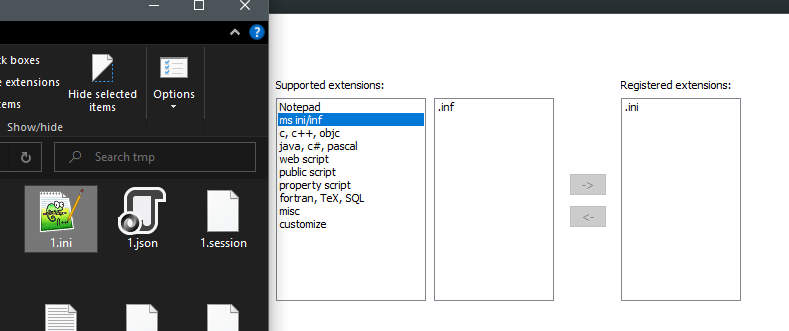
I’ve done it with local installation of Notepad++.


Hello! It looks like you're interested in this conversation, but you don't have an account yet.
Getting fed up of having to scroll through the same posts each visit? When you register for an account, you'll always come back to exactly where you were before, and choose to be notified of new replies (either via email, or push notification). You'll also be able to save bookmarks and upvote posts to show your appreciation to other community members.
With your input, this post could be even better 💗
Register Login