Direct folders/Notepad++
-
I use direct folders to quickly access my latest projects. However when i go to save a new file and i double click and select a folder via direct folders, notepad++ gives me the following message;
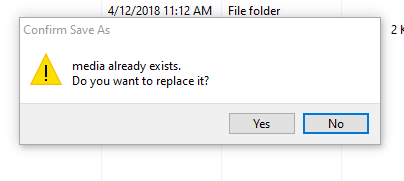
Which is the folder i have selected in direct folders.
Is there anyway around this? Some setting maybe? -
Please elaborate what a “direct folder” is? Do you mean links or junctions?
-
Direct folders is a pop-up utility that allows you to navigate to the most recent folders or a predefined folder
https://www.codesector.com/directfolders -
To me it sounds like an effect from a setting in an older version of Notepad++ that isn’t present in recent versions, so I’m guessing it would not manifest a problem like you are seeing. Can you provide your Debug Info from the
?menu in the menu bar? -
I have updated reently and it does appear to be working. I will make sure i record the Debug Info if it occurs in the future.
Thanks you for your help -
@Anthony-Blinco said in Direct folders/Notepad++:
I will make sure i record the Debug Info if it occurs in the future
Just to clarify here, you don’t record the “Debug Info”.
Debug Info is a popup you invoke that has text describing things about your install of Notepad++; version #, operating system, what plugins you have, etc. There’s an option to copy it to the clipboard for pasting somewhere useful, like into a posting here.As I mentioned before Debug Info is found on the ? menu, on the far right of Notepad++'s menu bar. Traditional applications call this menu the “Help” menu, but N++ chose to call it ?.
-
Very sorry here’s the debug info
Notepad++ v7.9.5 (32-bit)
Build time : Mar 21 2021 - 02:09:07
Path : C:\Program Files (x86)\Notepad++\notepad++.exe
Admin mode : OFF
Local Conf mode : OFF
OS Name : Windows 10 Home (64-bit)
OS Version : 2009
OS Build : 19042.867
Current ANSI codepage : 1252
Plugins : CodeAlignmentNpp.dll DSpellCheck.dll LocationNavigate.dll mimeTools.dll NppConverter.dll NppExec.dll NppExport.dll NppTextFX.dll -
@Anthony-Blinco said in Direct folders/Notepad++:
Given your earlier comment of:
I have updated reently and it does appear to be working.
It wasn’t really necessary for you to provide Debug Info now (since your issue is solved).
I was just attempting to clarify what was meant by it, since your earlier reply seemed to indicate you didn’t know what it was. -
I thought so. Thanks for your help yet again.


Hello! It looks like you're interested in this conversation, but you don't have an account yet.
Getting fed up of having to scroll through the same posts each visit? When you register for an account, you'll always come back to exactly where you were before, and choose to be notified of new replies (either via email, or push notification). You'll also be able to save bookmarks and upvote posts to show your appreciation to other community members.
With your input, this post could be even better 💗
Register Login