I need to riduce my text. Easy problem
-
Hi everyone, sorry for my english.
I need to set up my notes in a simple way. I have some lists that I would like to reduce with + and -. Let me explain with some examples.
i currently use xml:
-
<Boy>
| mick
| patrick
| Steave
</boy> -
<Woman>
| Erika
| Giudith
</woman>
Is there a method without opening and closing <> </> to collapse the lists?
I don’t use notepad to program, but to sort my notes, so I can also change the language to simplify what I said. -
-
Sorry, I guess I don’t quite understand what you want – or rather, I’m not sure why choosing “xml” isn’t sufficient. Clicking on the +/- next to a collapsible section is the way to collapse a single level (or you can use the View > Collapse/Uncollapse Level submenus to affect all levels at the same time.
Are you saying that you don’t actually have XML-like
<>around theBoyandWoman, and you still want the ability to collapse? That’s doable with a UDL, but it would take knowing what your file format really looked like to know for sure.For example, if your file format looked like
* Boy
    | mick
    | patrick
    | steave
end

* Woman
    | Erika
    | Giudith
end
Then you could set up a UDL (user defined language), where yould define
*as the start of folding andendas the end of the folding block. (Unfortunately, I don’t know a way to set a blank line as the end of a UDL folding block, sorry.)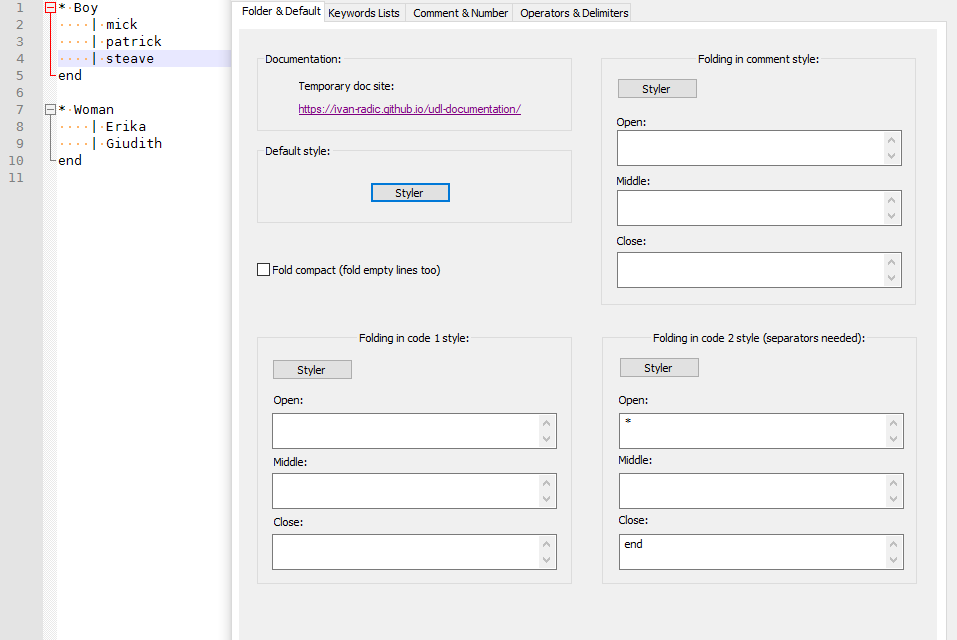
If your data looks different than that, then you’ll have to give an example – after tying the example data, select it all and hit the
</>toolbar button in the forum, so it goes in black box, like my example data above does
With example data, we might be able to come up with a UDL folding definition that would work for you. But there are limits as to what will and won’t work.


Hello! It looks like you're interested in this conversation, but you don't have an account yet.
Getting fed up of having to scroll through the same posts each visit? When you register for an account, you'll always come back to exactly where you were before, and choose to be notified of new replies (either via email, or push notification). You'll also be able to save bookmarks and upvote posts to show your appreciation to other community members.
With your input, this post could be even better 💗
Register Login