Notepad++ v8 Release Candidate 3
-
Notepad++ v8 Release Candidate is available here:
http://download.notepad-plus-plus.org/repository/8.x/8.0.RC3/The fixes of RC3 from the RC2:
- Invert lightness of plugin toolbar icons for dark mode (if present).
- Add new API NPPM_ADDTOOLBARICON_FORDARKMODE for dark mode.
- Add 1 click action (SHIFT-click) on close button to close all tabs in dockable panel.
Notepad++ v8 new features & bug-fixes:
- Add Dark Mode. (Implement #9183 & #7692)
- ARM64 build is available. (Implement #5158)
- One button to build them all - build Notepad++ with Scintilla static lib and Boost RegExpr headers. (Implement #9594)
- Add new Fluent UI icons for toolbar. (Implement #9742)
- Add new feature “Distraction Free Mode” (Menu “View->Distraction Free Mode”).
- Add new API NPPM_ADDTOOLBARICON_FORDARKMODE for dark mode (Implement #9928).
- Add 1 click action (SHIFT-click) on close button to close all tabs in dockable panel (Implement #8922.
- Add ability of changing select text foreground color (optional). (Fix #3397 & #1314)
- Allow Replace to stop after replacement (optional). (Implement #4437)
- Add ability to reverse line order. (Implement #9837)
- Add ability to style only current instance of text. (Fix #9263)
- Fix duplicated entries in Auto-Completion pop-up window. (Fix #9711)
- Fix Python Function List not showing functions in some circumstance. (Fix #9844)
- Enhance Folder as Workspace performance while adding/removing files in bulk. (Fix #9203)
- Add Ada, Fortran, Fortran77 & Haskell in function lists. (Fix #9698)
- Improve performance of “Open all” command in Search results. (Fix #9819)
- Add “Copy Pathnames” command to Search results context menu. (Fix #9821)
- Catch regex search exceptions and show exception message. (Fix #9565)
- Add MarkAll Preference settings for case and word. (Fix #9751 & #5148)
- Fix regression: Handle “Default Directory” setting correctly in Open/Save File Dialog. (Fix #9767)
- Fix a special character in UTF16 file crash issue (regression). (Fix #9797)
- Add “Append extension” checkbox to Save As dialog. (Implement #9515)
- Fix Copy command in Search result is available as there’s no selection. (Fix #9757)
- Add padding ability in the edit zone. (Fix #2323)
- Make new tab name translatable. (Fix #2837)
- Improve character case handling in RegEx. (Fix #9636)
- Fix dragged out UDL file is not applied to UDL in the new instance. (Fix #3451)
- Add command line parameter for adding specified string to app title bar. (Implement #9539)
- Fix Auto-Completion ignoring case issue. (Fix #3997, #4833 & #4998)
- Fix “Match Whole Word” option being enabled in RegEx Search. (Fix #9766)
- Fix sort with column key selection that appears after tab characters. (Fix #9682)
- Fix “Reload Workspace” menu command not working issue. (Fix #9350)
- Fix view file in Edge browser failure issue if name contains spaces. (Fix #9313)
- Add ability to avoid accumulating multiple search results. (Fix #8777)
- Fix UTF-16 decoding/encoding for code points above U+FFFF. (Fix #9597, #3747 & #5754)
- Fix “Save As” command removing original path from recent files history issue. (Fix #9673)
- Fix function List button tool tips mixed up issue. (Fix #9804)
The release will be out in about
643 days if there’s no critical bug found. -
@donho ,
24 hours with no complaints! It’s a world record! :-)
Other than the fix to “Append Extension” in the SaveAs dialog, I haven’t yet found anything that doesn’t work the way it’s described in v8.0-RC3. (If only that PR had been a couple hours earlier… Pesky real life getting in the way of contributors’ schedules. ;-) )
Thanks for all your effort on this.
-
This post is deleted! -
@donho
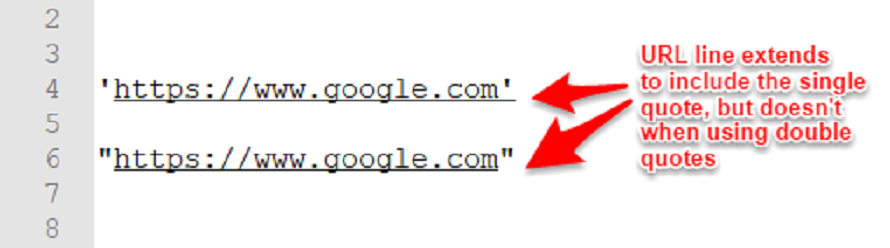
for URLs that are within SINGLE quotes, the closing quote (%27) is included as part of the URL.
It works fine for URLs within double quotes, but not single.
You can even see the URL underline extend to include a single quote, but not when in double quotes (see image)
-
The same thing happens in v7.9.5, so while I agree that it is a bug, it is not a regression specific to the upgrade to v8.0. Bugs like that should be reported by creating an issue in the github-based issues tracker – but you might want to search there to see whether it’s been reported already or not.
-
Hello @hmin124, @peterjones and All,
Indeed, the apostrophe (
\x27) should be considered as a valid character, in Internet addresses, only when not followed with a regex space char. So, if the regex\x27(?!\s)matches the'!Best regards,
guy038



Hello! It looks like you're interested in this conversation, but you don't have an account yet.
Getting fed up of having to scroll through the same posts each visit? When you register for an account, you'll always come back to exactly where you were before, and choose to be notified of new replies (either via email, or push notification). You'll also be able to save bookmarks and upvote posts to show your appreciation to other community members.
With your input, this post could be even better 💗
Register Login