Notepad++ v8.1 is available
-
how can we insert a image in notepad++???
can someone please help??? -
-
What your link points to isn’t what @Raheesh-Ramsy is asking about.
@Raheesh-Ramsy said:
how can we insert a image in notepad++???
Short answer: You can’t. Notepad++ doesn’t handle images, only text.
BOTH: This thread is for discussion of problems with the 8.1 release of Notepad++. Please don’t ask questions or make comments unrelated to that in this thread – create a new discussion thread in that case.
-
@ten2120 Interesting. Do you use any custom plugins? Have you enabled the dark mode?
It would be interesting to see your debug info (Menu > ? > Debug Info) -
And still no way to choose the obsolete icon. The app and file type icon is the only reason I’m sticking with 6.9.2.
-
@Andrei-Mincov-0 said in Notepad++ v8.1 is available:
And still no way to choose the obsolete icon. The app and file type icon is the only reason I’m sticking with 6.9.2.
And the award-winner for the dumbest reason ever to use an ancient version of a software program goes to…YOU.
Sorry, but that is really, really, really dumb. -
@Alan-Kilborn The old version does everything I really NEED it to do, and I prefer to use a program that uses file-type icons that look like word documents, not some random green bullshit.
-
@Andrei-Mincov-0 said in Notepad++ v8.1 is available:
The old version does everything I really NEED it to do
Then why come here to comment on it? Live on in your happy obsolescence. :-)
Seriously, though, aren’t there reasonable ways to get any icons you want using the OS instead of Notepad++ 's control?
If that aspect of the discussion is to be continued, respectfully request that you open a new discussion thread, as this one is sort of reserved for real 8.1 problems. -
@maddes-b said in Notepad++ v8.1 is available:
Themes are only installed to %APPDATA%\Notepad++\themes of the user who installed N++. Other users never get these (no themes at all in my case, see earlier post).
From my point of view this is a concept error. Default themes should be in %ProgramFiles%\Notepad++\themes and %APPDATA%\Notepad++\themes supersede these. I hope this would also fit the “settings in the cloud” approach.This issue will be fixed in the next release:
https://github.com/notepad-plus-plus/notepad-plus-plus/commit/3347044595cae60c658ed39e4f2e1ea913eb66e2 -
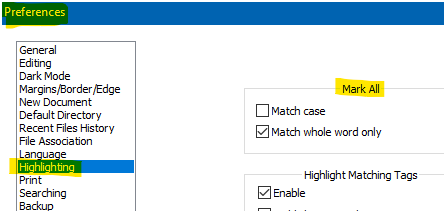
The is a regresion with the Style Token feature (under right click). For instance: write “RECONCILE” and “UNRECONCILE”. Select RECONCILE and apply a Style Token color. Before it would hightlight both RECONCILE from both words, even on UNRECONCILE (not highlighting “UN” as expected).
-
-
Thanks for the Helpful Suggestions. I think I figured out why it’s doing this, but I don’t know how to fix it. The app is installed on my OS drive, which is an SSD, but it seems Notepad++ is waiting for my other drives, which are regular HDD to spin up before it launches.
-
P PeterJones locked this topic on






Hello! It looks like you're interested in this conversation, but you don't have an account yet.
Getting fed up of having to scroll through the same posts each visit? When you register for an account, you'll always come back to exactly where you were before, and choose to be notified of new replies (either via email, or push notification). You'll also be able to save bookmarks and upvote posts to show your appreciation to other community members.
With your input, this post could be even better 💗
Register Login