Community
    • Login

    Notepad++ v8.1.2 Released

    Scheduled Pinned Locked Moved Announcements
    53 Posts 20 Posters 28.7k Views 9 Watching
    Loading More Posts
    • Oldest to Newest
    • Newest to Oldest
    • Most Votes
    Reply
    • Reply as topic
    Log in to reply
    This topic has been deleted. Only users with topic management privileges can see it.
    • mere-humanM Offline
      mere-human
      last edited by

      So here is the video from Vista VM. I type into the file name edit box, but nothing happens.
      https://imgur.com/90YNFn7

      1 Reply Last reply Reply Quote 0
      • mere-humanM Offline
        mere-human @dinkumoil
        last edited by

        @dinkumoil said in Notepad++ v8.1.2 Released:

        @donho

        I have Vista Enterprise in a VM and tested Save As. As @David-Sperduto wrote, I was not able to input a new filename, the dialog just hangs. Same with Save a copy as.

        I can take a look at the problem and try several things if someone creates an issue on GitHub.
        But I won’t promise anything.
        I’m not able to hook up a remote debugger to Vista VM (it works fine with Win 7 VM).

        Alan KilbornA David SperdutoD David Sperduto 0D 3 Replies Last reply Reply Quote 0
        • Alan KilbornA Offline
          Alan Kilborn @mere-human
          last edited by

          @mere-human

          IIRC, this is the first complaint received about the file dialogs and Vista, even though the file dialog change-out was a bit of time ago. To me this says the number of Vista users is low, probably. If it is not any easy repair, perhaps time to leave Vista behind?

          1 Reply Last reply Reply Quote 0
          • David SperdutoD Offline
            David Sperduto @mere-human
            last edited by

            @mere-human Sorry, I’ve been offline for a couple days. I’d be happy to try to create an issue on GitHub, although I’ve never worked on GitHub before so it may be a bumpy ride.
            If I’m the only Vista user in the Notepad++ universe, and it’s a headache to make this work, I’m happy to go back a version. For my purposes, Notepad++ knocks it out of the park every day for me, as it was!
            Thanks

            1 Reply Last reply Reply Quote 0
            • David Sperduto 0D Offline
              David Sperduto 0 @mere-human
              last edited by

              @mere-human Apparently GitHub also does not support Vista. Can’t set up an account. Just get a malfunctioning registration page. Can this really be the end?..oh well…some day I’ll upgrade to W10 but can’t get to it right now. Which Notepad++ version should I go back to?

              1 Reply Last reply Reply Quote 0
              • mere-humanM Offline
                mere-human
                last edited by

                Nevermind. Here is the issue I created: https://github.com/notepad-plus-plus/notepad-plus-plus/issues/10238
                I have a fix which turns out to be simple. Let’s see if it gets approved.

                David Sperduto 0D 1 Reply Last reply Reply Quote 1
                • Jason R MayberryJ Offline
                  Jason R Mayberry
                  last edited by

                  Just upgraded. It appears that the “Search/Mark All” feature now doesn’t work if you select a whole line or more. It works with the “Search/Mark One” feature, but this is less useful.

                  Jason R MayberryJ PeterJonesP 2 Replies Last reply Reply Quote 0
                  • Jason R MayberryJ Offline
                    Jason R Mayberry @Jason R Mayberry
                    last edited by

                    @Jason-R-Mayberry. FYI: I had to go back to 7.9.5 for this to work again.

                    1 Reply Last reply Reply Quote 0
                    • PeterJonesP Offline
                      PeterJones @Jason R Mayberry
                      last edited by

                      @Jason-R-Mayberry said in Notepad++ v8.1.2 Released:

                      Just upgraded. It appears that the “Search/Mark All” feature now doesn’t work if you select a whole line or more. It works with the “Search/Mark One” feature, but this is less useful.

                      Did you go to Settings > Preferences > Highlighting and turn off “Match whole word only” in the new “Mark All” section? Because with that on, it will only mark all if you’ve selected one word; with it off, it will mark all for partial words or multiple words

                      https://npp-user-manual.org/docs/preferences/#highlighting

                      Jason R MayberryJ 1 Reply Last reply Reply Quote 0
                      • David Sperduto 0D Offline
                        David Sperduto 0 @mere-human
                        last edited by

                        @mere-human Thank you for giving it a shot !!

                        1 Reply Last reply Reply Quote 0
                        • donhoD Offline
                          donho
                          last edited by

                          @David-Sperduto @dinkumoil
                          FYI, the fix is included in the master and it will be in the next release:
                          https://github.com/notepad-plus-plus/notepad-plus-plus/commit/a0c15274f54f388dadabf5231cec8cbfc23fa286

                          Thank you @mere-human for the prompt fix!

                          David Sperduto 0D 1 Reply Last reply Reply Quote 1
                          • David Sperduto 0D Offline
                            David Sperduto 0 @donho
                            last edited by

                            @donho Yes, thank you @mere-human and @donho. Very cool !! I have used Notepad++ for years, and almost every day. Very handy for the things I do.

                            1 Reply Last reply Reply Quote 1
                            • cmeriauxC Offline
                              cmeriaux @cmeriaux
                              last edited by

                              @cmeriaux said in Notepad++ v8.1.2 Released:

                              I found a regression introduced in V8.0.
                              Mark all feature is no longer configurable through “find dialog settings”. It was wery convenient to configure it through “find dialod settings”, in a same way like smart highlighting.
                              Please consider to set it back.

                              https://github.com/notepad-plus-plus/notepad-plus-plus/issues/10195

                              cheers
                              Christophe

                              @donho what about the regression I’ve found. Is there any chance to have a follow up on this ? Here is the feature request https://github.com/notepad-plus-plus/notepad-plus-plus/issues/10195
                              Thanks

                              1 Reply Last reply Reply Quote 1
                              • larsVoltaL Offline
                                larsVolta
                                last edited by larsVolta

                                Hi,

                                I don’t know if this is a problem with v8.1.2 or with >v8. When using Search & Replace for large files (5 million lines, 11 characters each line - replace 2 characters on each line) I’m waiting 15-20 minutes without progress and have to stop notepad++ hard.

                                I now downgraded to 7.9.5 again (from which I updated) and the same procedure takes about 3-4 minutes.

                                EkopalypseE 1 Reply Last reply Reply Quote 0
                                • EkopalypseE Offline
                                  Ekopalypse @larsVolta
                                  last edited by Ekopalypse

                                  @larsVolta

                                  Can you provide some information on what type of search/replace you do?
                                  Regular expressions or normal text search?
                                  This would give an indication of what to look for and how to replicate it to see
                                  if this is really a problem with Npp or perhaps with a plugin you are using
                                  that is having problems with the current version of Npp.

                                  larsVoltaL 1 Reply Last reply Reply Quote 0
                                  • larsVoltaL Offline
                                    larsVolta @Ekopalypse
                                    last edited by larsVolta

                                    @Ekopalypse

                                    Example: Each line looks similar to this (random letters): ABC;DEF;GHI. Now I want to replace “;” with “” (empty String)

                                    These are my Settings (for 8.1.2 and 7.9.5):
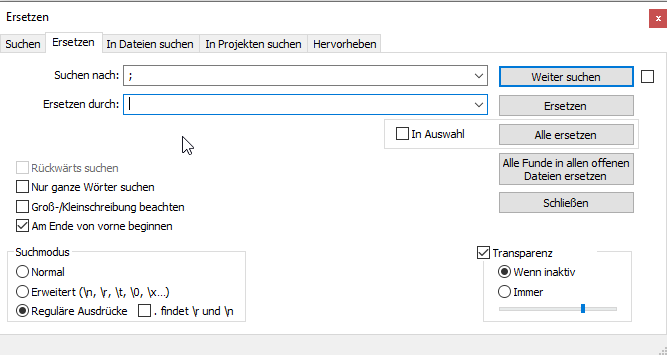
                                    f734b08c-03eb-4aa4-b6ae-ca6e7740bfc3-grafik.png

                                    1 Reply Last reply Reply Quote 0
                                    • donhoD Offline
                                      donho
                                      last edited by

                                      @larsVolta said in Notepad++ v8.1.2 Released:

                                      Example: Each line looks similar to this (random letters): ABC;DEF;GHI. Now I want to replace “;” with “” (empty String)
                                      These are my Settings (for 8.1.2 and 7.9.5):

                                      Could you report to Github issue tracker:
                                      https://github.com/notepad-plus-plus/notepad-plus-plus/issues

                                      with complete information please?

                                      1 Reply Last reply Reply Quote 2
                                      • Jason R MayberryJ Offline
                                        Jason R Mayberry @PeterJones
                                        last edited by

                                        @PeterJones Thank you. That was it.

                                        1 Reply Last reply Reply Quote 0
                                        • Scott MarchS Offline
                                          Scott March
                                          last edited by

                                          Long-time user. Thanks for the Dark Mode options. I noticed the Plug-in Admin dialog box is not using Dark Mode. Not a complaint ;) Just an FYI.

                                          PeterJonesP 1 Reply Last reply Reply Quote 0
                                          • PeterJonesP Offline
                                            PeterJones @Scott March
                                            last edited by

                                            @Scott-March said in Notepad++ v8.1.2 Released:

                                            Long-time user. Thanks for the Dark Mode options. I noticed the Plug-in Admin dialog box is not using Dark Mode. Not a complaint ;) Just an FYI.

                                            Don responded to my comment about that in the 8.1.2 Release Candidate thread

                                            1 Reply Last reply Reply Quote 0

                                            Hello! It looks like you're interested in this conversation, but you don't have an account yet.

                                            Getting fed up of having to scroll through the same posts each visit? When you register for an account, you'll always come back to exactly where you were before, and choose to be notified of new replies (either via email, or push notification). You'll also be able to save bookmarks and upvote posts to show your appreciation to other community members.

                                            With your input, this post could be even better 💗

                                            Register Login
                                            • First post
                                              Last post
                                            The Community of users of the Notepad++ text editor.
                                            Powered by NodeBB | Contributors