Dark mode: please darken the bright white line after folded code.
-
The dark mode is great! Here is one thing that could make it even better:
Whenever you folder some code, such as a function or a for-loop, you get this bright white (guessing 255,255,255) line all the way across and a plus sign inside a square on the left side. Could this bright white line be darkened in dark mode? If you have lots of these lines and they are really very bright.Thanks.
-
What theme do you have active? Because the folding color is determined by your theme (Style Configurator> Global Styles > Fold xxx), and the Dark Mode Default theme has reasonable color choices for folding.
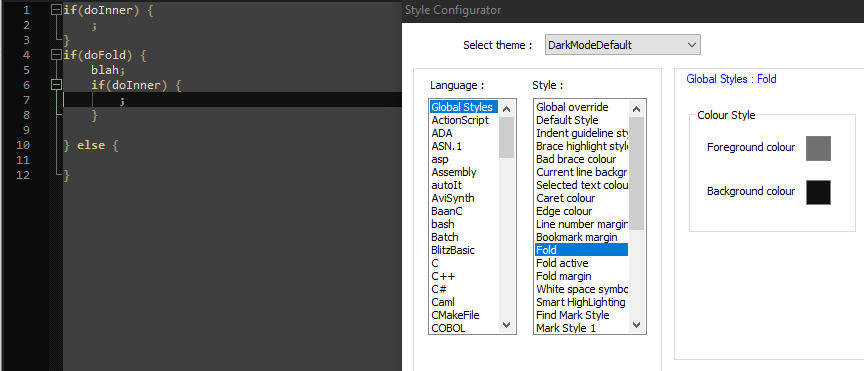
- FOLD (inactive fold) color is 112,112,112 (grey)
- FOLD ACTIVE (active fold) color is 127,159,127
- FOLD MARGIN (checkered background colors) are FG=(24,24,24), BG=(16,16,16)
-
Thanks for your response. I don’t have Fold active but my two other fold settings are both dark enough. But I started experimenting and found this option controls the color of the horizontal line, Default Style:
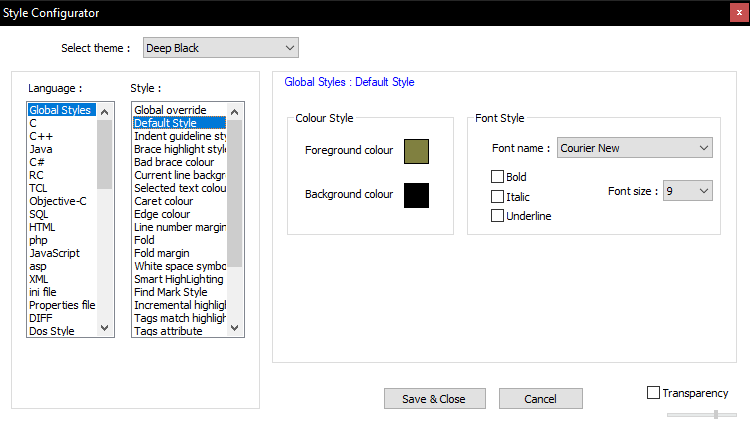
It was white. I changed it to a darker yellow. If I see other things turn into this color then I’ll have to find other ways to resolve.
What I meant are the horizontal lines that replace the folded content. Maybe I was not clear about this. -
As far as I can tell, this option also affects the search results. It’s no big deal for me.
-
What I meant are the horizontal lines that replace the folded content.
Weird. In all my time of using the folding feature of Notepad++, I don’t think it ever hit me that it indicated folded text by a horizontal line in the default-style’s foreground color. I had presumably seen the line, because it’s pretty obvious, but I don’t think I ever thought about it.
If I see other things turn into this color
Well, any text that uses the global default color will use that. But a well-defined lexer should have its own DEFAULT entry, and a UDL definitely will – and it doesn’t fold without a lexer or UDL active – so hopefully there isn’t much text in a lexer-or-UDL-active file that doesn’t get styled by the lexer-or-UDL.
However, given that the folding feature has other entries in the style configurator’s default-style section, you might want to make a feature request (see the FAQ), asking that they add a new Language:Global Styles > Style:Fold Horizontal style whose foreground color sets the color of that line (make sure you include a screenshot of that line) instead of using the default foreground. Because I think it would be a good idea to have that separately-configurable from the default foreground color. But it’s up to you.
-
@PeterJones said in Dark mode: please darken the bright white line after folded code.:
a new Language:Global Styles > Style:Fold Horizontal style whose foreground color sets the color of that line
Thanks @PeterJones !
Here is my new “feature request” issue:
https://github.com/notepad-plus-plus/notepad-plus-plus/issues/10313#issue-958429921
-
This post is deleted!


Hello! It looks like you're interested in this conversation, but you don't have an account yet.
Getting fed up of having to scroll through the same posts each visit? When you register for an account, you'll always come back to exactly where you were before, and choose to be notified of new replies (either via email, or push notification). You'll also be able to save bookmarks and upvote posts to show your appreciation to other community members.
With your input, this post could be even better 💗
Register Login