Ctrl+Shift+Z to Redo not working in 8.1.4 ?
-
I’d been putting off updating for a few releases, updated this morning and now Ctrl+Shift+Z doesn’t seem to be working. Ctrl+Y is working.
-
It works for me.
Steps
- Open fresh v8.1.4 (no change in settings from the time I unzipped or installed)
- Verify that Edit menu shows right keystrokes:
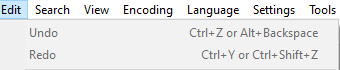
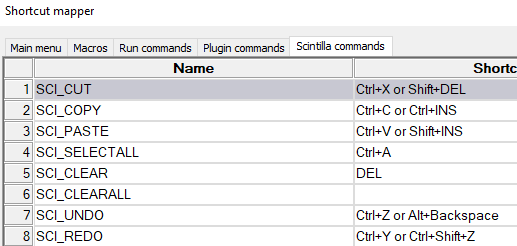
- Verify that Settings > Shortcut Mapper > Scintilla Commands lists two entries each for UNDO and REDO:
- Paste
It works for me. Ctrl+Zmakes the text go awayCtrl+Shift+Zmakes the text come back
I cannot replicate your problem. Sorry.
-
@PeterJones
Thanks for checking, Mine is working today as well, not sure when it started working again, but it’s still on 8.1.4 🤷♂️I swear it was broken for more than a few days before I reported the issue 😅


Hello! It looks like you're interested in this conversation, but you don't have an account yet.
Getting fed up of having to scroll through the same posts each visit? When you register for an account, you'll always come back to exactly where you were before, and choose to be notified of new replies (either via email, or push notification). You'll also be able to save bookmarks and upvote posts to show your appreciation to other community members.
With your input, this post could be even better 💗
Register Login