Community
    • Login

    Managing session with a lot of open files

    Scheduled Pinned Locked Moved General Discussion
    tabssessionsession manager
    17 Posts 3 Posters 2.6k Views 2 Watching
    Loading More Posts
    • Oldest to Newest
    • Newest to Oldest
    • Most Votes
    Reply
    • Reply as topic
    Log in to reply
    This topic has been deleted. Only users with topic management privileges can see it.
    • Alan KilbornA Offline
      Alan Kilborn @dz15mlru
      last edited by

      @dz15mlru said in Managing session with a lot of open files:

      How can I deal with them, how to hide/unhide open files tabs panel

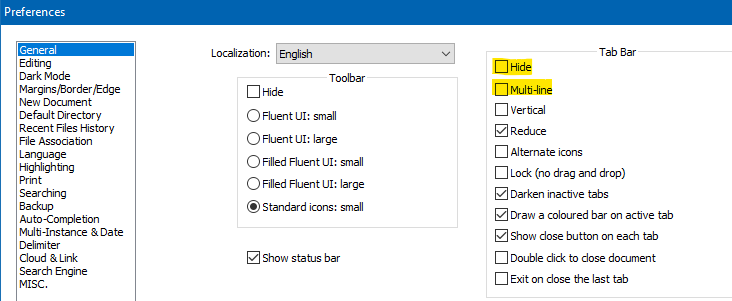
      Hide the tab bar entirely or turn off multiline:
      277fb5c2-2a59-432d-af90-5144092104f8-image.png

      Not sure how one deals with so many tabs mentally, but…if you can do it then good for you.

      @dz15mlru said in Managing session with a lot of open files:

      I really need to keep them open and unsaved

      IMO this is just asking for trouble, if you care about the data.

      dz15mlruD 1 Reply Last reply Reply Quote 3
      • dz15mlruD Offline
        dz15mlru @Alan Kilborn
        last edited by

        @alan-kilborn Mm. Thx. Probably useful options, but not for me. I need the multi-line enabled. If hiding the tab bar, I’ll need a hot key to easily toggle -show/hide the tab bar. Now I know what I need )
        Is there such a hot key, or should I request one?

        PeterJonesP Alan KilbornA 2 Replies Last reply Reply Quote 0
        • PeterJonesP Offline
          PeterJones @dz15mlru
          last edited by

          @dz15mlru ,

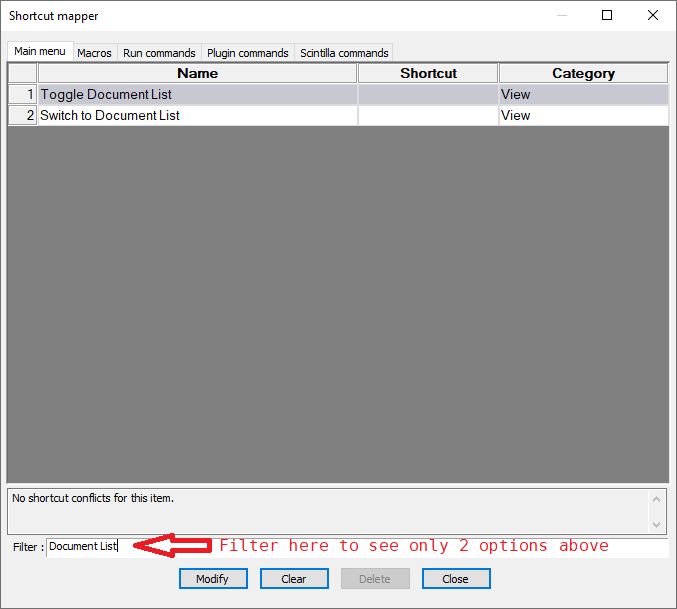
          You could hide the tab bar through the option once, and assign a keyboard shortcut to the View > Document List , which gives an alternate method of navigating all the tabs you have open.
          a013cdf3-9385-485a-a3e8-b0e611c6ef88-image.png

          dz15mlruD 1 Reply Last reply Reply Quote 4
          • Alan KilbornA Offline
            Alan Kilborn
            last edited by

            Also, if you use the PythonScript plugin, there are a couple of commands that could be tied to custom keycombos:

            notepad.hideTabBar()
            notepad.showTabBar()

            Rather than burn two available keycombos, you could write a script that will toggle, but there’s no corresponding .isTabBarVisible() function. :-(

            However, you could call showTabBar in startup.py and then have a toggling script that could internally keep track of the state.

            1 Reply Last reply Reply Quote 4
            • Alan KilbornA Offline
              Alan Kilborn @dz15mlru
              last edited by

              @dz15mlru said in Managing session with a lot of open files:

              Is there such a hot key, or should I request one?

              Apparently, you requested one:

              https://github.com/notepad-plus-plus/notepad-plus-plus/issues/11145

              Alan KilbornA 1 Reply Last reply Reply Quote 3
              • Alan KilbornA Offline
                Alan Kilborn @Alan Kilborn
                last edited by

                Here’s a PythonScript called TabBarVisibilityToggle.py that will (somewhat obviously) toggle the visibility of the tab bar with each run of the script. I tied it to the single hotkey suggestion of Ctrl+Alt+Shift+t.

                As indicated before, the startup state of N++ doesn’t know if the tab bar is showing or hiding, so I default to showing it with this single line in startup.py: notepad.showTabBar()

                So here’s the script:

                # -*- coding: utf-8 -*-
                from __future__ import print_function
                
                from Npp import *
                
                #-------------------------------------------------------------------------------
                
                class TBVT(object):
                
                    def __init__(self):
                        self.tab_bar_visible = True
                
                    def run(self):
                        self.tab_bar_visible = not self.tab_bar_visible
                        notepad.showTabBar() if self.tab_bar_visible else notepad.hideTabBar()
                
                #-------------------------------------------------------------------------------
                
                if __name__ == '__main__':
                    try:
                        tbvt
                    except NameError:
                        tbvt = TBVT()
                    tbvt.run()
                
                dz15mlruD 1 Reply Last reply Reply Quote 3
                • dz15mlruD Offline
                  dz15mlru @Alan Kilborn
                  last edited by

                  @alan-kilborn said in Managing session with a lot of open files:

                  Also, if you use the PythonScript plugin

                  I am not really into these plugins with user scripts.
                  Thanks for you efforts!
                  Tried to do it.
                  Added notepad.showTabBar() in startup.py
                  Created a new script with your code.
                  Can’t find how to assign hotkey to a script?
                  Now it works from menu’s script button.

                  Alan KilbornA 1 Reply Last reply Reply Quote 0
                  • dz15mlruD Offline
                    dz15mlru @PeterJones
                    last edited by

                    @peterjones
                    Oh, I’ve forgot about Document List mode. Thanks for suggestion.

                    I’ll stick to this variation for a while:
                    Show tab bar in single line and enable Document List mode.
                    Not really what I wanted; I’ll wait for the reqested hot key.

                    Alan KilbornA 1 Reply Last reply Reply Quote 0
                    • Alan KilbornA Offline
                      Alan Kilborn @dz15mlru
                      last edited by

                      @dz15mlru said in Managing session with a lot of open files:

                      Can’t find how to assign hotkey to a script?

                      There’s a nice demo of how to do that HERE.
                      At least I call it nice because I wrote it. :-)

                      dz15mlruD 1 Reply Last reply Reply Quote 0
                      • Alan KilbornA Offline
                        Alan Kilborn @dz15mlru
                        last edited by

                        @dz15mlru said in Managing session with a lot of open files:

                        I’ll wait for the reqested hot key.

                        Not all requests are fulfilled.
                        Typically devs will see issues that can be solved by plugins and they let that solution ride.
                        So…

                        1 Reply Last reply Reply Quote 1
                        • dz15mlruD Offline
                          dz15mlru @dz15mlru
                          last edited by

                          @dz15mlru said in Managing session with a lot of open files:

                          I have a lot of open files, over 200 up to 300

                          Session.xml says that actually there are 340+ open tabs ))

                          1 Reply Last reply Reply Quote 0
                          • dz15mlruD Offline
                            dz15mlru
                            last edited by

                            @alan-kilborn said in Managing session with a lot of open files:

                            Apparently, you requested one:
                            https://github.com/notepad-plus-plus/notepad-plus-plus/issues/11145

                            Yes.
                            Waiting, maybe it will be implemented soon.

                            Alan KilbornA 1 Reply Last reply Reply Quote 0
                            • Alan KilbornA Offline
                              Alan Kilborn @dz15mlru
                              last edited by

                              @dz15mlru said in Managing session with a lot of open files:

                              Waiting, maybe it will be implemented soon.

                              I take it you are new to this. ;-)
                              Good luck.

                              1 Reply Last reply Reply Quote 1
                              • dz15mlruD Offline
                                dz15mlru @Alan Kilborn
                                last edited by

                                @alan-kilborn said in Managing session with a lot of open files:

                                There’s a nice demo of how to do that HERE.

                                Can you check the link pls? It’s broken.

                                Alan KilbornA 1 Reply Last reply Reply Quote 0
                                • Alan KilbornA Offline
                                  Alan Kilborn @dz15mlru
                                  last edited by

                                  @dz15mlru said in Managing session with a lot of open files:

                                  Can you check the link pls? It’s broken.

                                  So it is. Try THIS instead.

                                  dz15mlruD 1 Reply Last reply Reply Quote 2
                                  • dz15mlruD Offline
                                    dz15mlru @Alan Kilborn
                                    last edited by

                                    @alan-kilborn Thank you! I’ve succeeded. It works fine!
                                    Great job!

                                    1 Reply Last reply Reply Quote 2
                                    • TeasyT Teasy referenced this topic on

                                    Hello! It looks like you're interested in this conversation, but you don't have an account yet.

                                    Getting fed up of having to scroll through the same posts each visit? When you register for an account, you'll always come back to exactly where you were before, and choose to be notified of new replies (either via email, or push notification). You'll also be able to save bookmarks and upvote posts to show your appreciation to other community members.

                                    With your input, this post could be even better 💗

                                    Register Login
                                    • First post
                                      Last post
                                    The Community of users of the Notepad++ text editor.
                                    Powered by NodeBB | Contributors
