Notepad++ v8.3 release
-
Notepad++ v8.3 installed.
When in PHP language, starting to write a command already known, it shows the list. if I see the autocompletion needed, i search with [ARROW UP/DOWN]+[ENTER].
i remember that before, the command was autocompleted.
now, it does a single “chariot return”.for instance, i want to write “public $my_data;”
so let’s start … : “pu”
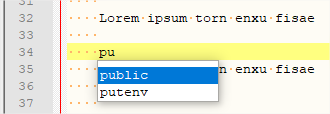
public is selected, so let press [ENTER]
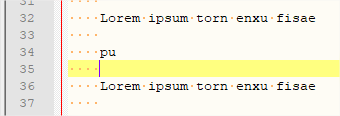
why do we need to do [CTRL]+[ENTER] to get the same result ? -
It was not Ctrl+Enter before: in previous versions, either the ENTER key or the TAB key would select the active choice from auto-complete. Starting in v8.2.1, the Developers added an option to configure whether it was ENTER or TAB or either (in Settings > Preferences > AutoCompletion); but because the option defaulted to TAB=on and ENTER=off, which changed the default behavior of Notepad++, it has confused a lot of users. You should go to that option, and
☑ ENTER, which will re-enable using ENTER to finish the auto-complete. -
@peterjones Oh, thanks. I was confused because in config page it still showed “Enter” as the key to autocomplete, so I couldn’t understand what was going on. Well this behavior is great anyways, so I’m glad its staying.
-
Great work, π do rust bl
-
T Terry R referenced this topic on
-
@donho Using the latest release v8.3 the command line parameter -nLineNumber is not working anymore …
It open the file at the first line …
I’m using Windows 10 and notepad++ (x64) msi installer …
To reproduce go to de commando prompt e type notepad++ -n5 test.txt -
@hercules-queiroz-palombo said in Notepad++ v8.3 release:
Using the latest release v8.3 the command line parameter -nLineNumber is not working anymore …
It open the file at the first line …
I’m using Windows 10 and notepad++ (x64) msi installer …
To reproduce go to de commando prompt e type notepad++ -n5 test.txtKnown issue. It will be fixed in the next version.
-
@michael-vincent said in Notepad++ v8.3 release:
It will be fixed in the next version.
which @Hercules-Queiroz-Palombo can confirm using the v8.3.1 Release Candidate
-
As always, dude, thanks for all your work on this great editor!
Considering the many improvements in 8.3 (and 8.3.1), I don’t understand why v8.2.1 said “no update is available” when I checked from within it. Would more frequent auto-updates require too much bandwidth?
-
@anderwriter said in Notepad++ v8.3 release:
Considering the many improvements in 8.3 (and 8.3.1), I don’t understand why v8.2.1 said “no update is available” when I checked from within it.
So this is a PERFECT example of exactly why it says no update is available.
8.3+ introduces HUGE file support, which caused a lot of new bugs to be introduced. Developers are working through the bugs, but probably at this point it isn’t a great idea for every single Notepad++ user out there to migrate to these versions. Just my 2c.
-
P PeterJones referenced this topic on
-
which caused a lot of new bugs to be introduced.
So why dont you release it marked as a beta version ?
-
@albrecht-hilker said in Notepad++ v8.3 release:
So why dont you release it marked as a beta version ?
There are “release candidate versions”; click HERE and glance down the list produced, and you’ll see them.
-
@albrecht-hilker said in Notepad++ v8.3 release:
So why dont you release it marked as a beta version ?
Because this is the sequence that the developer usually follows:
- Develop updates
- Submit as Release Candidate (RC) version
- Wait for feedback from those users who are willing to download a RC version
- Iterate 1-2 until no “critical regressions” are reported
- Release as official version
- Wait for feedback from those users who are willing to download the released version without waiting for auto-update to be triggered (much larger number of people)
- Do a faster loop back to step 1 if critical regressions found after #4
- If no critical regressions found in #5, then trigger auto-update
The goal is for critical regressions to be found in #2 (the equivalent of “beta”), but not enough users download the RC/beta versions, so sometimes critical regressions are not found until #5. This happened to be one of those cases. Since the developer likes a fast-paced release cycle anyway, he feels that the current process works reasonably well – and the delay between #4 and #7 prevents “too many” people from downloading the release if a critical regression is found within a week or two of release.
-
T Terry R referenced this topic on
-
This post is deleted! -
T Terry R referenced this topic on
-
D deleelee referenced this topic on
-
T Terry R referenced this topic on
-





Hello! It looks like you're interested in this conversation, but you don't have an account yet.
Getting fed up of having to scroll through the same posts each visit? When you register for an account, you'll always come back to exactly where you were before, and choose to be notified of new replies (either via email, or push notification). You'll also be able to save bookmarks and upvote posts to show your appreciation to other community members.
With your input, this post could be even better 💗
Register Login