Notepad++ 8.4 Release - Keep standing up for Ukraine
-
@donho ,
Thanks for the effort and for the new version, much appreciated.
I recently added N++ version check in my plugins and noticed that there is an issue with NPPM_GETNPPVERSION message.
In Notepad++ v8.3.3LOWORD(version)gives 33 which is OK but
in Notepad++ v8.4LOWORD(version)gives 4 which should be 40 in my understanding.Tell me if I should file an issue for that or you will fix it “on the fly”, thanks.
-
@donho ,
I see that there is already an issue for that: https://github.com/notepad-plus-plus/notepad-plus-plus/issues/11535.
Sorry for writing about it here again, it is of course not connected with N++ 8.4 itself.
BR
-
@michael-vincent
What is the next step? Will someone fix it? -
@laszlo-botka said in Notepad++ 8.4 Release - Keep standing up for Ukraine:
What is the next step? Will someone fix it?
If you think it is a bug, you can create an issue. You could also use a scripting plugin like NppExec or PythonScript to adjust it.
Cheers.
-
@pnedev said in Notepad++ 8.4 Release - Keep standing up for Ukraine:
@donho ,
I see that there is already an issue for that: https://github.com/notepad-plus-plus/notepad-plus-plus/issues/11535.
Sorry for writing about it here again, it is of course not connected with N++ 8.4 itself.
BR
Here is my reply:
https://github.com/notepad-plus-plus/notepad-plus-plus/issues/11535#issuecomment-1111152543 -
@laszlo-botka said in Notepad++ 8.4 Release - Keep standing up for Ukraine:
What is the next step? Will someone fix it?
Please create an issue here:
https://github.com/notepad-plus-plus/notepad-plus-plus/issuesI will see what I can do about it.
-
@donho said in Notepad++ 8.4 Release - Keep standing up for Ukraine:
Please create an issue here:
https://github.com/notepad-plus-plus/notepad-plus-plus/issuesI will see what I can do about it.
Maybe I don’t understand you, or I did it wrong, but I already created this issue:
https://github.com/notepad-plus-plus/notepad-plus-plus/issues/11595
-
@laszlo-botka
Fixed in the master:
https://github.com/notepad-plus-plus/notepad-plus-plus/commit/3b0d5242acd23b4a727560ea98139cc5f4a8b88aThe fix will be in the next release.
-
@donho said in Notepad++ 8.4 Release - Keep standing up for Ukraine:
The fix will be in the next release.
Thanks. How will it work?
-
Has anyone else noticed that reloading a file with
CTRL+Rmakes the code style and/or fold levels disappear until you refocus the tab?This regression was initially blamed on the NppFTP plugin
until I reproduced it myself: https://github.com/notepad-plus-plus/notepad-plus-plus/issues/11585#issuecomment-1111979650 -
@laszlo-botka said in Notepad++ 8.4 Release - Keep standing up for Ukraine:
Thanks. How will it work?
It appears to just keep the same background color of selection with the window in or out of focus. Thanks @donho !
Cheers.
-
@michael-vincent said in Notepad++ 8.4 Release - Keep standing up for Ukraine:
It appears to just keep the same background color of selection with the window in or out of focus. Thanks @donho !
Thank you!
-
The user defined syntax colors disappear after reloading the program by pressing Ctrl-R.
I have to click on the language again to make the syntax color active again. -
@argyle-trees,
That will be fixed in the next release: https://github.com/notepad-plus-plus/notepad-plus-plus/commit/9cc01de97c8d2a617c7ada7aba6854a9f7e1426b -
Updated to Notepad++ 8.4 and still cannot save a XML file with ~46000 words - Notepad++ is not responding. When I copy all code and paste it in a new file I can save it. Using Symantec Encryption Desktop on my pc.
@Bugfix 13 -
@i-am-connected,
The XML Tools plugin is probably the cause: https://github.com/notepad-plus-plus/notepad-plus-plus/issues/11603#issuecomment-1111879226 -
Hi!
The default colors of html and php codes in the editor do not work as expected.
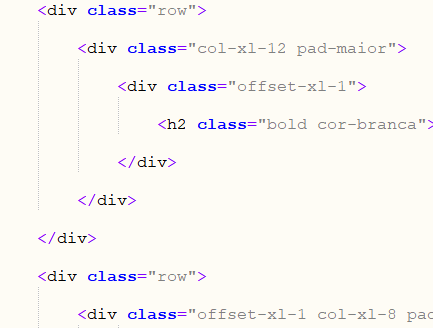
-
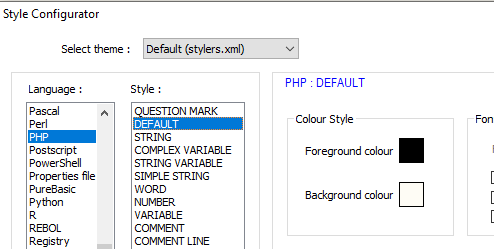
The PHP lexer renders tag names using the Style Configurator > PHP > DEFAULT style. And the initial setting for that style is black text on white background, which is what your screenshot shows.
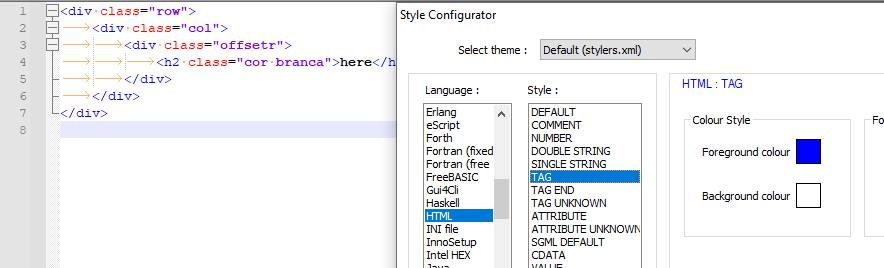
The HTML would render similar text slightly differently:

This is because it uses the HTML > TAG style for rendering tag names:
-
@ffgmusik,
previous Notepad++ versions did automatically activate HTML tag highlighting when opening PHP files (as well as*.aspand*.jspfiles):else if ((type == L_HTML) || (type == L_PHP) || (type == L_ASP) || (type == L_JSP)) { execute(SCI_SETLEXER, SCLEX_HTML); // ... }The code providing this feature was accidentally removed during the Scintilla 5 upgrade, just before the 8.4 release. It will work again in the next release: https://github.com/notepad-plus-plus/notepad-plus-plus/commit/2fbac354ed00a7723b18f688f922a2ffb114cb13
-
Notepad++ 8.4 “Print Selection” is printing the selected text along with highlights as shown on screen making the print hard to read as it is black text with dark grey background on a black and white printer. We have uninstalled, and moved back to Notepad++ 8.3.3 and the issue is no longer present.
-
D donho unpinned this topic on





Hello! It looks like you're interested in this conversation, but you don't have an account yet.
Getting fed up of having to scroll through the same posts each visit? When you register for an account, you'll always come back to exactly where you were before, and choose to be notified of new replies (either via email, or push notification). You'll also be able to save bookmarks and upvote posts to show your appreciation to other community members.
With your input, this post could be even better 💗
Register Login