Notepad++ is crashing abruptly
-
Hi All,
Notepad++ is crashing abruptly. Please find debug info as below.
Notepad++ v8.4.1 (64-bit)
Build time : May 8 2022 - 19:51:18
Path : C:\Program Files\Notepad++\notepad++.exe
Command Line :
Admin mode : OFF
Local Conf mode : OFF
Cloud Config : OFF
OS Name : Windows 10 Enterprise (64-bit)
OS Version : 2009
OS Build : 19044.1706
Current ANSI codepage : 1252
Plugins : AnalysePlugin.dll mimeTools.dll NppConverter.dll NppExport.dll -
The AnalysePlugin developer has already been informed about that issue. Unfortunately, as of yet, AnalysePlugin does not have a “full release” that is compatible with Notepad++ v8.3 and newer (including your Notepad++ v8.4.1).
However, the Analyse Plugin website does show a download for a v1.13-pre1 (which usually means “pre-release”), which was created after v8.3 had come out and after the bug was reported to them, so it might be compatible. Try downloading that, and overwrite the
C:\Program Files\Notepad++\Plugins\AnalysePlugin\AnalysePlugin.dllwith the DLL from the v1.13-pre1 download. If it works, great. If not, you might want to interact with that plugin’s developer through the existing bug report -
@peterjones Hi!
I do not have AnalysePlugin installed but 8.4.1 was crashing very very frequently.
Now updated to 8.4.2 and it also crashes (but less frequently)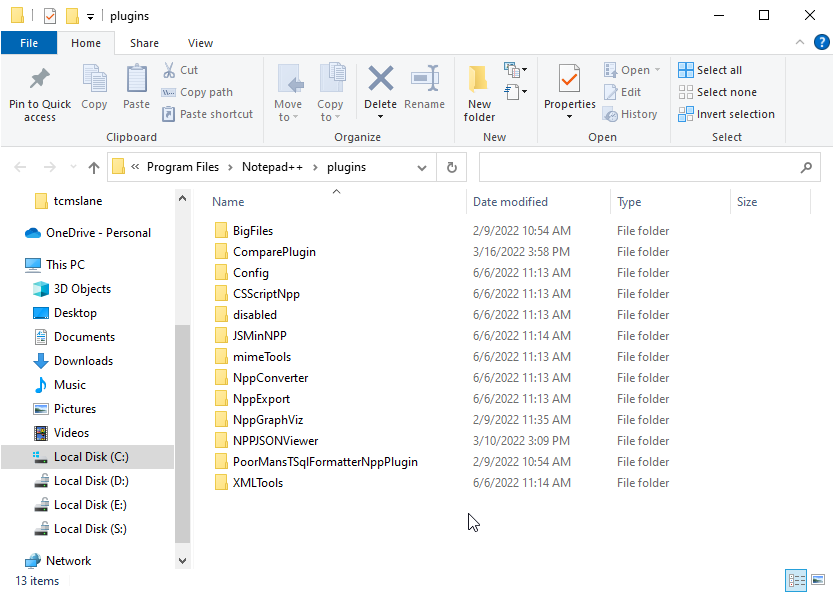
Nothing in disabled folder.
-
The BigFiles plugin has not been updated since 2021, so it is guaranteed to not have the fixes necessary to work correctly with Notepad++ v8.3-and-newer (which includes your v8.4.1); if it makes any of the calls that have been changed, it will cause instability or crash Notepad++.
I won’t check all your other plugins for you, but basically, you have to go through every one of your plugins, and make sure that they either have a fix to work with newer Notepad++ or if they never do anything using the changed portions of the plugins API. (The easiest way to do that: disable all the plugins, and add them back in one-by-one until Notepad++ starts crashing – the most recently re-added plugin is your likely culprit.)
-
@peterjones Thanks for suggestion.
I will definitely do that and update you. -
@Amol-Tarte Hi @PeterJones
The problem is solved after removing BigFiles plugin.
Sorry for delayed reply and Thanks.


Hello! It looks like you're interested in this conversation, but you don't have an account yet.
Getting fed up of having to scroll through the same posts each visit? When you register for an account, you'll always come back to exactly where you were before, and choose to be notified of new replies (either via email, or push notification). You'll also be able to save bookmarks and upvote posts to show your appreciation to other community members.
With your input, this post could be even better 💗
Register Login