<style>tag don't highlighting in php file in <html> tag why??
-
<style>tag don’t highlighting in php file in <html> tag why??
-
There was a brief interlude of one or two versions where that wasn’t working.
You might want to update to v8.4.2, which includes the fix for that issue.
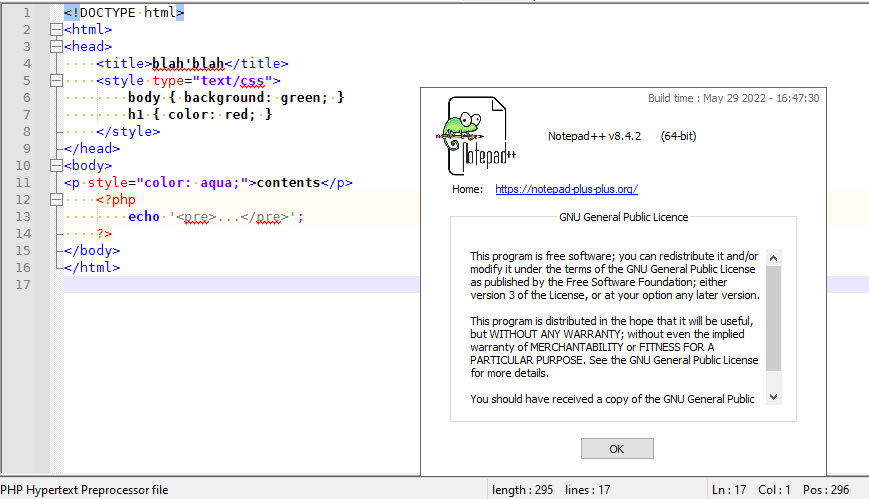
-—
Addendum: issues #11585 and #11602 were broken in v8.4 and fixed in v8.4.1, and the screenshot above shows<style>tag being highlighted in v8.4.2 -
…
unless what you are talking about is you want the “body” and “backround”, etc, to have different colors.
That ability has never existed in the HTML/PHP/ASP parser as far as I am aware, so if that is what you were wanting, it doesn’t yet exist. For example, here’s similar code in the HTML parser of v8.3.3:
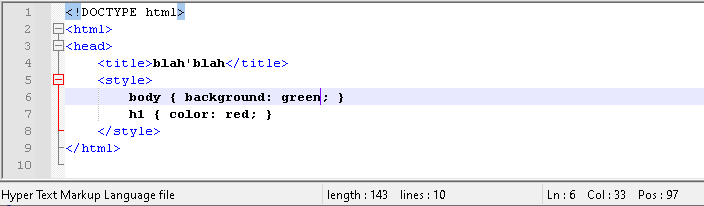
I now assume that what you’re wanting is for it to render the style similar to the way CSS is highlighted, but just inside the
<style>tag in the HTML or PHP (or similar):
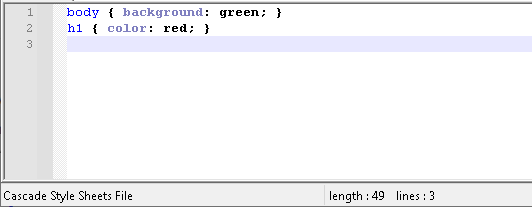
That would require a feature request, because we fellow users in the Community forum cannot add features to the codebase. Further, I don’t think a feature request for Notepad++ will be sufficient: Notepad++ uses the Scintilla Lexilla lexer for handling the syntax highlighting, so I believe you would have to convince Scintilla/Lexilla to add CSS highlighting inside their HTML/PHP/ASP parser, and they would have to implement it, then you would have to lobby the Notepad++ developers to update to the newer version of Scintilla that contains the updated parser.


Hello! It looks like you're interested in this conversation, but you don't have an account yet.
Getting fed up of having to scroll through the same posts each visit? When you register for an account, you'll always come back to exactly where you were before, and choose to be notified of new replies (either via email, or push notification). You'll also be able to save bookmarks and upvote posts to show your appreciation to other community members.
With your input, this post could be even better 💗
Register Login