Copy/paste & Gmail (chrome)
-
Notepad++ opened with a source file (thus colourization).
In Notepad++:
-
Select some lines
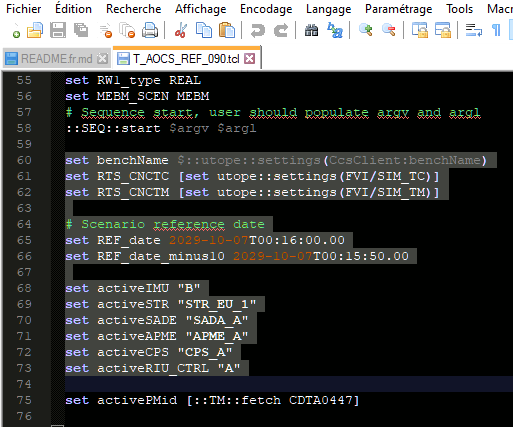
-
Copy
or
Plugins->NppExport->Copy HTML to Clipboard
In Chrome/Gmail New message window:
- Paste
Some text is systematically added when pasting: “Exported from Notepad++” in the case of “HTML to Clipboard” + some strange effects with new lines and section formatting:
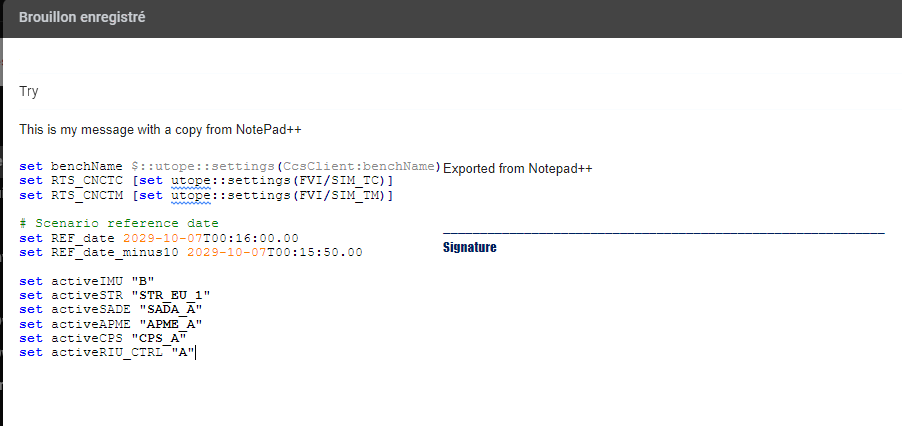
Is it a notepad++ issue or a chrome issue ?
(seems to be chrome because a copy from the same lines opened in vi in mintty gives also some shit):
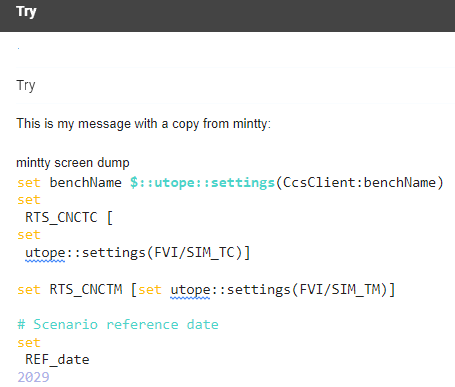
-
-
A normal copy will not have that extra line. However, using NppExport to Copy HTML to Clipboard will.
That’s because when the NppExport plugin generates the HTML and puts it in the clipboard, it includes a
<title>Exported from Notepad++</title>as part of the HTML it exports. (This is because Notepad++ is generating standards-compliant HTML, and a full HTML document requires a TITLE.)There are no configuration settings for that simplistic plugin, so you cannot change the behavior. Sorry.
It’s simple enough to delete that line after you paste the results into gmail (or other HTML-accepting app).


Hello! It looks like you're interested in this conversation, but you don't have an account yet.
Getting fed up of having to scroll through the same posts each visit? When you register for an account, you'll always come back to exactly where you were before, and choose to be notified of new replies (either via email, or push notification). You'll also be able to save bookmarks and upvote posts to show your appreciation to other community members.
With your input, this post could be even better 💗
Register Login