Notepad++ v8.5.3 Release Candidate
-
http://download.notepad-plus-plus.org/repository/8.x/8.5.3.RC/
- Fix Explorer context menu “Edit with Notepad++” needs restarting os to appear issue under Win 8/10. (Fix #13)
- Fix Explorer context menu “Edit with Notepad++” not installed for multiple users issue. (Fix #13476)
- Fix Explorer context menu “Edit with Notepad++” double entries in some applications (Winzip). (Fix #13499)
- Make Explorer context menu “Edit with Notepad++” translatable. (Fix #17)
- Add the UTF8 character ability for Run & Macro menu. (Fix #12670, #13221, #13488)
- Add hide/show ability of Control Characters (C0 & C1) and Unicode EOL. (Fix #8111)
- Fix Change history margin in black color issue. (Fix #12764, #13593)
- Improve “Remove consecutive duplicate lines” command performance. (Fix #5538, #12548)
- Project Workspace “Save a Copy As” confusion issue. (Fix #13135)
- Make “Remove consecutive duplicate lines” support more line break. (Fix #13474)
- Fix UDL deletion issue. (Fix #8101)
- Fix RTL not working on FindInFiles progress window. (Fix #13458)
- Fix search results output alignment for large file searches. (Fix #13481)
- Several GUI Enhancements. (Fix #13615, #13601, #12812, #13579, #13577, #13575, #13597, #13524, #13540, #13544, #13315)
-
@donho ,
If I go to that URL (http://download.notepad-plus-plus.org/repository/8.x/8.5.3.RC/), all the filenames are 8.5.2:
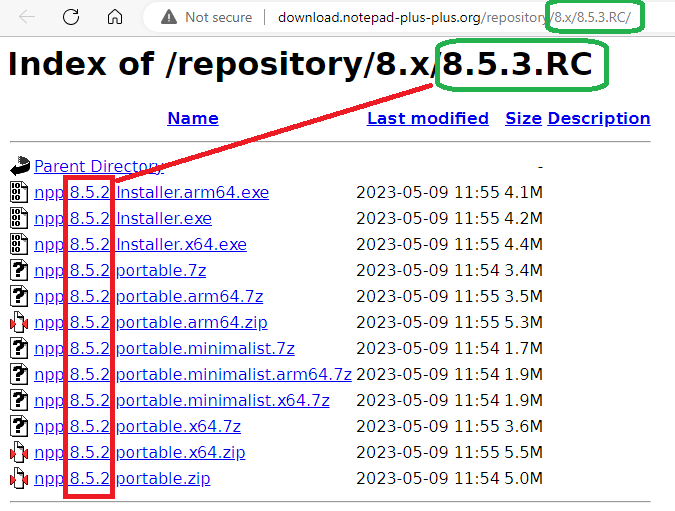
And if I run the portable I downloaded from that URL, it shows Debug Info:
Notepad++ v8.5.2   (64-bit)
Build time : May  9 2023 - 05:25:41
Path : C:\usr\local\apps\npp\npp.8.5.3-RC1.portable.x64\notepad++.exe
Command Line :
Admin mode : OFF
Local Conf mode : ON
Cloud Config : OFF
OS Name : Windows 10 Enterprise (64-bit)
OS Version : 22H2
OS Build : 19045.2846
Current ANSI codepage : 1252
Plugins :
    mimeTools (2.9)
    NppConverter (4.5)
    NppExport (0.4)
However, when I run it, I correctly see the new v8.5.3-RC features, so I think it was just mis-labeled.
-
@PeterJones
Thank you for your heads up.
It’s fixed now. -
-
Thank you so much for
5. Add the UTF8 character ability for Run & Macro menu. -
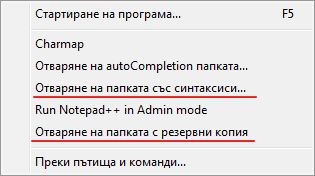
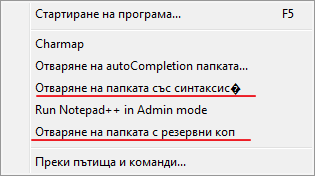
8.5.3 RC cut text in
Runmenu
v8.5.2 correct
v8.5.3 incorrect
Content:
<UserDefinedCommands> <Command name="Отваряне на autoCompletion папката..." Ctrl="no" Alt="no" Shift="no" Key="0">"Explorer" "$(NPP_DIRECTORY)\autoCompletion\"</Command> <Command name="Отваряне на папката със синтаксиси..." Ctrl="no" Alt="no" Shift="no" Key="0">"Explorer" "$(NPP_DIRECTORY)\userDefineLangs\"</Command> <Command name="Отваряне на папката с резервни копия" Ctrl="no" Alt="no" Shift="no" Key="0">"Explorer" "$(NPP_DIRECTORY)\backup\"</Command> </UserDefinedCommands>It is interesting that the proper
Отваряне на autoCompletion папката...and incorrectОтваряне на папката със синтаксиси...have same length of 37 chars.May be this issue is related to #13556
- Can you take a look at Add hide/show ability of Control Characters (C0 & C1) and Unicode EOL , please
-
-
It is interesting that the proper
Отваряне на autoCompletion папката...and incorrectОтваряне на папката със синтаксиси...have same length of 37 chars.The limit is 64 bytes; the first is 54 bytes long, the second is 67:
> python3 -c "print(len(bytes('Отваряне на autoCompletion папката...', 'utf8')))" 54 > python3 -c "print(len(bytes('Отваряне на папката със синтаксиси...', 'utf8')))" 67 -
@rddim
Could you check this PR please?
https://github.com/notepad-plus-plus/notepad-plus-plus/pull/13645 -
D donho unpinned this topic on
-
P PeterJones locked this topic on


Hello! It looks like you're interested in this conversation, but you don't have an account yet.
Getting fed up of having to scroll through the same posts each visit? When you register for an account, you'll always come back to exactly where you were before, and choose to be notified of new replies (either via email, or push notification). You'll also be able to save bookmarks and upvote posts to show your appreciation to other community members.
With your input, this post could be even better 💗
Register Login