How to Add Run Option in Notepad++ for Launch in Edge
-
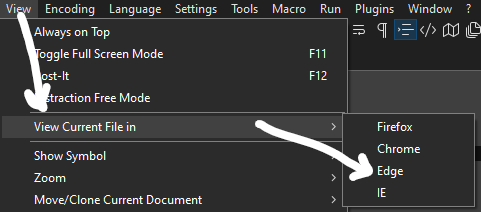
To add a Run menu option in Notepad++ for “Launch in Edge”, use the below steps:
- Backup your AppData\Roaming\Notepad++\shortcuts.xml file.
- Edit your AppData\Roaming\Notepad++\shortcuts.xml file.
- Under the UserDefinedCommands section add the below line:
<Command name=“Launch in Edge” Ctrl=“no” Alt=“no” Shift=“no” Key=“0”>msedge "$(FULL_CURRENT_PATH)"</Command>*
- Save the file.
- Restart Notepad++
-
-
Simpler way #2:
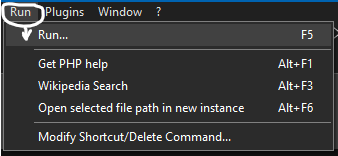
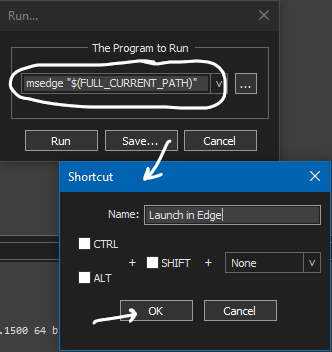
-
@Alan-Kilborn Thanks!
-
Please note that @Alan-Kilborn’s second method is described in the User Manual already, and is effectively the GUI-way of doing the laborious manual-
shortcuts.xml-editing that you described. -
@PeterJones Thanks! Good to know!
-
This post is deleted!




Hello! It looks like you're interested in this conversation, but you don't have an account yet.
Getting fed up of having to scroll through the same posts each visit? When you register for an account, you'll always come back to exactly where you were before, and choose to be notified of new replies (either via email, or push notification). You'll also be able to save bookmarks and upvote posts to show your appreciation to other community members.
With your input, this post could be even better 💗
Register Login