Notepad++ v8.5.4 Release
-
@XanKyBpaT said in Notepad++ v8.5.4 Release:
I update my notepad++ to 8.5.4. Now i have 2 menus with the same name SHA-256. They do 2 different things - one generate sha256 and the other generate sha1. See printscreen. Maybe localization is broken.
That’s exactly the same thing that @Michael-Vincent pointed out in his very first reply in this topic ten days ago. It will be fixed in the next version of Notepad++.
-
@PeterJones
I am stupid. Thank you! -
@Alan-Kilborn Thanks for the response Alan. I did not notice that and happy to see there’s a shortcut for it as well.
-
Hello,
first of all - thank you all for your work! I like npp so much :)
And it is quite pity that my first message here is a complain :(
Seems I update npp too rarely… Today I’ve updated it from 8.4.7 up to current version. So much changes, maybe very useful - but I am very frustrated… There is no bash/shell syntax suport here? There is neither syntax choice (unser 'S, as earlier) not file extantion to save. Is it an error or feature? I had to rollback to good old 8.4.7 even if it costed me all my custom settings :(
WBR
Kirill -
@Kirill-Shalygin said in Notepad++ v8.5.4 Release:
There is no bash/shell syntax suport here?
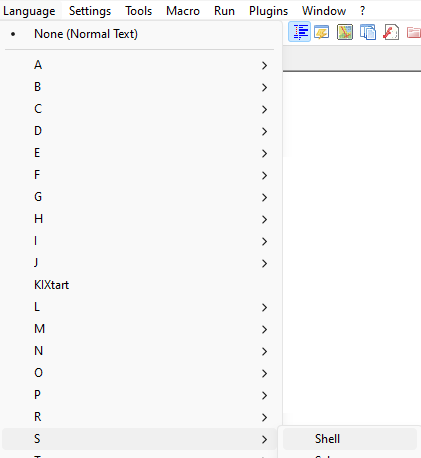
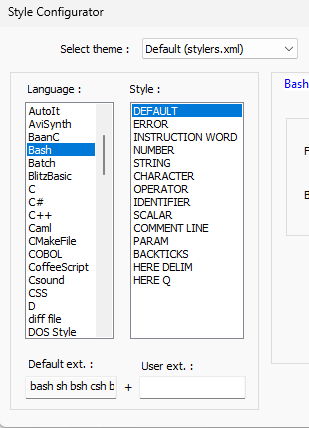
It may be confusing because it’s called “Shell” in the Language menu but “Bash” in the Style Configurator.
-
@Kirill-Shalygin said in Notepad++ v8.5.4 Release:
…
There is neither syntax choice (unser 'S, as earlier) not file extantion to save.
…As for the Save as type, look for
Unix script fileUnix script file (*.bash;*.sh;*.bsh;*.csh;*.bash_profile;*.bashrc;*.profile; *.*.*.)which can append the extension if the checkbox is checked
new 1.bashTip: Focus the Save as type combobox and type the letter
uand it will select theUnix script fileitem which can be quicker than viewing the long drop down list to find the item to select. -
@mpheath thank you for check!
‘Highly probably’ :) there was a glitch somewhere in npp stored data. The full story looks like:- first update - there was no Shell in syntax
- remove of the new version with data stored, then install 8.5.4 - Shell was absent yet
- remove npp (data still not removed!) with rollback to 8.7.4 - there is no Shell again
- full remove includung stored data, then 8.7.4 install - sucsess, Shell returned back!
- update up to 8.5.4 - nothing is spoiled, Shell is OK.
So now everithing is fine!
BTW, maybe the reson of glitch is somewhere in localization? Historically I use russian in npp… Well, maybe it is the good reason to change language finally :)
WBR
Kirill -
@Kirill-Shalygin said in Notepad++ v8.5.4 Release:
…
So now everithing is fine!
BTW, maybe the reson of glitch is somewhere in localization? Historically I use russian in npp… Well, maybe it is the good reason to change language finally :)
…Happy that you solved the problem :)
I checked the sources for Bash (Shell) and it has not changed for about 6 years. I would suspect file corruption in
%AppData%\Notepad++\langs.xmlas that is where the file extensions and keywords are stored for Bash. Without a working extension identification for Bash, no automatic Bash language selection which causes no document styling and the Save dialog will not pre-selectUnix scripts filesin the combobox.Append extensionstring is localized though I consider as less likely as a cause so russian should be good. -
@mpheath
You can compare you personal languages file in %APPDATA% with the one shipping with NPP.
If there are no customization’s that you need in your file, replace it with the one shipping with NPP. -
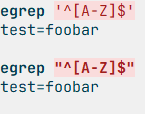
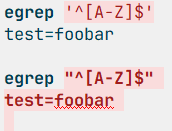
There seems to be an issue with shell script syntax highlighting when using a ‘$’ as the last character of a double quoted string. Up to npp-v8.5.3 everything was fine, but with v8.5.4 it breaks the syntax highlighting to the end of the document:
v8.5.3:
v8.5.4:
This can of course be fixed with escaping the ‘$’ sign:
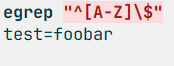
Even though using an unescaped ‘$’ sign inside double quotes when not referencing a variable is not best practice, it should still not break the syntax highlighting.
-
@ifschulz 6 items are listed for Bash in the change log for Lexilla v5.2.5 that was pulled in Notepad++.
Whether your examples are a bug or intentional is unknown to myself as
$,`,\are special characters within double quotes as mentioned inhttps://www.gnu.org/software/bash/manual/html_node/Double-Quotes.html
and the Bash lexer can optionally highlight code within these strings. The backslash escape looks correct to make
$a literal, though the person who changed the lexer may still see this as a bug in the lexer and may change it. If you want, you can submit a new issue to Lexilla to have it evaluated. -
@mpheath, Thanks for info. I submitted a new issue to Lexilla.
-
Since using 8.5.4 the tabs have an increased font-size. Can this somehow be changed as it was before?
-
This post is deleted! -
I think you’ve been around long enough to know better for making such a posting (and in this thread, too, which is reserved for ONLY important issues regarding rel. 8.5.4). It’s sad when people don’t learn…
-
 W wonkawilly referenced this topic on
-
@Alan-Kilborn
Thank you so much for the advice: I have corrected my mistake deleting the wrong post and moving it to General discussion section here: https://community.notepad-plus-plus.org/topic/24713/enhancement-request-plugins-admin-dialog-transform-the-search-feature-like-the-one-into-shortcut-mapper-s-dialog-incremental-filter
Thank you again. -
D donho unpinned this topic on
-
P PeterJones locked this topic on



Hello! It looks like you're interested in this conversation, but you don't have an account yet.
Getting fed up of having to scroll through the same posts each visit? When you register for an account, you'll always come back to exactly where you were before, and choose to be notified of new replies (either via email, or push notification). You'll also be able to save bookmarks and upvote posts to show your appreciation to other community members.
With your input, this post could be even better 💗
Register Login