Notepad++ v8.6 Release Candidate 2
-
Notepad++ v8.6 Release Candidate 2:
http://download.notepad-plus-plus.org/repository/8.x/8.6.RC2/Regression-fix & new minor enhancement since RC
- Enable Direct Write Technology in Scintilla by default
- Fix backspace keystroke not working for multi-editing
- Make all SCI_SETELEMENTCOLOUR message use 32 bits color
- Fix Multi-edit DEL keystroke delete part of Unicode character
- Prevent Direct Write being set if user uses RTL
Notepad++ v8.6 Change log:
- Multi-edit is fully supported in Notepad++. (Fix #14266, #8203)
- Make multi-select background & caret colours customizable. (Fix #14302)
- Make session inaccessible files remembered (empty & read-only document as placeholder). (Fix #12079, #12744, #13696)
- Fix missing session invalid error for user session & enhance API NPPM_GETNBSESSIONFILES. (Fix #14228)
- Fix network shared files saving regression. (Fix #14300)
- Update Scintilla to v5.3.8 & Lexilla to v5.2.8. (Fix #13442, #14188, #14288)
- Fix docking panel crash due to messing up config.xml. (Fix bug report
- Fix invalid styler.xml making Notepad++ crash issue. (Fix #12101)
- Fix tab-closing crash by middle mouse button (unexpected mouse position). (Fix #14328)
- Fix 2 performance issues in Style Configurator. (Fix #14321)
- Add 3 line operation (delete, copy & cut) shortcuts. (Fix #14296)
- Display extra info in the status bar of Find/Replace dialog to avoid PEBKAC. (Fix #14307)
- Fix “Hide lines” command hiding unselected lines issue. (Fix #14166)
- Fix silent installer mode when Notepad++ is running issue. (Fix #10189, #10277, #22514, #14236, fix partially #8514)
- Fix Updater’s vulnerability (update cURL in WinGUp for fixing CVE-2023-38545). (Fix WinGUp issue #50)
- Fix incoherent behaviour of “Duplicate Current Line” menu command. (Fix #5298)
- Fix JSON5 not using JSON keywords. (Fix #14205)
- Fix empty message showing while cancelling session file saving dialog. (Fix #14235)
-
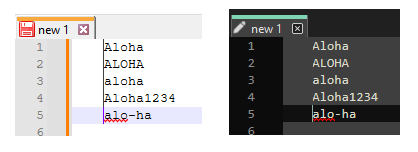
Problem with multi-edit 0-width column selection visibility in N++ dark mode:
-
@xomx
Thank you for your heads up. Done in commit:
https://github.com/notepad-plus-plus/notepad-plus-plus/commit/2a90f1148782d23d0553e84bae83552b6944d6e7 -
@donho Thank you for the RC2 fix for the zero-width column delete of multi-byte UTF-8. I was able to confirm that RC2 works correctly for me.
I have not done a github report yet for how what I think you call multi-select works. I’m getting more used to some aspects of it and like it when it works. I’m also finding myself seeming to fight with Notepad++ v8.6 and needing to do Ctrl-Z undo when I don’t notice that the editor has switched to multi-select mode but my brain is on single-select mode. I use column mode a lot but have not yet nailed down a pattern to when my mind and Notepad++ v8.6 diverge… To use your Firefox analogy, I’m thinking ahead and don’t notice right away that I’m firing missiles out my rear.
-
If I change my style (Settings > Style Configurator … > Select theme), or just open the Select-theme-combobox, the current line background appears unreadable/black …
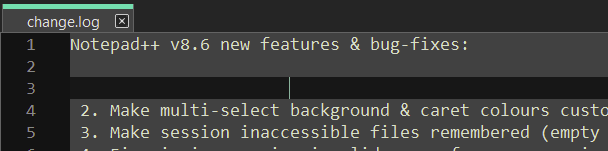
… until I restart Notepad++, then it’s again as it should be:
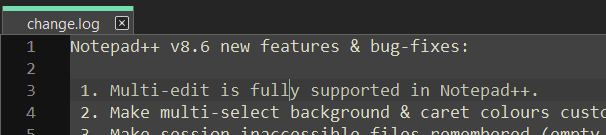
With 8.5 it wouldn’t display the current line background at all until restart (so it would at least still be readable).
-
@CennoxX pointed out the following HERE:
The way the v8.6 Release Candidate 2 of Notepad++ works when using ctrl+c without selection and then ctrl+v differs from Visual Studio Code. In VS Code the whole line will be added in the line above, in Notepad++ the line will be added on the cursor position. I’m probably biased because I’ve used VS Code’s copy function before, but I think VS Code’s behaviour is more useful.
IMO the paste point should be absolute; i.e., right where the caret is. But, I wanted to point this out in this RC thread in case there’s a lot of disagreement with me and a lot of agreement with @CennoxX
-
@CennoxX said in Notepad++ v8.6 Release Candidate 2:
With 8.5 it wouldn’t display the current line background at all until restart (so it would at least still be readable).
I suppose that you mean With 8.6.
I cannot reproduce it at all.
Could you provide the complete instructions to reproduce the issue steadily please? -
@mkupper said in Notepad++ v8.6 Release Candidate 2:
I’m also finding myself seeming to fight with Notepad++ v8.6 and needing to do Ctrl-Z undo when I don’t notice that the editor has switched to multi-select mode but my brain is on single-select mode. I use column mode a lot but have not yet nailed down a pattern to when my mind and Notepad++ v8.6 diverge…
To summarize the situation:
In Scintilla there are rectangular mode (column mode) and stream mode (for single or multi-selection), and multi-edit/select is stream mode.
Notepad++ bases on these 2 modes only in the current state of code to display on status bar. So in the future release, it’s better to be able to distinguish the multi-selection from single selection.Please create an issue and ping me, I will work on it.
-
@Alan-Kilborn said in Notepad++ v8.6 Release Candidate 2:
@CennoxX pointed out the following HERE:
The way the v8.6 Release Candidate 2 of Notepad++ works when using ctrl+c without selection and then ctrl+v differs from Visual Studio Code. In VS Code the whole line will be added in the line above, in Notepad++ the line will be added on the cursor position. I’m probably biased because I’ve used VS Code’s copy function before, but I think VS Code’s behaviour is more useful.
IMO the paste point should be absolute; i.e., right where the caret is. But, I wanted to point this out in this RC thread in case there’s a lot of disagreement with me and a lot of agreement with @CennoxX
https://github.com/notepad-plus-plus/notepad-plus-plus/issues/14296#issuecomment-1823722799
-
D donho unpinned this topic on
-
@donho I have found it out, the black line is actually a bug in a plugin (CSVLint) in combination with the new version.
-
@CennoxX said in Notepad++ v8.6 Release Candidate 2:
the black line is actually a bug in a plugin (CSVLint) in combination with the new version.
I know this issue had happened before with CSVLint in combination with ComparePlus in particular (and AFAIK ComparePlus has actually solved this problem on their end), but does the black-line bug now happen even without ComparePlus installed?
Big if true. If this is indeed the case, someone should definitely raise an issue in CSVLint’s GitHub repo.
-
P PeterJones locked this topic on





Hello! It looks like you're interested in this conversation, but you don't have an account yet.
Getting fed up of having to scroll through the same posts each visit? When you register for an account, you'll always come back to exactly where you were before, and choose to be notified of new replies (either via email, or push notification). You'll also be able to save bookmarks and upvote posts to show your appreciation to other community members.
With your input, this post could be even better 💗
Register Login