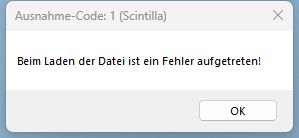
Big files cannot opened in v8.6.4 (x64)
-
@xomx
sorry for small delay
here’s Your link: [http://allegronet.de/zdb.zip](Link Adresse) .
527MB as zip. content: a pure mrk-file. unzip it. content than: 3 GB.
content is public data. allegronet is my server. please don’t go first onto http://allegronet.de. it will not work. try please only with the exact link: [http://allegronet.de/zdb.zip](Link Adresse) . thanks. -
@Klaus-Lehmann
I can open this file ok, used the same version as yours for the test:Notepad++ v8.6.4 (64-bit) Build time : Feb 20 2024 - 00:12:59 Path : C:\Program Files\Notepad++\notepad++.exe Command Line : C:\TEMP\NPP\zdb.mrk Admin mode : OFF Local Conf mode : OFF Cloud Config : OFF OS Name : Windows 10 Enterprise LTSC 2021 (64-bit) OS Version : 21H2 OS Build : 19044.4170 Current ANSI codepage : 1250 Plugins : mimeTools (3.1) NppConverter (4.6) NppExport (0.4)Will try your build of Win11 later.
-
@Klaus-Lehmann
I successfully opened it also on the Win11 22H2 (I do not have your 23H2 available).So it is something specific on your PC. We can eliminate the possible problem with a N++ setting by downloading the portable version equivalent, which does not need to be installed, but just unzipped into a folder and then run the notepad++.exe from there. Then, if you are able to open that zdb.mrk in your portable N++, the problem lies with your N++ installation. Otherwise the problem is probably outside the N++ control (a Windows setting, installed app or shell extension, AV, storage place problem, etc…).
-
@xomx
sorry for me, that my answer arrived You very late. but there was too much jobs with family ;-)
ok. I think, I will see my problem and can explain it.
1st: thanks to @Coises , who gave me hint with Sc1.
Yes! with Sc1 I can open without problems m ymrk-file with 3GB content.
This talks to me, the propblem is based on my machine. but where?
some days have gone
deInstall and install N++ at new. and very certain: on another machine (why? it depends from appdata\roaming\notepadd++ . there resides config.xmlI’m shure, here was my problem:
old (not working since 2 weeks WITH 3GB file) config.xml:
<GUIConfig name="largeFileRestriction" fileSizeMB="4096" isEnabled="no" allowAutoCompletion="no" allowBraceMatch="no" allowSmartHilite="no" allowClickableLink="no" deactivateWordWrap="yes" suppress2GBWarning="yes" />
new (working) config.xml
<GUIConfig name=“largeFileRestriction” fileSizeMB=“200” isEnabled=“yes” allowAutoCompletion=“no” allowBraceMatch=“no” allowSmartHilite=“no” allowClickableLink=“no” deactivateWordWrap=“yes” suppress2GBWarning=“yes” />I think last line brings me good results. all works. again: last line was my solution. Yes I know, there are some "misunderstoodings": isEnabled="yes" and fileSizeMB="200" . very unlogical. but it works! Thanks for all, who has helped me. Yours Klaus -
@Klaus-Lehmann
Congrats, you’ve just uncovered a N++ misconfiguration bug (as you have already found with the Sc1.exe test - this is not a Scintilla issue but a N++ one):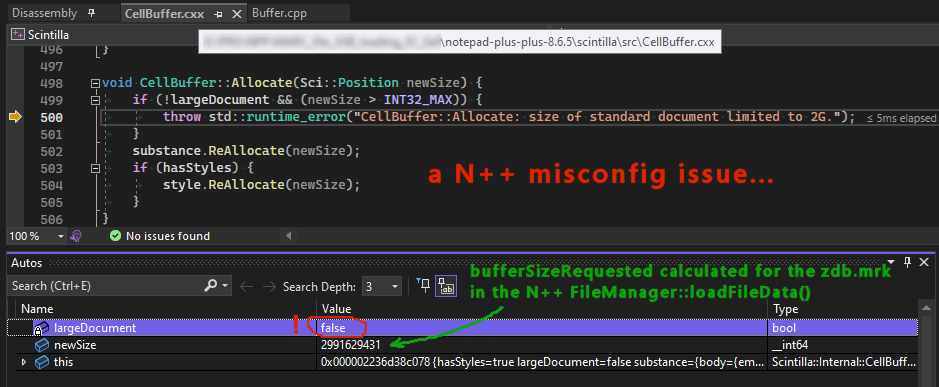
I’ll try to fix it but no ETA.
-
fixed, will be in the upcoming v8.6.6
-
@xomx great! glad, You have found an error. a misconfiguration bug.
I will wait for v8.6.6
than I can report some issues with speed. I want to prepare a comparison between n++ v8.6.6 and Vedit 6.2(64bit). more than later. 1st I will wait vor v8.6.6
Thanks for Your good job!
yours, klaus -
@Klaus-Lehmann
my problem is solved. thank You for all!in Notepad++ v8.6.6 Release Candidate:
http://download.notepad-plus-plus.org/repository/8.x/8.6.6.RC/
Change log:
Fix crash when crossing the 2GB file size threshold. (Fix #14944 , #14981 )it works. great!
who is intested in: how looks a big file, opened with notpad++ v8.6.6(RC1)
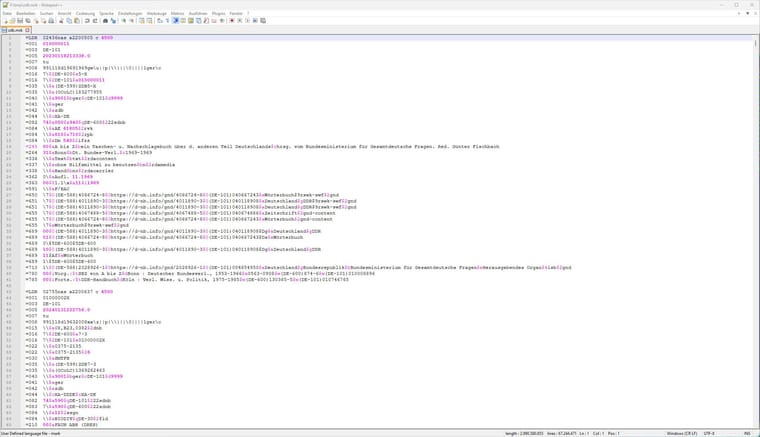
its a interesting file ;-)
2,9 GB. including text in 67 Mill lines! mainly asciiok. some certain stuff:
my config.xml has this content
<GUIConfig name=“largeFileRestriction” fileSizeMB=“200” isEnabled=“no” allowAutoCompletion=“no” allowBraceMatch=“no” allowSmartHilite=“no” allowClickableLink=“no” deactivateWordWrap=“yes” suppress2GBWarning=“yes” />
and with these settings I have my colors back!
colors? I have changed "userDefineLang.xml. that I can see some special content, with “alarming colors”. You will it see in the picture. for me are the content very very certain, it begins with $0 or $a or or or.ok. this all is very good for me! Thank You so much! ;-)
in next days I will do some tests. and publish them here!
notepad++ have to load a unknown file with approx. 3GB data. or with 11GB.
those big files are very welcome at me. I must do my work with them.
and without good tools it is VERY uncomfortable.
last 5-10 years I do my work with notepad++.
and for very very big files I do use -just now- VEDIT v6.2 as a 64bit. but notepadd++ is more comfortablier! ;-)I remember: 5-10 years before, I only have used (former BRIEF) CRiSP. (and I think its known well from old dos-times.)
but just now? it seems CRiSP exists. but I don’t want take business with them, I have had “monetary” problems with the folks. Does anybody know more about CRiSP ???Yours very, Klaus Lehmann
-
@Klaus-Lehmann said in Big files cannot opened in v8.6.4 (x84):
VEDIT v6.2 as a 64bit. but notepadd++ is more comfortablier!
Why don’t you use the 64-bit version of Notepad++? It’s the same as the 32-bit version you are using. The only downside may be if you need a specific plugin that is only available as a 32-it version then, yes, you would need to use the 32-bit Notepad++.
-
@mkupper
sorry, I’m an idiot. Of course I do use an 64bit-version.
as I was beginning this discussion on march 23th 2024, I have used a very wrong “title” or “RE”: “Big files cannot opened in v8.6.4 (x84)”. This is wrong!
every time I have installed and I’m using this “npp.8...Installer.x64.exe”. really.
Does there exist an admin, who can change the titel? It would be lovely. thanks a lot. Yours Klaus



Hello! It looks like you're interested in this conversation, but you don't have an account yet.
Getting fed up of having to scroll through the same posts each visit? When you register for an account, you'll always come back to exactly where you were before, and choose to be notified of new replies (either via email, or push notification). You'll also be able to save bookmarks and upvote posts to show your appreciation to other community members.
With your input, this post could be even better 💗
Register Login